
The automation tool market has never had more options. It’s also never been harder to figure out which one actually ships to production without burning your month.
Heads up: some links below are affiliate links. If you sign up through them we may earn a commission, at no extra cost to you. We only link tools we actually build with.
We host and run workflows for clients across several of the platforms on this list. That means we’re not neutral — but it also means we’ve seen what breaks at 3am, which error logs are actually useful, and where “generous free tier” quietly becomes a $400 overage bill.
The best AI agent depends on what you’re automating. For no-code business workflows, n8n and Make lead on flexibility and cost at scale. For customer-facing agents, Claude (Anthropic) and ChatGPT (OpenAI) offer the most reliable reasoning. Developer teams building multi-agent systems should evaluate CrewAI or LangChain.
That’s the short answer. The rest of this article is the decision logic behind it — with real pricing, real failure modes, and the math vendors don’t publish.
Not sure which category fits your stack? We map this in a free 30-minute automation audit — you leave with a written recommendation, not a sales pitch. Tell us what you’re automating →
TL;DR Comparison Table
| Tool | Best For | Free Tier | Paid Plan (estimate, Jan 2026) | Self-Hosted |
|---|---|---|---|---|
| n8n | No-code/low-code workflow automation at scale | Yes (Cloud Starter trial) | Cloud Starter ~$20/mo, Pro ~$50/mo | Yes (free) |
| Make | Visual multi-step automations, mid-volume | Yes (1,000 ops/mo) | Core ~$9/mo, Pro ~$16/mo | No |
| Zapier | Quick integrations, non-technical teams | Yes (100 tasks/mo) | Starter ~$19.99/mo, Professional ~$49/mo | No |
| ChatGPT / OpenAI API | Conversational agents, content, GPT-4o reasoning | Yes (ChatGPT free) | API pay-as-you-go; GPT-4o ~$2.50/1M input tokens | No (API only) |
| Claude (Anthropic) | Long-context reasoning, safer outputs | Yes (Claude.ai free) | API pay-as-you-go; Sonnet tier (see pricing page) | No (API only) |
| Gemini (Google Cloud) | Google Workspace integration, multimodal tasks | Yes | Gemini API pay-as-you-go; Workspace add-on pricing varies | No |
| Mistral | Cost-efficient LLM, EU data residency | Yes (La Plateforme free tier) | API pay-as-you-go, lower per-token cost than GPT-4o | Yes (open weights) |
| LangChain + LangSmith | Developer-built multi-step agent pipelines | Yes (LangSmith free tier) | LangSmith Plus ~$39/mo per seat (estimate) | Yes (open-source) |
| CrewAI | Multi-agent orchestration, autonomous task crews | Yes (open-source) | CrewAI+ cloud pricing varies | Yes (open-source) |
| HubSpot AI | CRM-native agents, sales/support workflows | Yes (limited) | Bundled into HubSpot plans; Sales Hub Starter ~$15/seat/mo | No |
| Salesforce Agentforce | Enterprise CRM agents, complex orgs | No | Agentforce pricing varies; enterprise contract | No |
What an AI Agent Actually Is (and Isn’t)
A chatbot answers questions from a script. A standard automation runs a fixed sequence when a trigger fires. An AI agent does something different: it takes a goal, decides which steps to run, calls tools or APIs as needed, checks its own output, and loops until the goal is met — or fails trying. The key word is decision. If the software can branch based on reasoning, not just conditional logic, it’s acting as an agent. That distinction matters because agents cost more to run (LLM calls per step, not just per message), fail in more interesting ways, and require different monitoring than a Zapier zap.
Types of AI Agents by Business Use Case
Before scrolling through 11 tool entries, figure out which category you actually need.
Automation Agents (workflow orchestration)
You want to replace a human clicking through a sequence of apps. The “AI” part handles decisions that used to require judgment — classifying an email, extracting fields from a PDF, routing a ticket. Tools: n8n, Make, Zapier.
Conversational Agents (customer/internal-facing)
You want a bot that talks to humans, handles branching dialogue, and escalates gracefully. The LLM is the product. Tools: ChatGPT (OpenAI), Claude (Anthropic), Gemini (Google Cloud), Mistral.
Multi-Agent Systems (autonomous task crews)
You want multiple specialized agents to hand off tasks between them — researcher, writer, QA reviewer — with a coordinator. Complex to build and debug. Tools: CrewAI, LangChain, n8n (newer multi-agent canvas).
Code and Developer Agents
You want an agent embedded in a CI/CD pipeline, GitHub workflow, or internal dev tooling. Tools: LangChain, GitHub Copilot Workspace, CrewAI with code tools.
The Ranked List: 11 AI Agents for Business Use
1. n8n — Best for Workflow Automation at Scale
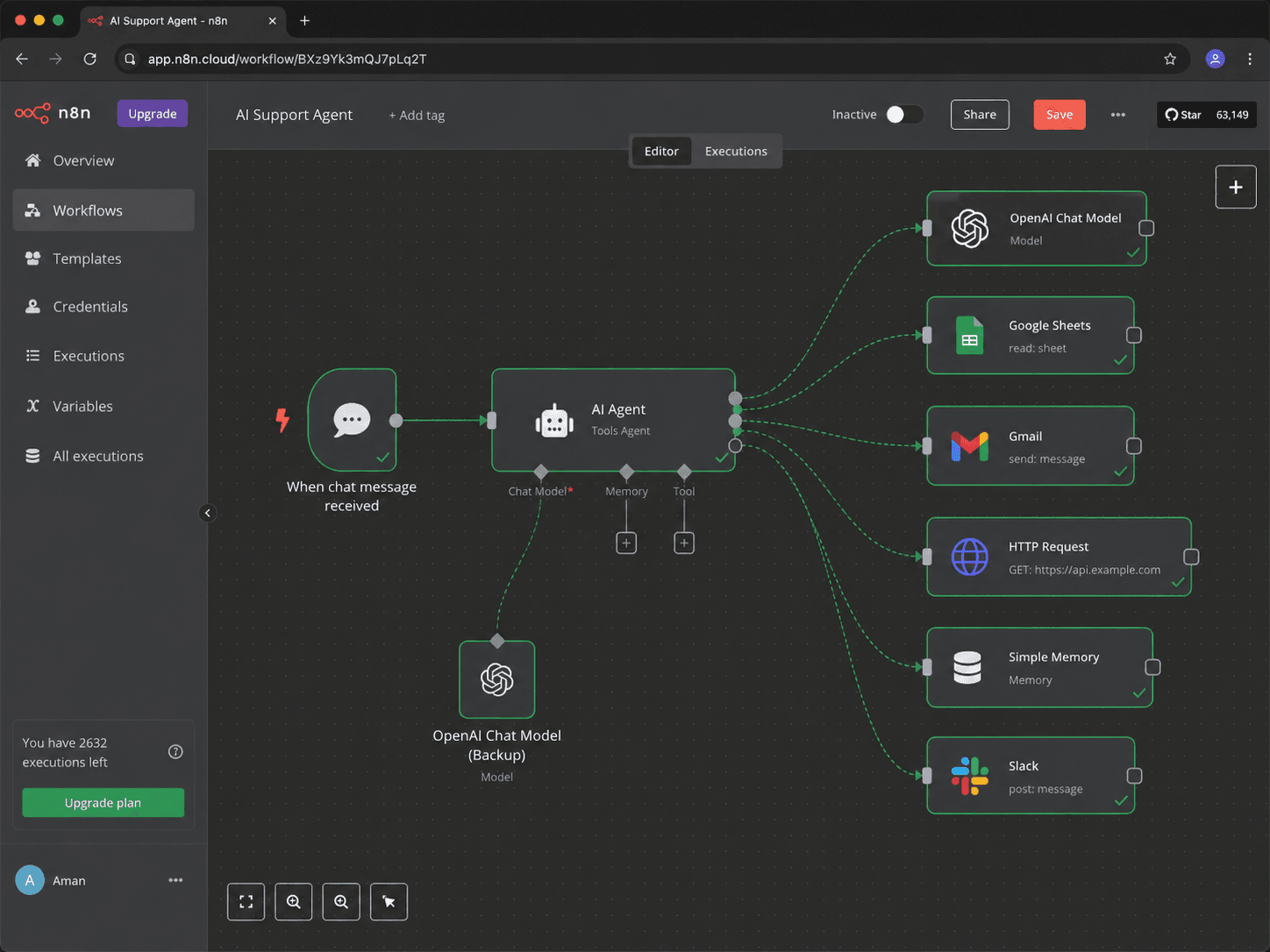
n8n is where we do most of our client work. The AI agent node lets you connect an LLM (OpenAI, Anthropic, Mistral, or a local model via Ollama) to any of its 400+ integrations, with tool-calling so the model can actually trigger actions — not just generate text. The multi-agent canvas (added in 2024–25) lets you chain sub-agents with memory and routing logic.
What it does in production: Handles lead enrichment, CRM updates, support ticket routing, Shopify order workflows, Airtable sync, Slack notifications, Stripe webhook processing, and document parsing — often in the same workflow.
Who it’s wrong for: Anyone who needs zero server management and won’t pay for Cloud. Self-hosted n8n is free but you’re responsible for uptime. If your team has no one to own infrastructure, start with Make.
Pricing (estimates, Jan 2026):
- Self-hosted: free (VPS cost ~$5–12/mo on Hetzner or DigitalOcean)
- Cloud Starter: ~$20/mo
- Cloud Pro: ~$50/mo
Best for: Operators who need flexibility, own their data, or are migrating off Zapier. See our n8n vs Zapier breakdown for the exact economics.
Not for: True no-code teams who need drag-and-drop simplicity without ever touching JSON.
2. Make — Best for Visual Multi-Step Workflows, Mid-Volume
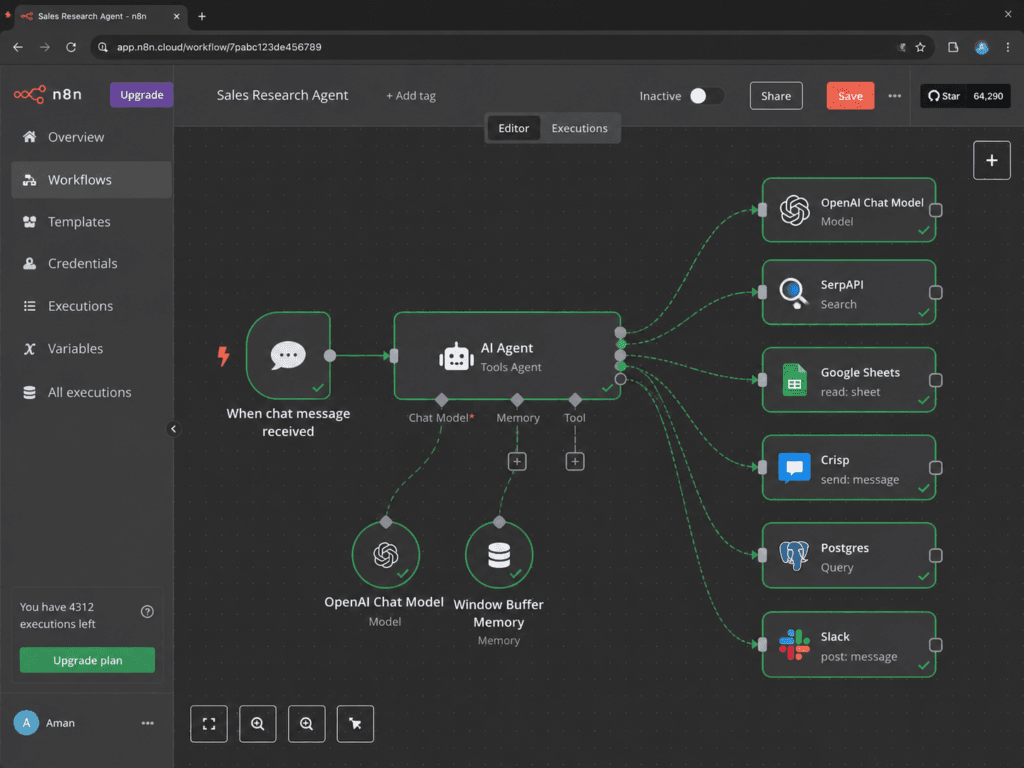
Make’s scenario builder is genuinely the most visual workflow tool in this list. Modules connect like a flowchart, making it easier to onboard a non-technical ops person than n8n’s canvas. The AI module calls OpenAI or any other LLM endpoint mid-scenario, though it’s less “agent” and more “LLM as a step.”
What it does in production: Content pipelines, lead routing, ecommerce order processing, Notion database updates, multi-app sync.
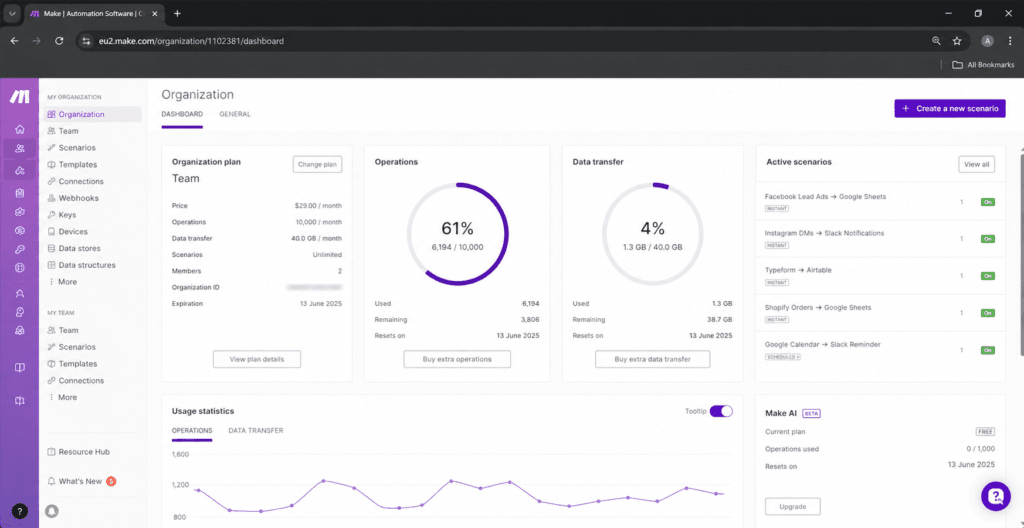
Who it’s wrong for: High-volume shops. Make prices by operations (each module execution = one op), so a 10-step scenario costs 10 ops per run. At 50,000+ runs/month, costs climb faster than n8n self-hosted.
Pricing (estimates, Jan 2026):
- Free: 1,000 ops/mo
- Core: ~$9/mo / 10,000 ops
- Pro: ~$16/mo / 10,000 ops (more features, same ops)
Best for: Teams that want visual scenario design and don’t need self-hosting.
Not for: High-frequency execution at scale.
3. Zapier — Best for Quick Integrations, Non-Technical Teams
Zapier is the easiest entry point, and it’s also the most expensive at volume. The AI features (Zapier AI, Chatbots, Canvas) have matured, but the core product is still trigger → action pairs, not true agentic loops. It connects to over 7,000 apps — more than anyone else — so if your niche SaaS only has a Zapier integration, you may not have a choice.
What it does in production: CRM updates from form fills, Slack notifications on new orders, basic multi-step sequences.
Who it’s wrong for: Anyone moving past ~2,000 tasks/month. The math stops making sense fast.
Pricing (estimates, Jan 2026):
- Free: 100 tasks/mo
- Starter: ~$19.99/mo / 750 tasks
- Professional: ~$49/mo / 2,000 tasks
Best for: Non-technical operators who need the broadest app library and want to move in an afternoon.
Not for: Cost-sensitive operators running volume, or anyone who needs multi-step AI reasoning across a chain.
4. ChatGPT / OpenAI API — Best for Conversational and Reasoning Tasks
The OpenAI API is the LLM layer inside most of the other tools on this list. As a standalone agent platform, the GPT-4o model with tool-calling and the Assistants API lets you build persistent agents with memory, file retrieval, and function calls. ChatGPT itself is a consumer interface, not a platform — separate your thinking here.
What it does in production: Customer support drafts, document Q&A, structured data extraction from unstructured text, code review.
Who it’s wrong for: Anyone who needs EU data residency or is concerned about OpenAI’s training data policies. Also wrong for operators who want an out-of-the-box agent — the API requires a developer or a no-code wrapper (like n8n) to be useful.
Pricing (estimates, Jan 2026):
- GPT-4o: ~$2.50 / 1M input tokens, ~$10 / 1M output tokens
- GPT-4o mini: lower cost (see openai.com/pricing)
Best for: The reasoning layer inside any automation — not a standalone platform pick.
Not for: Teams that need a managed platform, not an API.
5. Claude (Anthropic) — Best for Long-Context, Safer Outputs
Claude 3.5 Sonnet consistently outperforms GPT-4o on long-document tasks in our testing — summarizing 100-page contracts, reasoning across multi-file inputs, and holding instruction-following discipline over long conversations. It’s also notably less prone to hallucinated action steps when used as an agent.
What it does in production: Legal document review, support escalation triage, RAG over internal knowledge bases, anything where the prompt is long and accuracy matters more than speed.
Who it’s wrong for: Operators who need the widest plugin ecosystem or live inside an existing OpenAI-dependent stack.
Pricing (estimates, Jan 2026):
- API pay-as-you-go; Sonnet and Haiku tiers available
- Claude.ai free tier for basic use
Best for: Accuracy-sensitive agent tasks, long-context, anything where hallucinations are costly.
Not for: Pure speed-at-volume where cheaper models suffice.
6. Gemini (Google Cloud) — Best for Google Workspace Integration
If your business runs on Google Workspace — Drive, Docs, Gmail, Sheets, Calendar — Gemini’s integration is tighter than anything else on this list. Gemini agents can act natively inside Workspace apps without an API adapter. Multimodal support (image, video, audio) is a real differentiator for certain ecommerce and content workflows.
Who it’s wrong for: Anyone outside the Google ecosystem. Gemini’s reasoning quality on complex multi-step agent tasks trails Claude and GPT-4o in independent benchmarks as of 2025.
Pricing: Google AI Studio has a free tier; Gemini API pay-as-you-go via Google Cloud. Workspace AI features bundled into Business/Enterprise plans.
7. Mistral — Best for Cost Efficiency and EU Data Residency
Mistral is a French AI lab with open-weight models (Mistral 7B, Mixtral 8x7B) you can self-host, and a cloud API with competitive token pricing. For operators who need to keep data in the EU, or who want to run a capable model on their own infrastructure for near-zero marginal cost, Mistral is the clearest choice. We’ve tested Mistral Large inside n8n workflows — it handles classification and extraction tasks well at a fraction of GPT-4o cost.
Who it’s wrong for: Anyone who needs best-in-class reasoning on complex tasks. Mistral’s top models are good, not best.
8. LangChain + LangSmith — Best for Developer-Built Agent Pipelines
LangChain is an open-source Python/JavaScript framework for chaining LLM calls, tools, and memory into agent pipelines. LangSmith is Anthropic’s observability layer — wait, it’s LangChain’s own product — for tracing, debugging, and evaluating agent runs. Together they’re the standard infrastructure choice for teams building custom agents that don’t fit a no-code platform.
What it does in production: Custom retrieval-augmented generation (RAG), multi-step research agents, GitHub-integrated code review agents.
Who it’s wrong for: Operators who don’t have a developer on staff. LangChain is a framework, not a product — it requires code to configure.
Pricing: Open-source (free). LangSmith: free tier available, Plus ~$39/mo per seat (estimate).
9. CrewAI — Best for Multi-Agent Autonomous Workflows
CrewAI is purpose-built for the multi-agent pattern: you define a “crew” of agents (researcher, analyst, writer), give them roles and tools, and a coordinator routes tasks between them. It’s open-source, self-hostable, and increasingly used in production for autonomous research, content generation pipelines, and internal ops agents. CrewAI+ is the managed cloud offering.
Who it’s wrong for: Teams who need stable, battle-tested infrastructure. Multi-agent systems are the most complex category here — they have the most interesting failure modes (see below). If you don’t have developer capacity to debug loop failures, start with n8n’s agent node instead.
Pricing: Open-source (free). CrewAI+ cloud pricing — check their site for current plans.
10. HubSpot AI — Best for CRM-Native Agent Tasks
HubSpot has embedded AI across its CRM — AI assistants for email, Breeze Agents for prospecting and customer support, and AI-powered workflows. If your team already lives in HubSpot and the budget is there, the native integration removes a whole class of sync problems. Close (another CRM with AI features) is worth evaluating for smaller sales teams.
Who it’s wrong for: Anyone who doesn’t need a full CRM stack. The AI features are bundled — you’re not buying just the agent capability.
11. Salesforce Agentforce — Best for Enterprise CRM Agent Deployment
Agentforce is Salesforce’s answer to the enterprise AI agent question: autonomous agents deployed inside Sales Cloud, Service Cloud, or Commerce Cloud with access to your CRM data, case history, and customer records. The deployment model and pricing are enterprise contracts, not self-serve.
Who it’s wrong for: Every company that isn’t already on Salesforce at scale.
What AI Agents Actually Cost When You Run Them at Volume
This is the section most vendor comparison pages skip. Here’s the math.
The Three Cost Layers
Every AI agent run has three potential cost components:
- Platform task/execution fee — what Zapier, Make, or n8n Cloud charges per run or operation
- LLM API cost — what OpenAI, Anthropic, or Mistral charges per token
- Infrastructure — what you pay for a VPS if self-hosting
Modeled Cost: 10,000 Runs/Month
Assume a workflow that: triggers on an event, calls an LLM with a 500-token prompt, gets a 300-token response, writes a result to Airtable. One run = roughly 800 tokens.
Platform layer at 10,000 runs/month:
| Platform | Cost at 10,000 runs/mo | Notes |
|---|---|---|
| Zapier Professional | ~$49/mo (2,000 task cap — you’d overage) | At 10,000 tasks, estimated ~$100–200+/mo in overages |
| Make Pro | ~$16/mo base + ops overages (10,000 ops = 10,000 Make ops if 1 step each; multi-step = more) | A 5-step scenario = 50,000 ops for 10,000 runs — over plan |
| n8n Cloud Pro | ~$50/mo (check execution limits on Pro plan) | High-volume users often shift to self-hosted |
| n8n self-hosted | ~$5–12/mo VPS only | No per-execution fees |
LLM layer at 10,000 runs/month:
| Model | Input tokens (500 × 10,000 = 5M) | Output tokens (300 × 10,000 = 3M) | Estimated total |
|---|---|---|---|
| GPT-4o | ~$12.50 | ~$30.00 | ~$42.50/mo |
| GPT-4o mini | Much lower — see openai.com/pricing | ||
| Claude 3.5 Haiku | Lower cost tier — see anthropic.com/pricing | ||
| Mistral Small | Lowest in this comparison (estimate) |
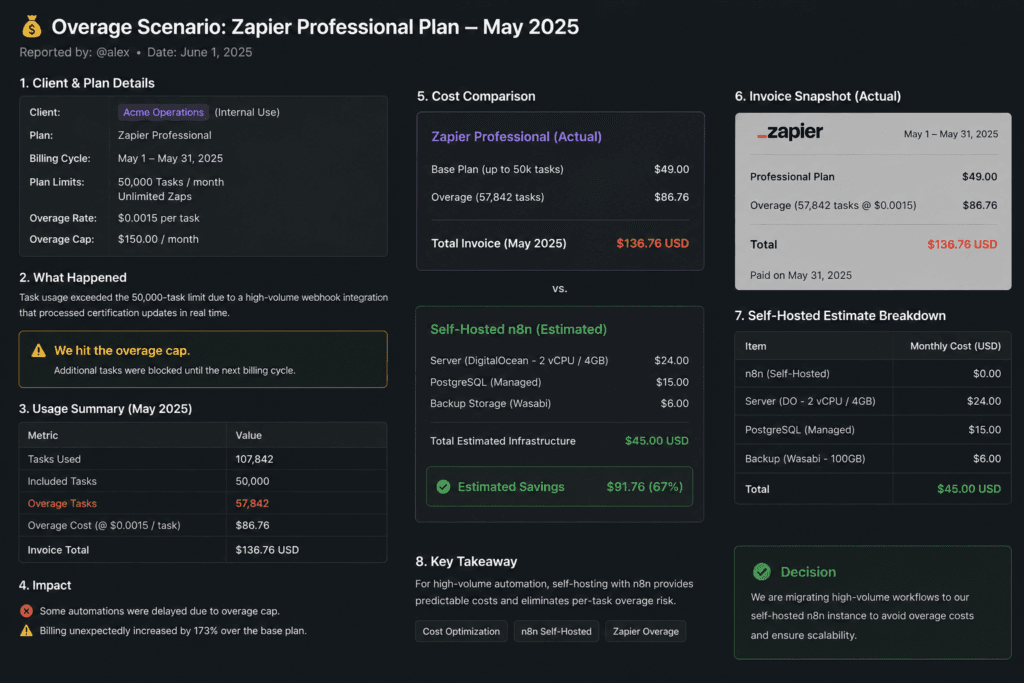
The threshold that changes the decision: At under 5,000 runs/month, Make or Zapier’s ease of setup often justifies the premium. Past ~15,000–20,000 runs/month, n8n self-hosted + Mistral or GPT-4o mini is almost always cheaper. The platform tax at volume is real — we’ve seen clients hit $400/month in Zapier overages on workflows that would cost $18/month to run self-hosted.
The Failure Modes No Vendor Demo Will Show You
This is the other section that doesn’t appear on vendor landing pages.
Rate-Limit Mid-Chain Failures
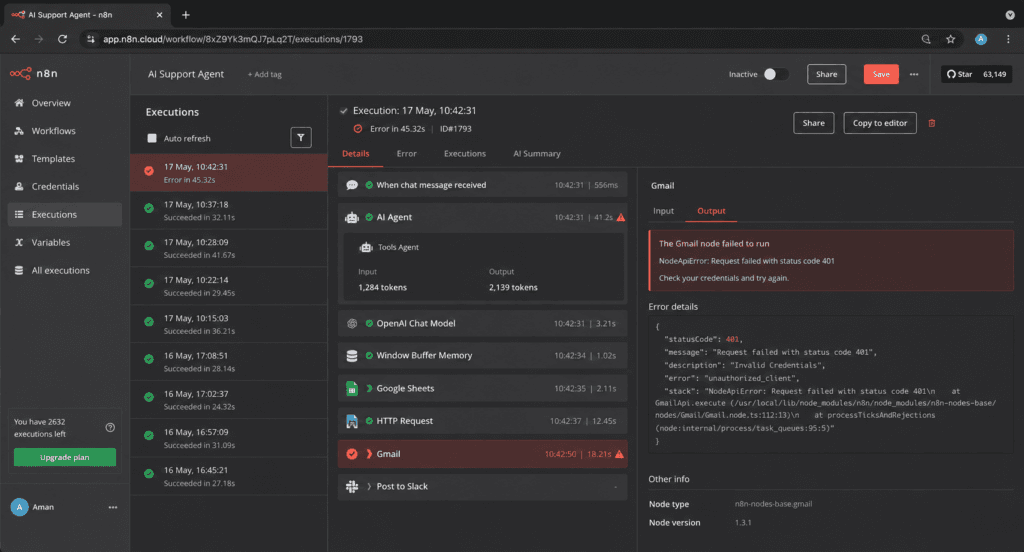
OpenAI and Anthropic both have rate limits — requests per minute and tokens per minute, by tier. In a multi-step agent that makes several LLM calls in sequence, a rate-limit error in step 4 of 6 can leave your workflow in a half-executed state. Zapier’s error handling here is minimal — the zap errors and you get an email. n8n lets you build retry logic and error branches. Make has error handlers but they’re manual to configure.
What we actually saw:
![[OPERATOR INPUT the specific incident — which platform, which LLM, what the error log showed or didn't show, and how it was resolved]](https://www.orchient.com/wp-content/uploads/2026/06/OPERATOR-INPUT-the-specific-incident-—-which-platform-which-LLM-what-the-error-log-showed-or-didnt-show-and-how-it-was-resolved-1024x683.png)
Silent Webhook Schema Drift
When a third-party app (Shopify, HubSpot, Stripe, Notion) changes its webhook payload — which happens without warning — your automation receives a field that’s null or renamed. If your agent is using that field as a decision input, it may complete silently with wrong data instead of throwing an error. Stripe’s webhook schema is stable; Shopify’s has drifted on major version releases; some CRMs are notorious for this.
Which platforms surface it: n8n shows you the raw payload in the execution log. Zapier shows you a partial payload but doesn’t always flag schema changes. Make’s execution history is readable but you have to know to look.
Multi-Agent Loops with No Kill Switch
CrewAI and LangChain multi-agent systems can loop — an agent calls another agent, gets an inconclusive result, retries, and burns API credits indefinitely. This is a known failure mode with no automatic safeguard unless you build one. Always set max_iterations on any agentic loop. Always set a token budget at the orchestrator level.
The Observability Gap
LangSmith (for LangChain pipelines) and n8n’s execution log are the most useful debugging tools we’ve used. Zapier’s run history shows inputs and outputs but not intermediate reasoning. Make’s execution history is similar — you see module-level I/O, not why the LLM chose a path. If you’re building anything that needs to be debugged in production, choose a platform that exposes the full execution trace.
Before You Migrate: The Hidden Cost of Switching Agent Platforms
Mid-growth operators face this decision regularly: you started on Zapier, hit the cost wall, and now you’re evaluating n8n. Or you’re on Make and want to self-host. Here’s what doesn’t get discussed.
What Doesn’t Map 1:1
Every platform uses its own trigger/action model. Zapier’s “Trigger app → Action app” pairs don’t translate directly to n8n’s node-based canvas. You can’t export a Zap as an n8n workflow — you rebuild. Realistic time estimate for a 10-step Zapier workflow with a conditional branch: 2–4 hours in n8n if you know what you’re doing, 8–12 hours if you’re learning the platform simultaneously.
For our n8n vs Zapier comparison on exact feature-by-feature mapping, that page has the full breakdown.
Auth Flows Break
OAuth connections don’t port between platforms. Every integration that uses OAuth — HubSpot, Salesforce, Shopify, Slack, Google Workspace — needs to be re-authorized in the new platform. If a client’s account requires admin-level OAuth approval, that’s a calendar event, not a click. Factor 30–60 minutes per OAuth-gated integration for re-auth and testing.
What a Pre-Migration Audit Prevents
We’ve done enough migrations to know the pattern: operators underestimate rebuilds because they map visible steps, not invisible logic. The filters, the error paths, the lookups that “just work” in Zapier — those all need explicit equivalents in n8n. A pre-migration audit should map every workflow, flag the ones with unusual logic, and estimate rebuild time before you start. It’s the difference between a 20-hour project and a 40-hour one.
Not sure whether your current stack is worth migrating? We map this in a free audit — you walk away with a written breakdown of which workflows make sense to move, and which don’t. Book the audit →
How to Choose the Right AI Agent for Your Stack
Run through this decision logic in order.
1. What’s your team’s technical capability?
- No developer on staff → Make or Zapier first; n8n Cloud as a stretch
- One developer or ops person comfortable with JSON → n8n
- Developer team → LangChain, CrewAI, or n8n with custom nodes
2. What’s your monthly run volume?
- Under 2,000 runs → Zapier or Make, whichever fits your app library
- 2,000–15,000 runs → Make or n8n Cloud
- Over 15,000 runs → n8n self-hosted, probably
3. Do you need a conversational interface or a background workflow?
- Background workflow → n8n, Make, Zapier
- Customer/user-facing conversation → OpenAI Assistants API, Claude API, or Gemini, wrapped in a front-end or embedded in your CRM
4. Does data residency or privacy matter?
- EU data residency required → Mistral (self-hosted or EU cloud), n8n self-hosted
- On-premise required → n8n self-hosted, LangChain, CrewAI
5. Are you already inside a CRM ecosystem?
- HubSpot shop → HubSpot AI Agents
- Salesforce enterprise → Agentforce
- Everyone else → platform-agnostic tools above
We wrote a deeper version of this for no-code AI tools replacing SaaS subscriptions — useful if you’re also evaluating whether to consolidate tool spend.
For operators running ecommerce, our ecommerce automation case study shows exactly what a Shopify-connected n8n workflow saves in practice.
Pricing Reference Table (Estimates, Jan 2026)
| Tool | Free Tier | Paid Plan Name | Paid Plan Cost/mo | Self-Hosted |
|---|---|---|---|---|
| n8n | Cloud trial | Starter / Pro | ~$20 / ~$50 | Yes (free) |
| Make | 1,000 ops/mo | Core / Pro | ~$9 / ~$16 | No |
| Zapier | 100 tasks/mo | Starter / Professional | ~$19.99 / ~$49 | No |
| OpenAI API | Free (limited) | Pay-as-you-go | GPT-4o ~$2.50/1M input tokens | No |
| Claude (Anthropic) | Claude.ai free | API pay-as-you-go | Varies by model/tier | No |
| Gemini | Google AI Studio free | API pay-as-you-go | Varies | No |
| Mistral | La Plateforme free tier | API pay-as-you-go | Lower than GPT-4o (estimate) | Yes (open weights) |
| LangChain | Open-source free | LangSmith Plus | ~$39/seat/mo | Yes |
| CrewAI | Open-source free | CrewAI+ cloud | Check crewai.com | Yes |
| HubSpot AI | Limited (in free CRM) | Bundled with Sales/Service Hub | Starter ~$15/seat/mo | No |
| Salesforce Agentforce | No | Enterprise contract | Varies | No |
FAQ
Which is the best AI agent right now?
For business workflow automation, n8n is the strongest all-around platform as of 2026 — flexible, cost-efficient at volume, and capable of true agentic loops. For conversational reasoning quality, Claude 3.5 Sonnet leads on long-context accuracy. For sheer breadth of integrations, Zapier still has the widest app library. “Best” depends entirely on your use case.
Is there a better AI than ChatGPT?
Yes, for specific tasks. Claude (Anthropic) outperforms GPT-4o on long-document reasoning and instruction-following in our use. Mistral is better on cost-per-token for classification tasks at volume. Gemini is better for Google Workspace integration. ChatGPT (GPT-4o) remains one of the strongest general-purpose models, but “best” stopped meaning “GPT-4o” for all tasks around mid-2024.
Who is leading AI agents in 2025–2026?
On the platform side: n8n and Make are leading no-code/low-code workflow agents; LangChain remains the developer standard for custom pipelines; CrewAI is the fastest-growing multi-agent framework. On the model side: OpenAI (GPT-4o), Anthropic (Claude 3.5), and Google (Gemini 2.0) are the three main contenders. Mistral is the leading open-weight alternative. Salesforce and HubSpot are leading on CRM-native enterprise agents.
What are the top 5 best AI agents?
For most business operators: (1) n8n for workflow automation, (2) Claude for reasoning-heavy agent tasks, (3) Make for visual mid-volume workflows, (4) CrewAI for multi-agent orchestration, (5) ChatGPT/OpenAI API as the reasoning layer inside any of the above. Your top 5 will look different depending on whether you’re in ecommerce, a service business, or enterprise.
What is the best AI agent for business automation?
n8n is the tool we’d recommend first for most business automation use cases — specifically where you need: multi-step logic, LLM tool-calling, self-hosting for cost or data control, and integration with Shopify, Stripe, HubSpot, Slack, Airtable, Notion, or GitHub. The self-hosted version is free; you pay for the VPS and the LLM API calls, and the economics stay predictable as you scale.
The Decision
You don’t need all eleven of these tools. You need the right one for your current volume, team, and integration requirements.
Here’s the honest version:
- Start simple: Zapier or Make if you’re under 2,000 runs/month and non-technical.
- Scale smart: n8n Cloud or self-hosted when your platform costs stop making sense.
- Add intelligence: Plug in Claude or GPT-4o as the LLM layer, not as the platform.
- Go multi-agent last: Only when single-agent workflows hit a real ceiling — multi-agent adds complexity faster than it adds capability for most business use cases.
If you’ve already hit the wall on your current platform — or you’re evaluating whether it’s time to move — the fastest path is a conversation, not more research.
We’ve done migrations from Zapier, Make, and custom-coded automations. We’ll tell you honestly whether a move makes sense, what it costs to rebuild, and what you’d save. Book a free 30-minute automation audit →
Pricing figures in this article are estimates as of January 2026. Automation tool pricing changes frequently — verify current figures at each vendor’s pricing page before making a budget decision. Orchient builds client workflows primarily in n8n and Make. We are an n8n affiliate; rankings are based on operational experience, not affiliate relationships.