

We’ve built workflows on both platforms — sometimes the same workflow on both, to settle an argument with a client. So here’s what we actually found, not what the affiliate blogs say.
Heads up: some links below are affiliate links. If you sign up through them we may earn a commission, at no extra cost to you. We only link tools we actually build with.
Workflow automation tools are one of those categories where the right answer genuinely depends on your situation. But the wrong answer costs real money. Zapier’s pricing surprises people at scale. n8n’s complexity surprises people on day one.
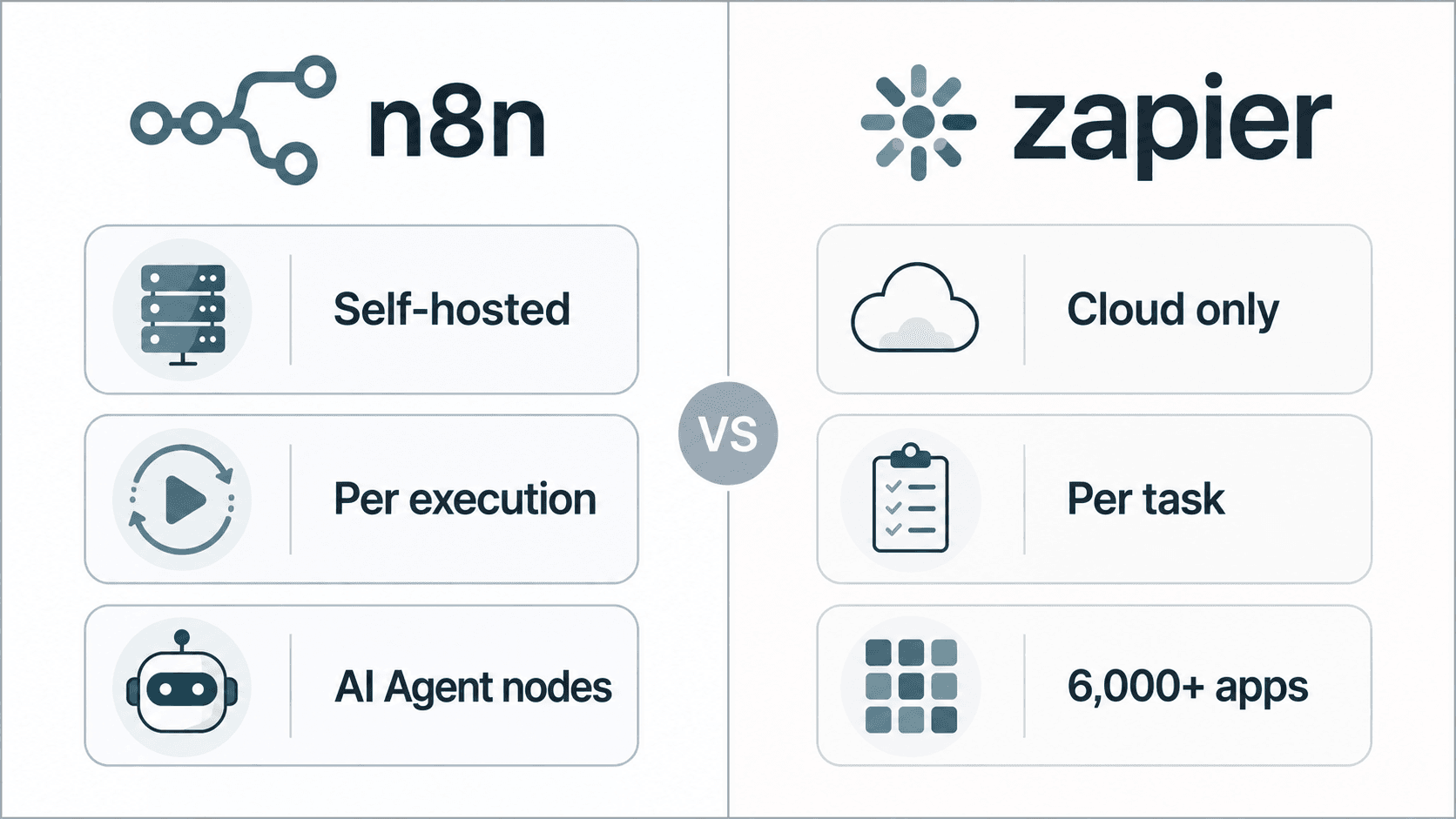
n8n and Zapier both automate multi-step workflows, but they suit different operators. Zapier is faster to set up and charges per task, making it practical for low-volume, non-technical teams. n8n offers self-hosted control and lower per-execution cost at scale, but requires more technical comfort to run reliably.
This article maps exactly where each platform wins, where it breaks, and what it actually costs at real volumes — with the math done for you.
A quick disclosure: Orchient builds n8n automation workflows professionally. We are not neutral. But we also send clients to Zapier when Zapier is the right call, and we’ll tell you when that is.
Not sure which fits your stack? We map this for clients in a free 30-minute audit and send a written recommendation. Book your free automation audit →
At-a-Glance Comparison: n8n vs Zapier
Before the 4,000-word deep-dive, here’s the orientation table.
| Dimension | n8n | Zapier |
|---|---|---|
| Hosting | Self-hosted (free) or Cloud (paid) | Cloud only |
| Pricing model | Per workflow execution (Cloud) or flat VPS cost (self-hosted) | Per task (each action step counts) |
| No-code UX | Visual canvas, steeper learning curve | Guided Zap editor, beginner-friendly |
| Custom code | Yes — JavaScript and Python nodes built-in | Yes — Code by Zapier (limited) |
| AI/LLM nodes | Native LLM, AI Agent, OpenAI, Anthropic, Gemini nodes | AI by Zapier (OpenAI-backed), limited chaining |
| Integration count | 400+ (community nodes add more) | 6,000+ |
| Error handling | Granular per-node retry, error branches | Basic — Zap history + email alerts |
| Branching logic | Full conditional branching, merge nodes | If/Filter steps (each counts as a task) |
| Self-hosted option | Yes — community edition is genuinely free | No |
| Best for | Scale, custom logic, AI agents, cost control | Speed of setup, wide app coverage, non-technical teams |
Feature Comparison: What Each Platform Actually Lets You Build
Triggers and Webhooks
Both platforms support webhook triggers, polling triggers, and scheduled runs. Zapier’s trigger library is larger — over 6,000 app integrations means you can almost always find a native trigger without touching an API. n8n’s 400+ native integrations look thin by comparison, but a generic HTTP Request node and a Webhook node cover almost anything with a REST API. For most operators, the gap closes quickly once you’re past the top 50 apps.
Webhook handling is where n8n pulls ahead in practice. n8n gives you a persistent webhook URL that survives workflow restarts. Zapier’s webhooks require a paid plan and have rate limits that can quietly drop requests under load.
Branching Logic and Conditional Flows
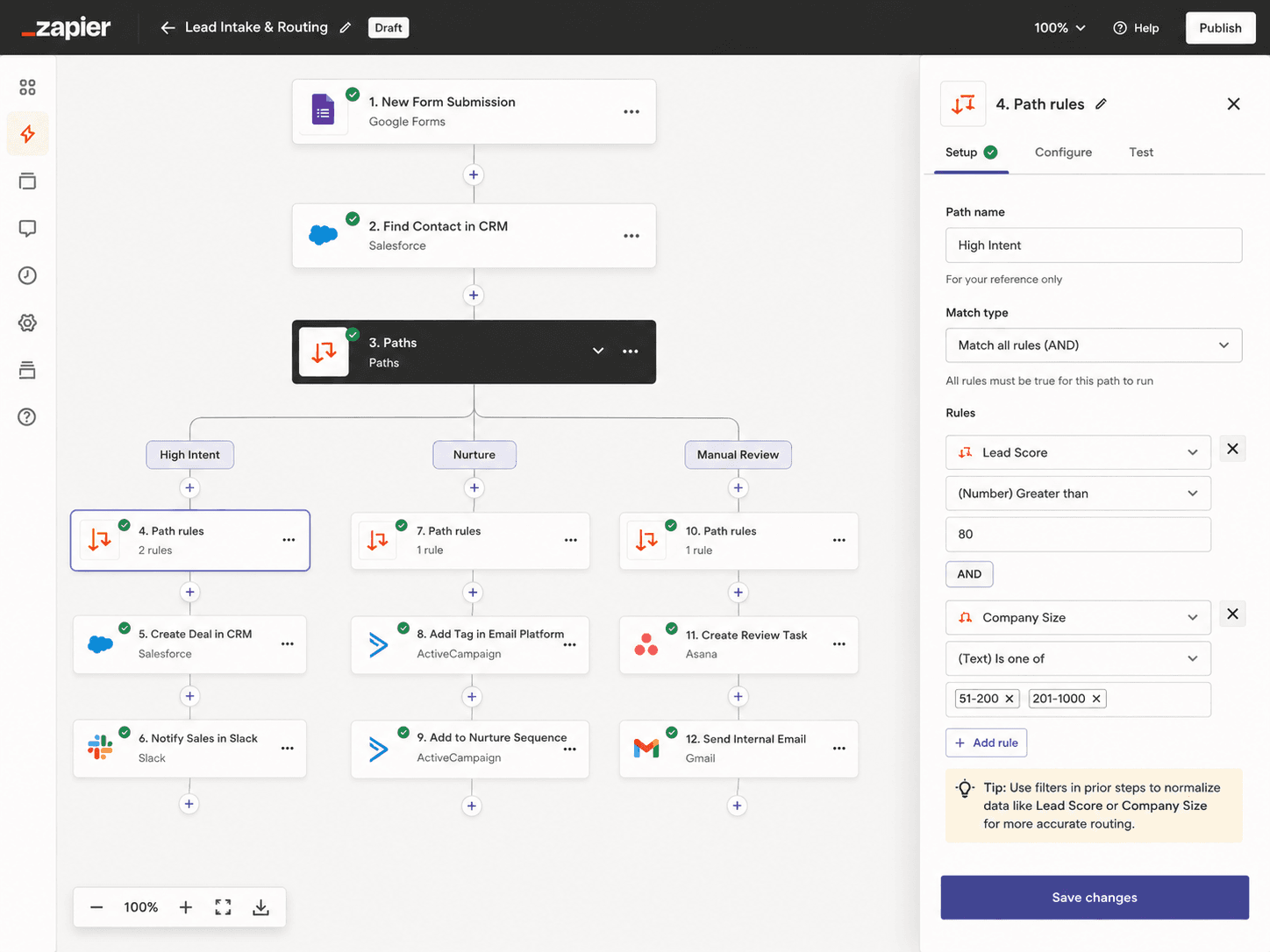
Zapier handles if/else branching through Filter and Paths steps. Clean enough for simple routing. The problem: each Filter or Formatter step counts as a task against your monthly limit. A five-step Zap with two filters and a formatter is effectively an eight-task Zap. This is the most common billing surprise we see.
n8n’s branching is a visual split in the canvas. IF nodes, Switch nodes, Merge nodes — all free within the execution. You build complex decision trees without paying per branch. For anything with real conditional logic, n8n is materially cheaper at the same volume.
Error Handling
Zapier’s error handling is: you get an email and the Zap stops. You can turn on “auto-replay” on higher plans, and the Zap history shows what failed. That’s about it.
n8n lets you wire an error branch on each node. A node fails, the error output fires — you can send a Slack message, log to Airtable, retry with different parameters, or trigger a completely different sub-workflow. For production workflows where silent failures cost money, this matters.
AI and LLM Nodes
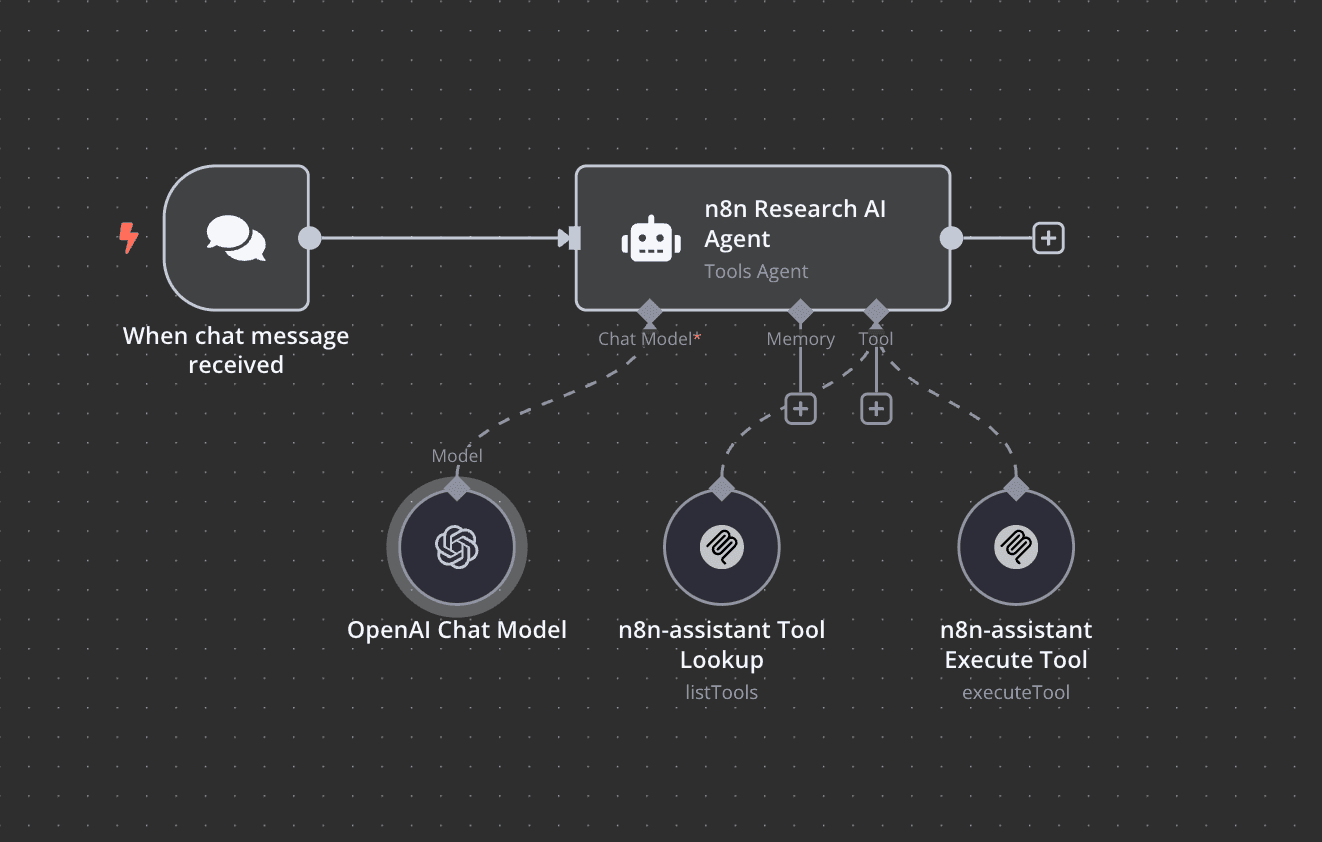
This is where n8n has moved fastest. You can wire an AI Agent node, connect it to OpenAI (GPT-4o), Anthropic (Claude), or Google Gemini natively, give it tools (other n8n nodes), and build a proper autonomous agent loop. LangChain-style chains are supported. If you want to build an AI agent in n8n, the primitives are all there.
Zapier’s “AI by Zapier” covers basic prompt-in, text-out use cases. It works. It’s not where you’d build a multi-step agent that calls your internal API, summarizes documents, and routes results. If AI agents are a core requirement, n8n wins this category cleanly.
Custom Code
n8n has a Code node supporting JavaScript and Python. Full Node.js runtime access. You can parse custom data structures, call libraries, transform payloads — anything you’d do in a script.
Zapier’s Code by Zapier supports JavaScript and Python but with a more sandboxed environment and lower execution limits. For simple transformations it’s fine. For anything that needs external packages or longer runtimes, you’ll hit walls.
Pricing Breakdown
This is the section most comparison articles get wrong by only showing entry-tier list prices. We’ve done the math at multiple volumes.
Pricing Tables
n8n Pricing (Cloud and Self-Hosted) — Estimates as of mid-2025
| Plan | Price/mo (est.) | Execution limit | Notes |
|---|---|---|---|
| Community (self-hosted) | $0 (VPS cost only) | Unlimited | You manage infra; see self-hosted cost below |
| Cloud Starter | ~$24/mo | 2,500 executions/mo | 5 active workflows; limited to 5 users |
| Cloud Pro | ~$60/mo | 10,000 executions/mo | Unlimited active workflows; 15 users |
| Cloud Enterprise | Custom | Custom | SSO, audit logs, custom SLA |
Self-hosted infrastructure cost estimate:
A DigitalOcean or Hetzner VPS suitable for n8n (2 vCPU, 4 GB RAM) runs roughly $6–$20/mo depending on provider and region. Add a managed database if you want persistent queue — another $15–$25/mo on the low end. Total self-hosted operational cost: roughly $20–$50/mo for a small to medium workload. See self-hosting n8n on a VPS for the full setup guide.
Zapier Pricing — Estimates as of mid-2025
| Plan | Price/mo (est.) | Task limit/mo | Notes |
|---|---|---|---|
| Free | $0 | 100 tasks | Single-step Zaps only |
| Starter | ~$29.99/mo | 750 tasks | Multi-step Zaps; webhooks not included |
| Professional | ~$73.50/mo | 2,000 tasks | Webhooks, filters, custom logic |
| Team | ~$103.50/mo | 2,000 tasks | Shared workspace, unlimited users |
Note: “Tasks” in Zapier = every action step that successfully runs, including filters, formatters, and lookups. A single business “operation” often consumes 3–5 tasks.
The Math at Multiple Volumes
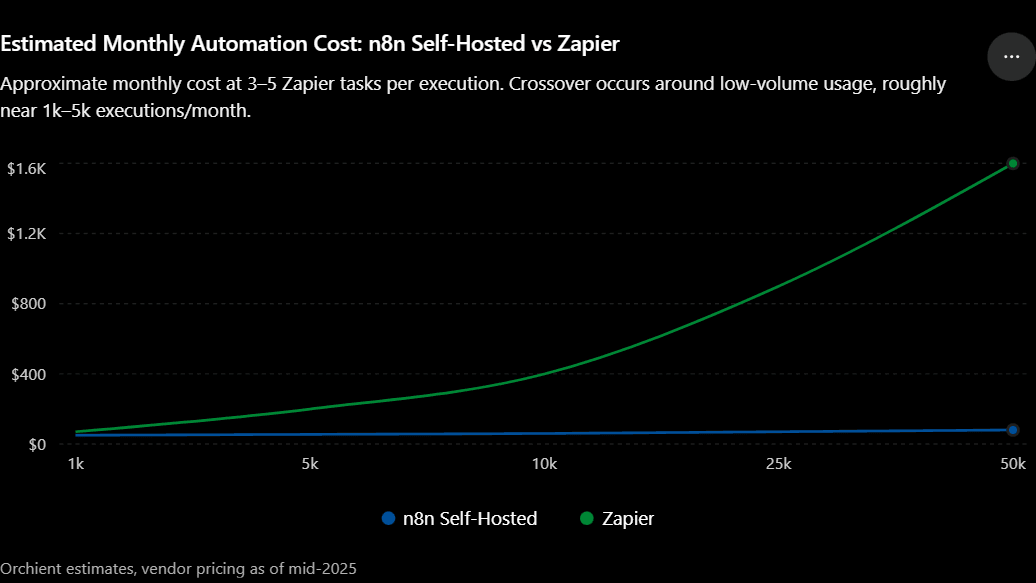
Let’s say you have a core workflow: webhook comes in, lookup in HubSpot, format data, branch on a condition, write to Google Sheets, post to Slack. That’s roughly 5 action steps per execution. On Zapier, that’s 5 tasks per run.
| Monthly executions | n8n Cloud Pro (~$60/mo) | n8n Self-Hosted (~$35/mo) | Zapier Professional (~$73.50/mo, 2k tasks) | Zapier cost if upgrading |
|---|---|---|---|---|
| 1,000 runs | $60 (within limit) | ~$35 flat | ~$73.50 (1k tasks used; need 5k) | ~$150+/mo |
| 5,000 runs | Upgrade needed (~$100+/mo) | ~$35 flat | ~$375+/mo (25k tasks) | $375+ |
| 10,000 runs | Enterprise pricing | ~$35–50 flat | $750+/mo estimate | Very high |
| 50,000 runs | Enterprise | ~$50–80 flat | Prohibitive | Not viable |
For n8n pricing explained in full detail, see our dedicated breakdown. The short version: self-hosted n8n becomes dramatically cheaper than Zapier around the 2,000–3,000 execution/month mark for complex workflows.
Strengths and Weaknesses of Each Platform
n8n: Honest Assessment
Where it wins:
– Cost at scale. Self-hosted cost is essentially flat regardless of execution volume.
– AI/agent workflows. The native LLM and agent nodes are genuinely good.
– Complex conditional logic. No per-branch tax.
– Custom code. Full runtime, not a sandbox.
– Data ownership. Self-hosted means your data never leaves your infrastructure.
Where it costs you:
– Setup time. Self-hosting requires a server, SSL, queue config, and ongoing maintenance. It’s not hard for a technical person, but it’s not zero.
– Smaller integration library. 400+ native integrations vs Zapier’s 6,000+. For obscure SaaS apps, you may need to build a custom HTTP node.
– Less polished UX. The canvas is powerful but not as guided as Zapier’s editor. New users spend more time on orientation.
– Cloud plans limit active workflows on Starter. If you have 50 lightweight Zap-equivalents, the Starter plan’s 5-workflow cap becomes real friction.
Zapier: Honest Assessment
Where it wins:
– Speed of first deployment. For a non-technical operator, Zapier gets a workflow live in 20 minutes. The guided editor, pre-built templates, and massive integration library remove friction.
– App coverage. 6,000+ apps is a real moat. If you use a niche CRM or vertical SaaS tool, Zapier probably has it. n8n may not.
– Reliability and uptime. Zapier’s cloud infrastructure is mature. They handle scaling, uptime, and maintenance. You pay for that certainty.
– Support. Paid Zapier plans come with support. n8n Cloud has support on Pro/Enterprise; self-hosted community edition means you’re on the forums.
Where it costs you:
– Task inflation. Filters, formatters, lookups — all tasks. Complex Zaps cost 3–5× more than expected.
– No self-hosted option. Your data, credentials, and workflow logic all sit in Zapier’s cloud.
– AI features are limited. “AI by Zapier” covers basic prompting; it’s not a platform for agent workflows.
– Error handling is thin. No error branches, no per-node retry logic. If a step fails silently, you find out from a customer complaint.
What Actually Breaks in Production: Failure Modes We’ve Hit on Both Platforms
This is the section the vendor docs don’t cover.
n8n Production Failures
Execution queue saturation. n8n processes workflows in a queue. If webhook traffic spikes — say, 500 webhooks arrive in 60 seconds — and you’re running a lean VPS with default worker configuration, executions queue up and start timing out. The symptom is silent: no error email, just missed records. You find it by watching queue depth in the execution log, which you have to know to check.
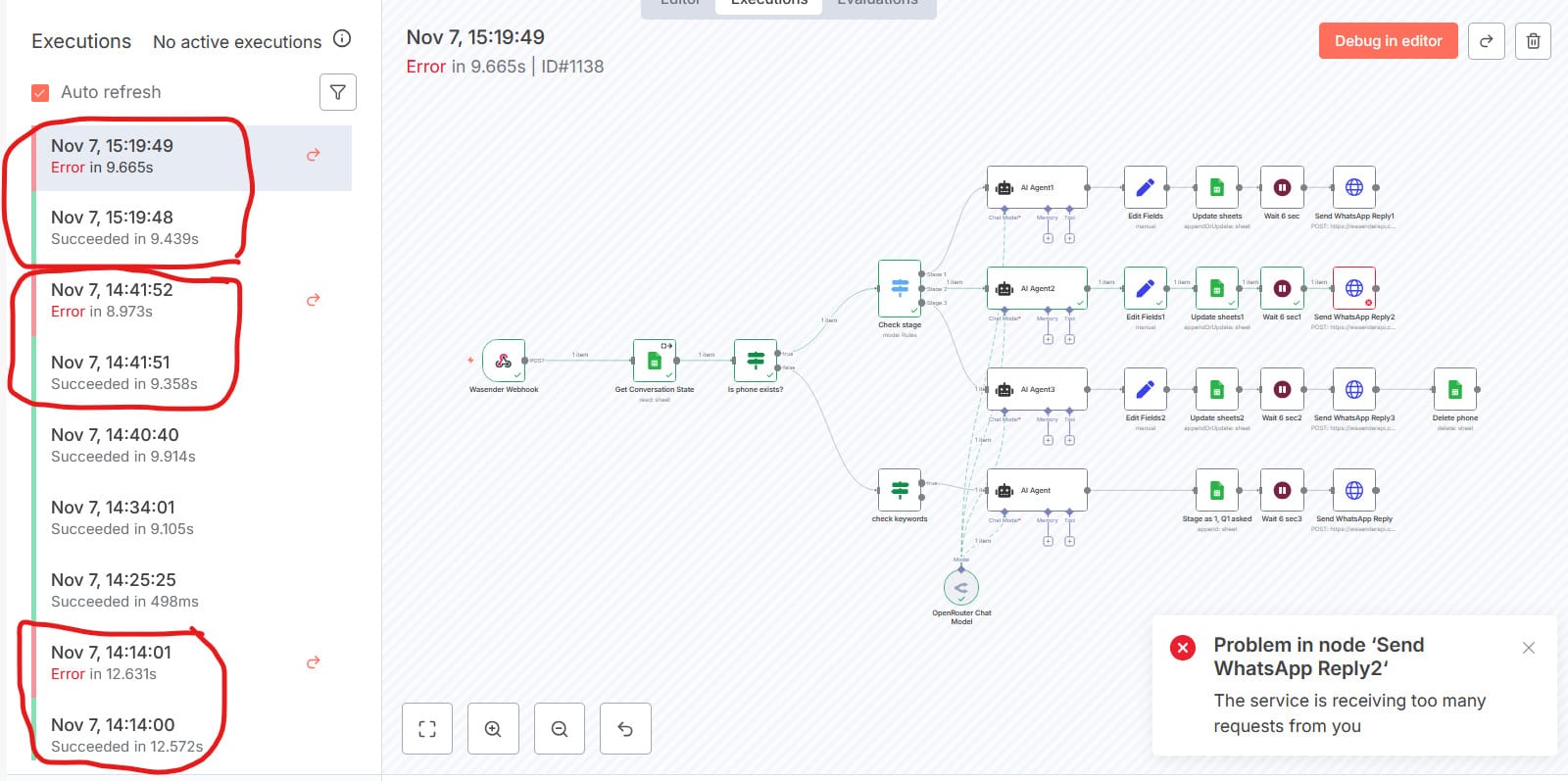
The fix is scaling queue workers or adding a Redis queue backend for self-hosted. But diagnosing it the first time costs hours. We’ve lost an afternoon to this.
Memory leaks on long-running agents. n8n AI agent nodes that run in loops — polling, summarizing, looping back — can accumulate memory over hours on a constrained VPS. The worker process dies. The workflow looks stuck. Again, the execution log is your friend, but you have to be watching.
Node version drift. Self-hosted n8n requires occasional updates, and community nodes can lag behind core version updates. We’ve had a workflow break after an n8n core update because a community node hadn’t kept pace.
Zapier Production Failures
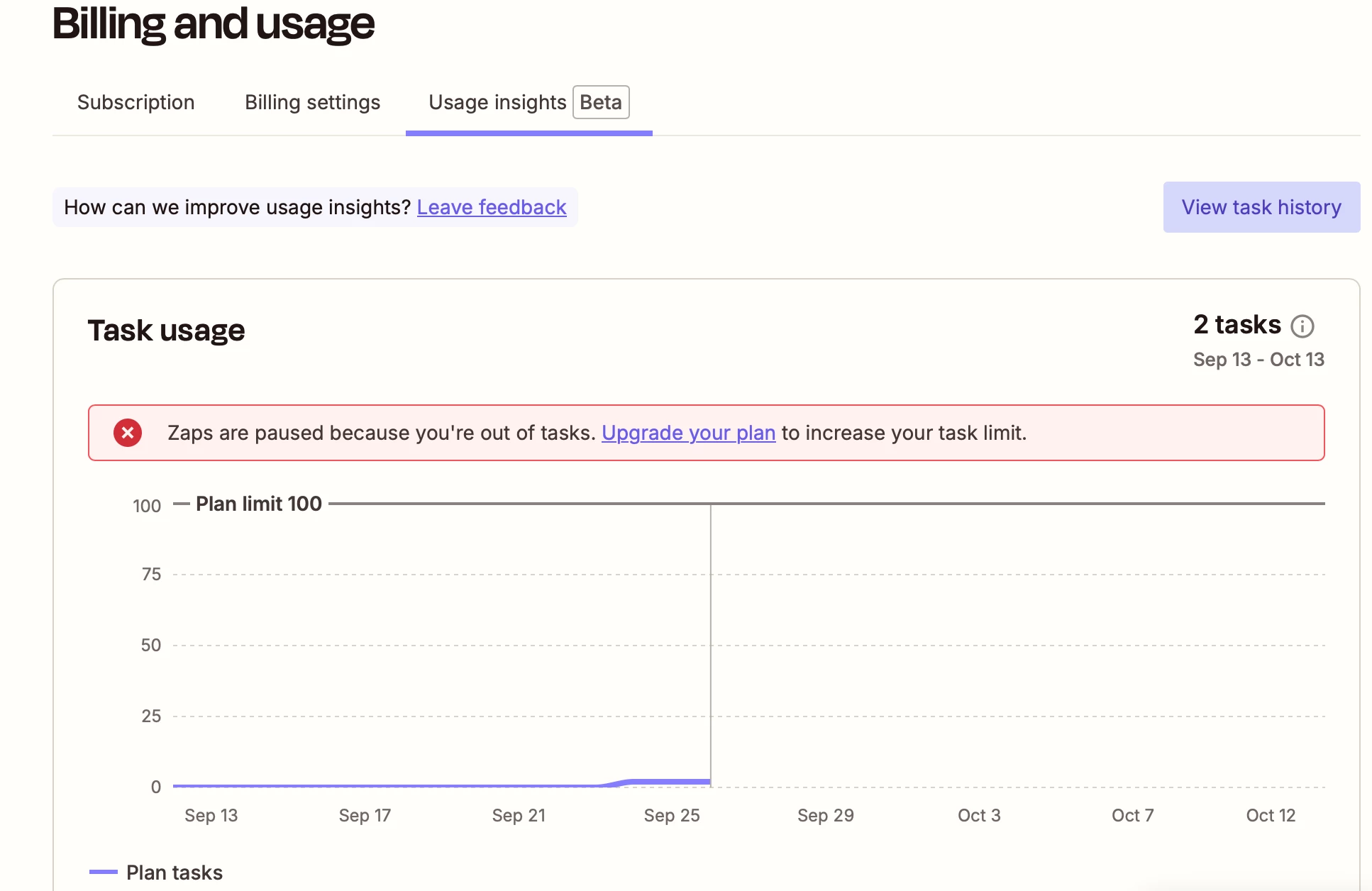
Silent task overruns. When you hit your task limit mid-month, Zapier pauses Zaps — but it sends one email and doesn’t re-alert as the queue builds. We’ve seen clients discover a 48-hour data gap because they missed the email. A $73/mo professional plan hitting its 2,000-task cap on the 18th of the month is a real operational risk.
Task count inflation surprise. One client had a Zap they thought was 3 steps. It was actually 7 tasks per run (two Formatter steps, a Paths split creating 2 branches, a Lookup, the actual write action). Monthly task consumption was 2.3× what they’d budgeted. The first bill at scale was a genuine surprise.
Webhook reliability on busy Zaps. Zapier processes webhooks asynchronously but has documented rate limits. Under sustained high-frequency webhook traffic (hundreds per minute), requests can queue and occasionally drop without triggering an error state visible in the Zap history. We’ve seen this on ecommerce order volume spikes.
The Real Cost Model: What You’ll Actually Pay at 50k, 500k, and 5M Executions
If you’re running n8n Cloud or Zapier at scale, the math gets important fast.
At 500,000 executions/month (complex workflows):
– n8n self-hosted: You’d want a beefier server — maybe $80–150/mo for a dual-server setup with Redis queue. Still flat cost.
– Zapier: Task-based pricing at this scale is prohibitive. Very few operators use Zapier at 500k+ monthly tasks; the ones who do have usually already switched.
At 5 million executions/month, the comparison is moot. n8n self-hosted is the only viable choice. Zapier is not designed for this volume at any cost point.
The inflection point in our experience: somewhere between 2,000 and 5,000 complex executions per month, n8n self-hosted becomes cheaper even accounting for server setup time. If you’re paying someone to manage infrastructure anyway, that crossover happens earlier.
Platform Migration Reality: What We Lost, Rebuilt, and Wish We Knew Before Switching
We’ve run Zapier-to-n8n migrations for clients. Here’s the honest version.
What migrates cleanly: Simple linear workflows — trigger, lookup, write, notify — rebuild fast. If a Zap has 3–4 steps with no branching, an experienced n8n builder can recreate it in 20–30 minutes. A straightforward Zapier account with 15 simple Zaps can be migrated in a day.
What requires a full rebuild: Complex Paths and branching logic doesn’t export from Zapier. There’s no migration utility. You’re screenshotting the Zap editor and rebuilding from memory. The n8n equivalent is usually more powerful once built, but the build time is real. Budget 2–4× the original build time for any Zap with multiple Paths branches.
What we wish we knew: Credential migration is the slowest part. Every connected app needs re-authentication. OAuth apps need someone with admin access to the third-party tool to reauthorize. For a client with 30 Zaps across 15 apps — including Salesforce, HubSpot, and a custom webhook endpoint — that reauth round-trip alone took half a day and required pulling in contacts at three different SaaS vendors.
What actually broke: We’ve had one Zap pattern that genuinely couldn’t be replicated cleanly in n8n without custom code: a Zapier Formatter “Utilities – Line-item to text” operation that processed a specific CRM field. n8n’s equivalent required a Code node with about 10 lines of JavaScript. Not hard, but it moved the task from “no-code” to “someone needs to read code to maintain this.” For a non-technical client, that’s a real handoff consideration.
The honest migration recommendation: if you’re moving because of cost, do the math first. If your Zapier bill is under $100/month and your workflows are simple, the migration work probably costs more than a year of Zapier. If you’re paying $300+/month or have complex logic you want to extend, the migration pays back within a quarter.
Use Cases: Which Operator Should Pick Which Tool
Not personas. Concrete scenarios.
Pick Zapier if:
– You’re setting up automation for the first time and need it working this week, not next month.
– Your team is non-technical and will need to edit workflows themselves without an agency.
– You rely on 5–10 niche SaaS integrations that may not have n8n community nodes.
– You run under 1,000 simple executions/month and the math works.
– Compliance or vendor-managed uptime is a requirement and you can’t support self-hosted infrastructure.
Pick n8n if:
– You’re running (or expect to run) more than 3,000–5,000 complex executions per month.
– You need AI agents — real multi-step LLM tool-calling, not just a prompt box.
– Data sovereignty matters (healthcare, legal, finance, EU operators with GDPR concerns).
– You have a technical operator on your team or a dev agency (like us) managing the build.
– You want complex error handling — error branches, retry logic, notification on failure.
– Your workflows need custom code or complex data transformations.
Consider Make if:
– You want Zapier’s approachability but better value at mid-volume, and you don’t need self-hosted.
– You’re comparing all three — see n8n vs Make and our Make vs Zapier breakdowns.
– For a broader view of the category, our guide to best AI automation tools covers more options.
Not sure which fits your stack right now? We do this mapping in a free 30-minute audit. You leave with a written tool recommendation and a workflow priority list — no pitch, no obligation. Book your free automation audit →
Leaning toward n8n after reading this? You can try n8n free and build your first workflow before committing to anything.
Decision Matrix / Summary Table
| Operator Profile | Recommended Tool | One-Line Rationale |
|---|---|---|
| Solo founder, first automation, non-technical | Zapier | Fastest to first working workflow; cost is fine at low volume |
| Small team, 10–20 Zaps, mixed technical skill | Zapier or Make | Zapier if app coverage matters; Make if you want better value at mid-volume |
| Ops-heavy team, 50k+ executions/month | n8n self-hosted | Cost delta vs Zapier is enormous; flat infrastructure cost wins |
| AI agent workflows (LLM, tools, autonomous loops) | n8n | Zapier’s AI tier doesn’t support real agent chaining |
| Data-sensitive workflows (healthcare, legal, EU) | n8n self-hosted | Your infrastructure, your data |
| eCommerce brand scaling rapidly | n8n self-hosted | Task-based Zapier pricing doesn’t survive order volume spikes |
| Non-technical team that must self-maintain | Zapier | n8n’s learning curve has a real ops cost if no technical owner |
| Agency managing client workflows | n8n | Multi-tenancy, white-label options, cost efficiency at volume |
| Uses 10+ niche SaaS integrations | Zapier | 6,000+ app library is a genuine moat |
| Needs Salesforce, HubSpot, GitHub, Airtable workflows | Either | Both have solid native nodes for these; cost model drives the call |
Answering the Questions We See in Search
Can Zapier replace n8n?
For simple, low-volume workflows: yes. For complex agent logic, high execution volume, or data-sensitive deployments: no. They’re not full substitutes — they occupy different positions on the cost/complexity curve.
Is n8n a Chinese company?
No. n8n GmbH is a German company, headquartered in Berlin. It was founded by Jan Oberhauser in 2019 and is incorporated in Germany. The name is a numeronym (“nodemation,” 14 characters shortened to n + 14 + n). Self-hosted deployment also means your data doesn’t leave your own infrastructure, regardless of vendor location.
Which is better: n8n, Make, or Zapier?
Depends on volume and technical comfort. Zapier wins on ease and app coverage. Make sits in the middle — better value than Zapier at mid-volume, more polished UI than n8n. n8n wins on cost at scale, AI capabilities, and data control. See our Zapier alternatives guide if you’re evaluating all options. There’s no universal winner.
Is anything better than n8n?
“Better” is always context-dependent. Zapier is better for non-technical teams that need fast setup. Make is better for operators who want a middle path. For large-scale agent workflows with custom logic and cost control, n8n is hard to beat in the open-source category. Enterprise tools like Workato or Boomi exist for large organizations with different requirements and budgets.
Why is n8n better than Zapier?
At scale and complexity: cost model (flat vs per-task), native AI agent nodes, richer error handling, self-hosted data control, and no per-branch tax on conditional logic. For a simple three-step workflow on a team with no technical resources, n8n is not better — it’s just harder.
Which AI automation tool is best?
For building real AI agents (multi-step, tool-calling, autonomous): n8n. For quick AI-assisted workflows inside a broad app ecosystem: Zapier’s AI features work for simple cases. If you’re deep in the LangChain ecosystem or need OpenAI/Anthropic/Gemini chaining with memory and tools, n8n is currently the strongest no-code-adjacent option.
What to Do Monday Morning
Here’s the decision, stated plainly.
If you’re on Zapier today and your monthly bill is under $100 with fewer than 20 simple workflows — stay there. The migration cost isn’t worth it yet.
If you’re on Zapier and one of these is true: bill is above $200/month, you want AI agent capabilities, you’ve hit task-count surprises, or you’re planning a volume increase — do the math now. The crossover point may be closer than you think.
If you’re starting fresh and have any technical resource available (internal or agency), default to n8n self-hosted. The $35/month infrastructure cost vs Zapier’s $73+/month starting point pays back fast once complexity grows.
If you’re unsure where your stack falls, that’s exactly what our free automation audit is designed to answer. We map your current workflows, run the cost math at your actual volume, and send you a written recommendation — including which tool, which plan, and what a migration would actually cost in hours.
Book your free automation audit →
No pitch, no obligation. Just a decision you can act on. If Zapier is the right call for your situation, we’ll tell you that.
All pricing figures in this article are estimates based on publicly available vendor information as of mid-2025. Verify current pricing at n8n.io/pricing and zapier.com/pricing before making a purchasing decision. Orchient builds n8n workflows professionally and has a commercial interest in that platform — we’ve tried to note where that affects our perspective.