
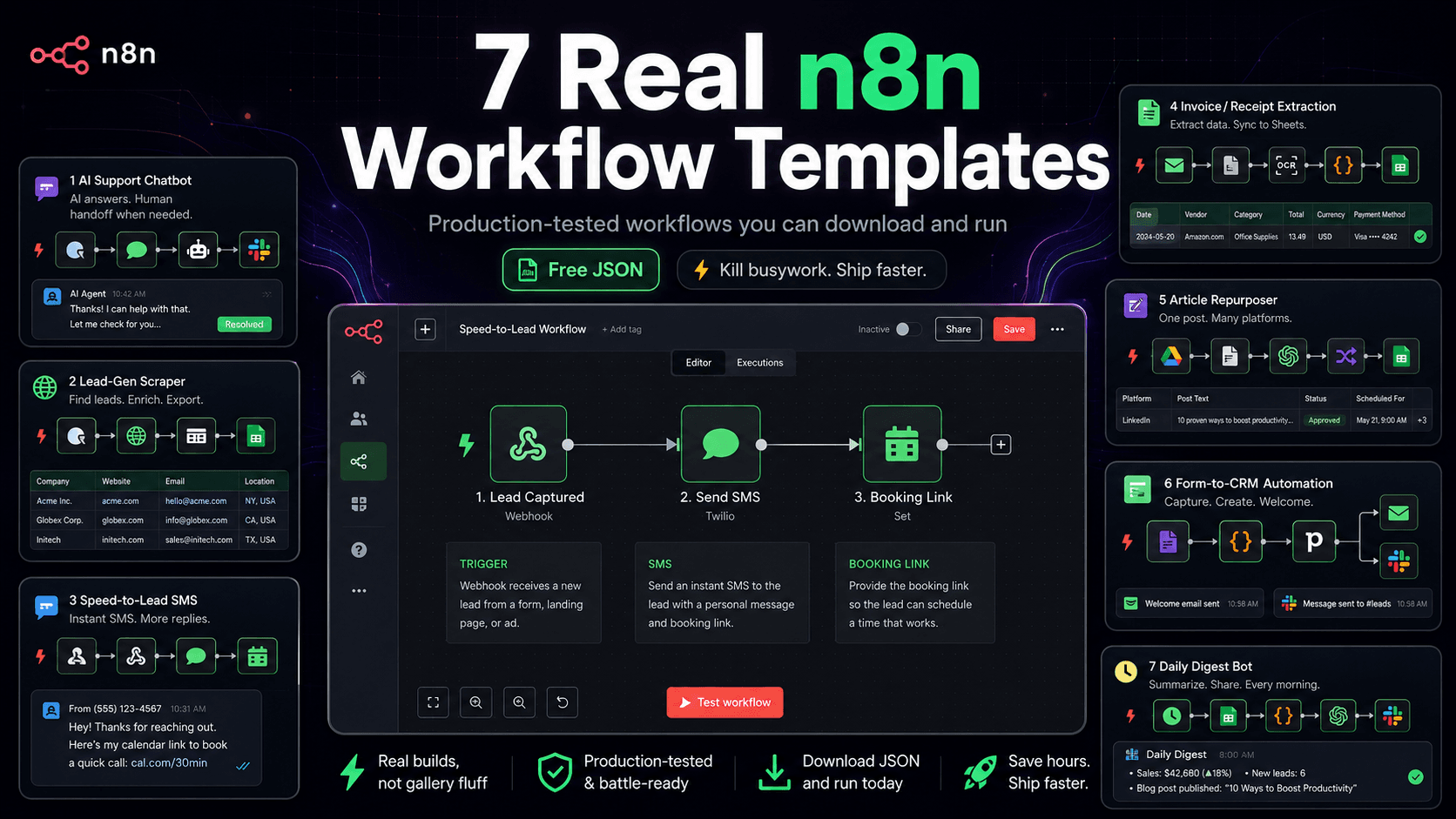
Search “n8n workflow templates” and you get the same thing every time: a link dump to the official template gallery, or a listicle of screenshots you can’t actually use. None of them hand you a working machine.
These do. Every template below is a workflow we’ve shipped to production — for a client or for ourselves — and where you see ⬇️ the importable JSON is yours, free. We build automations on n8n for a living, so this isn’t a gallery tour. It’s the shortlist of builds that actually earn their keep, each framed by the one thing it kills: a recurring task you’re probably still doing by hand.
What are n8n workflow templates? They’re pre-built automations you import into n8n and run, instead of wiring nodes from scratch. Most you’ll find online are thin gallery links. The ones below are workflows we’ve run in production, with the importable JSON free, each built to replace a specific recurring task — support tickets, prospecting, data entry, reporting.
Want one of these tuned to your exact stack and data? That’s a free 30-minute automation audit — we pick the highest-payback build and send a written plan.
Disclosure: Orchient builds client automations on n8n, and some n8n links here are affiliate links (we may earn a commission at no cost to you). The workflows are ours; the recommendation isn’t for sale.
How to use these (2 minutes)
Every template is a single .json file. To run one:
- In n8n: Workflows → Import from File and pick the JSON.
- Open the credential-using nodes and drop in your keys (OpenAI, etc.).
- Hit Test workflow, watch the nodes go green, then activate.
No server yet? Self-hosting n8n on a $5 VPS takes about ten minutes — here’s the setup — or use n8n Cloud and skip the ops entirely.
1. AI support chatbot that won’t hallucinate (RAG) ⬇️
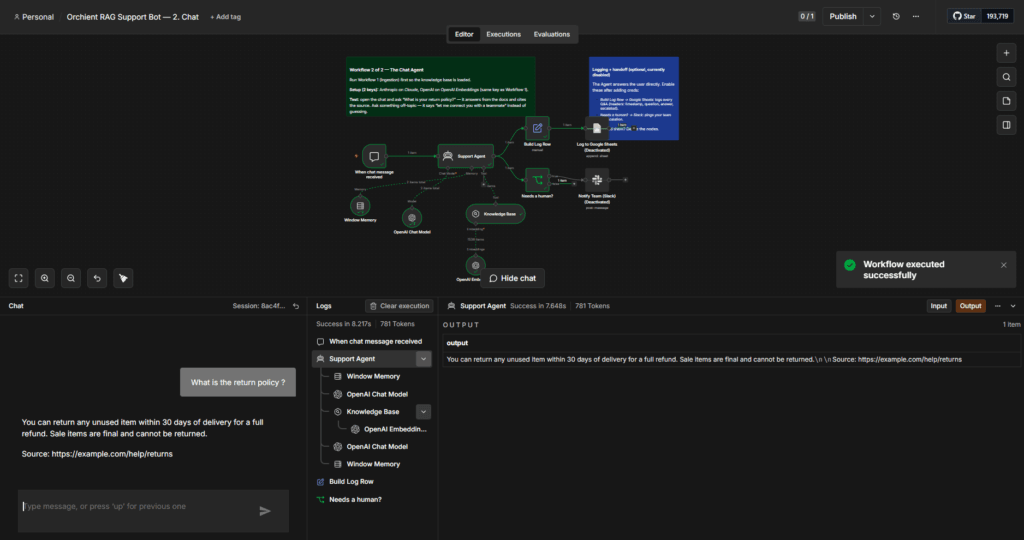
Replaces: answering the same 40 customer questions every day.
A support bot that answers strictly from your help docs, cites the source, and hands off to a human when it isn’t sure — instead of inventing a refund policy you never offered. Ask it something in your docs and it answers with a source link; ask something that isn’t and it says “let me connect you with a teammate” rather than guessing.
The build: Chat Trigger → AI Agent (Claude or GPT) with a vector-store knowledge tool + memory, plus a nightly ingestion workflow that keeps the docs fresh. The whole anti-hallucination trick is one grounding system prompt.
Rough cost: pennies per conversation on a small model; the vector store runs free in-memory for testing.
⬇️ Download the RAG support-bot workflow JSON (email-gated — two files: ingestion + chat). Full walkthrough: How to build an AI customer support chatbot in n8n.
2. Lead-gen scraper that ranks prospects for you ⬇️
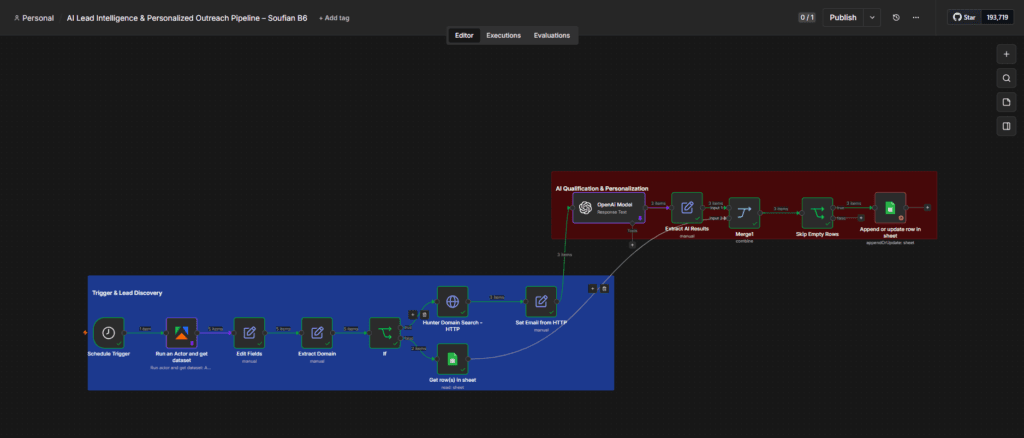
Replaces: an afternoon of copy-pasting businesses off Google Maps.
Scrapes local businesses from Google Maps, finds their email, scores each lead with AI, writes a personalized opening line, and drops a ranked list into a Google Sheet. You review a finished, sorted list instead of building a raw one.
The build: Schedule Trigger → Apify (Maps scrape) → clean fields → Hunter.io (email) → AI scoring + personalization → Google Sheets (dedup on Lead ID). Includes the four production fixes most tutorials skip.
Rough cost: about $0.50–$4 per 1,000 places scraped + pennies for the AI step.
⬇️ Download the lead-gen workflow JSON (email-gated). Full build: Lead generation automation in n8n · the numbers: our lead-gen case study.
3. Speed-to-lead: missed-call text-back
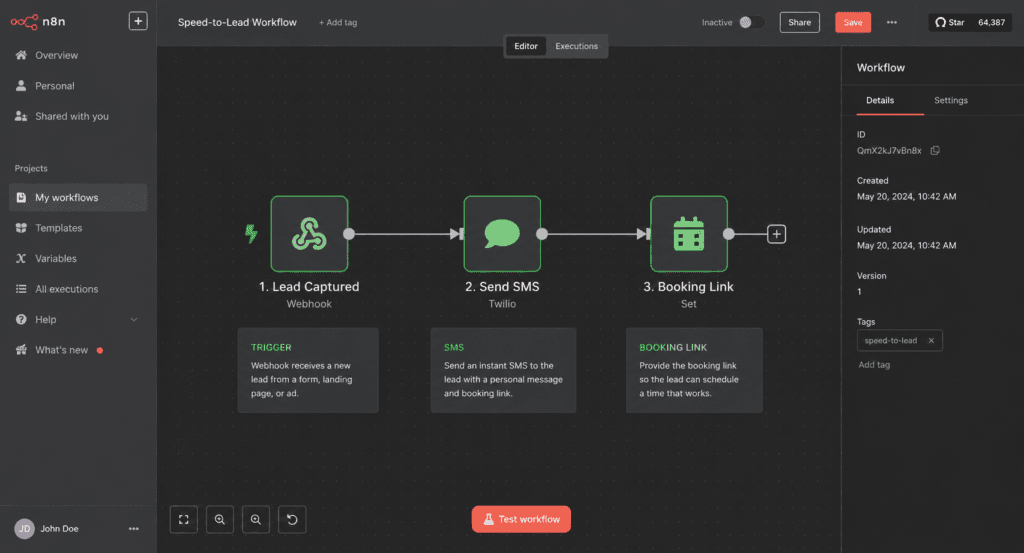
Replaces: the leads you lose in the 30 minutes before you call back.
The moment someone fills a form or calls and you miss it, this fires an instant personalized text and a booking link — so speed-to-lead is measured in seconds, not hours. For local-service businesses this is often the single highest-ROI automation you can run.
The build: Webhook/Form Trigger (or missed-call event) → check business hours → send SMS (Twilio) with a calendar link → log to CRM → notify the owner in Slack.
Rough cost: a few cents per text + your SMS provider’s number fee.
We build this as a client day-one workflow. Want it wired to your phone system and CRM? Free automation audit.
4. Invoice & receipt inbox → spreadsheet
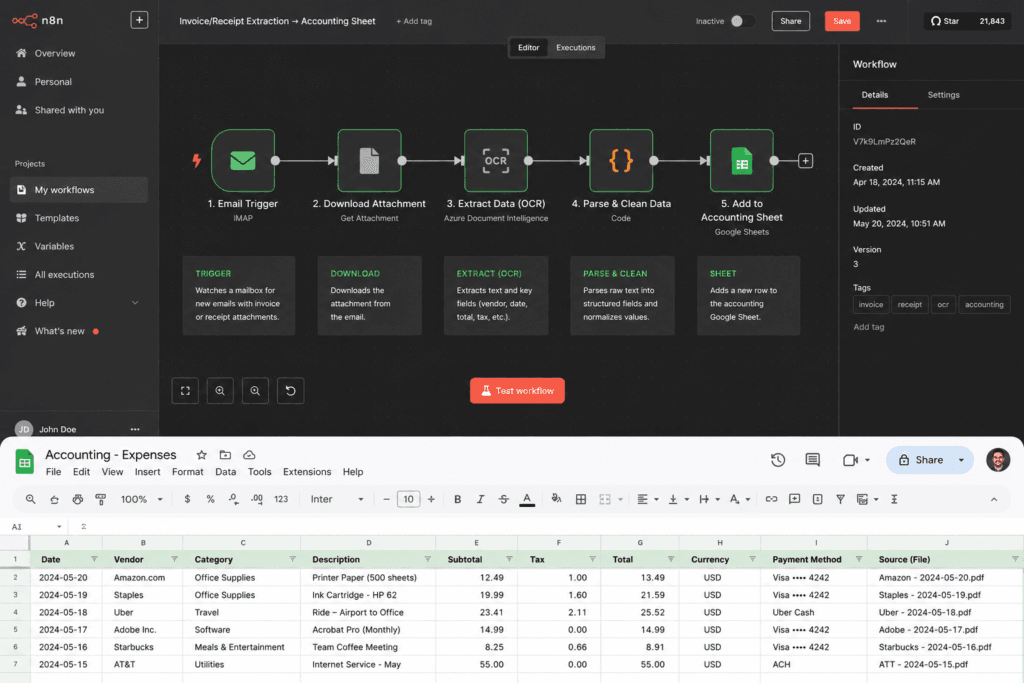
Replaces: manual data entry from email attachments.
Watches an inbox, pulls every incoming invoice or receipt PDF, extracts the vendor, date, and total with AI, and appends a clean row to your accounting sheet — so month-end isn’t a shoebox of attachments.
The build: Gmail/IMAP Trigger → filter attachments → AI extraction (structured JSON) → validate → Google Sheets / QuickBooks. Add an approval step in Slack for anything over a threshold.
Rough cost: pennies per document.
Get the template tuned to your accounting stack via a free audit.
5. One article → a week of social posts
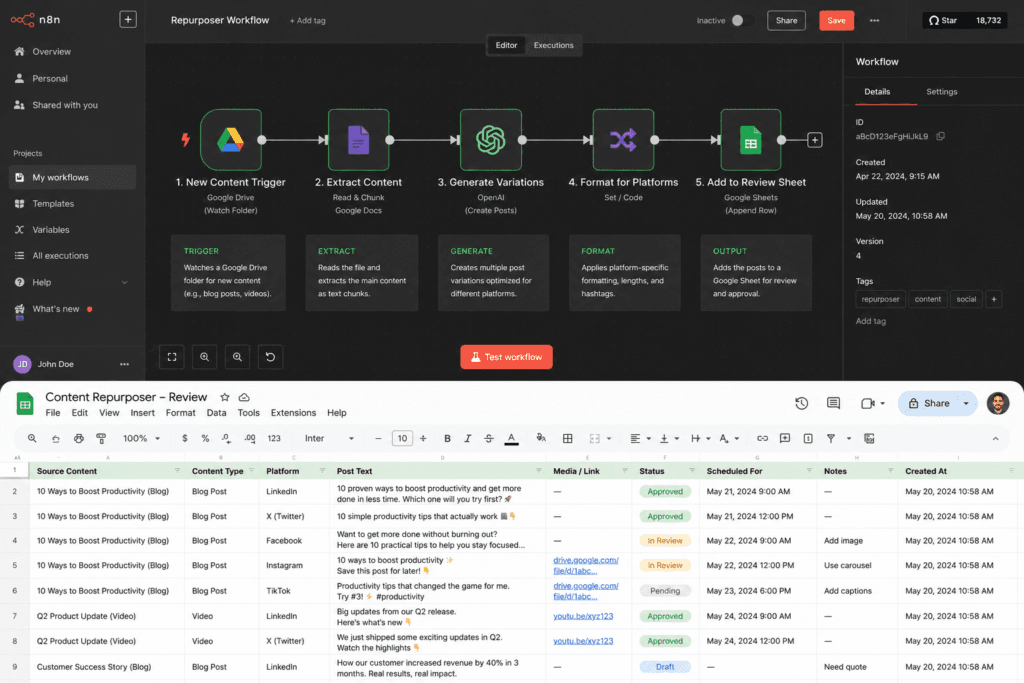
Replaces: staring at a blank “what do we post today” box.
Point it at a published article (or a Google Doc) and it drafts a LinkedIn post, an X thread, and a short-form video script in your brand voice, then drops them in a sheet for review. You approve and schedule; you don’t write from scratch.
The build: Trigger (RSS / new row / manual) → fetch the source → AI generation per platform with a brand-voice prompt → Google Sheets / Notion for review. Optional: push approved posts to a scheduler.
Rough cost: pennies per article processed.
This pairs with our reels and content system — ask about it in the audit.
6. Form submission → CRM + welcome sequence
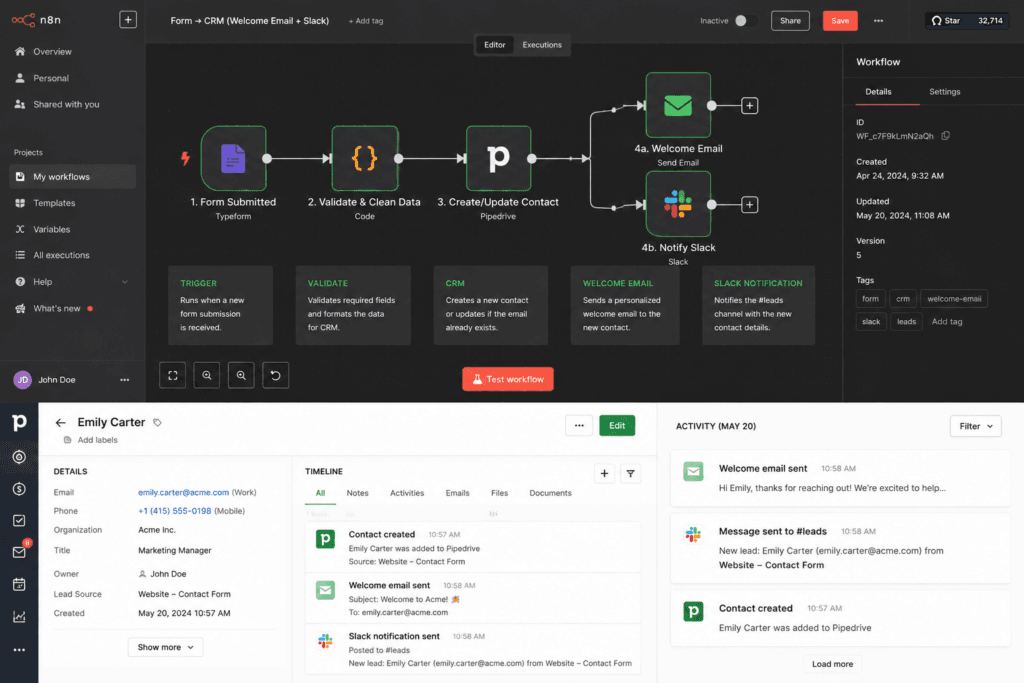
Replaces: copy-pasting new leads into your CRM and forgetting to follow up.
A form gets submitted and the lead lands in your CRM tagged and enriched, gets a personalized welcome email, and pings the right rep in Slack — without anyone touching a keyboard.
The build: Webhook/Form Trigger → enrich (company data) → upsert to CRM (HubSpot/Pipedrive) → send welcome email → Slack alert → log. Branch on lead score to route hot leads straight to a human.
Rough cost: essentially free on self-hosted n8n; one execution per lead.
We map your exact funnel in a free automation audit.
7. Daily digest bot (your metrics, summarized)
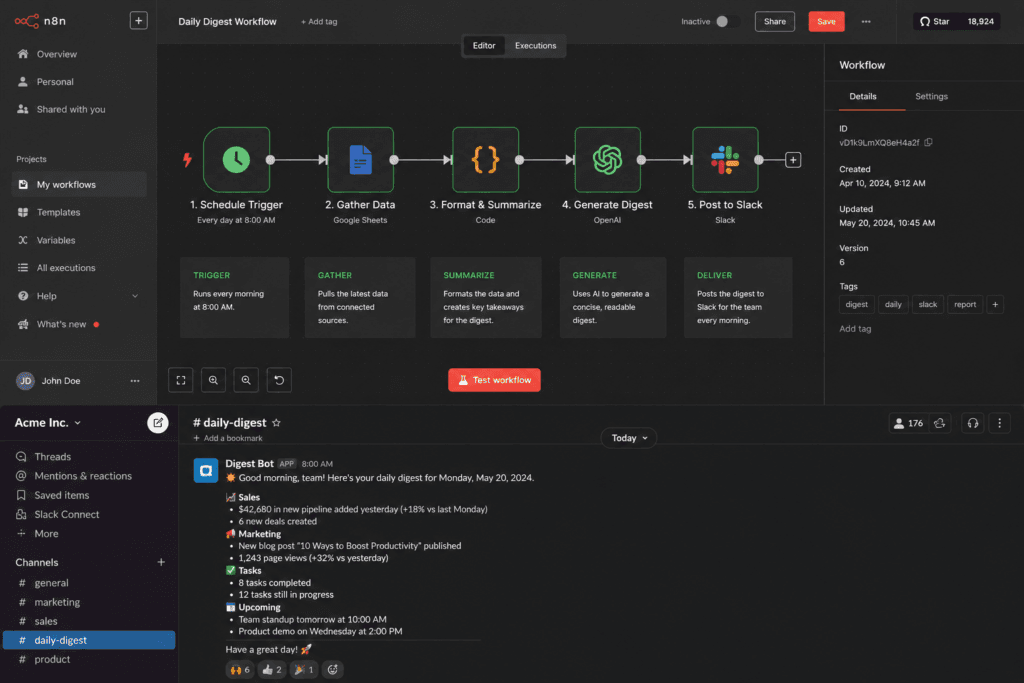
Replaces: logging into five dashboards every morning.
Pulls yesterday’s numbers from your tools — sales, ad spend, support volume — has AI write a two-line plain-English summary, and posts it to Slack or email before you’ve had coffee. Anomalies get flagged so you notice the spike, not the noise.
The build: Schedule Trigger (daily) → HTTP/API pulls from each source → merge → AI summary with a “flag anything unusual” prompt → Slack/email. Add a threshold alert for the metrics you care about.
Rough cost: pennies per day.
Want your specific dashboards wired in? Free audit.
Which one should you build first?
Pick by the task that’s currently eating the most of your week:
- Drowning in support tickets? → #1, the RAG chatbot.
- Still prospecting by hand? → #2, the lead scraper.
- Losing leads to slow follow-up? → #3, speed-to-lead.
- Buried in admin and data entry? → #4 or #6.
- Behind on content? → #5.
- Flying blind on your numbers? → #7.
You don’t need all seven. You need the one with the fastest payback for your week — and the honest truth is it’s usually obvious once you name where the hours go.
That’s the entire job of a free automation audit: in 30 minutes we find your highest-payback workflow, hand you the template, and send a written plan to run it. No retainer, no pitch — these are the builds we ship clients on day one.
Related reading: n8n automation guide · Build an AI agent in n8n · How to build an AI support chatbot · Lead generation automation in n8n