

We’ve built client automations in both n8n vs Make, and migrated workloads between them in both directions. So here’s the operator version of this comparison, not the affiliate-table version. Full disclosure: we build on n8n professionally and link to n8n Cloud with an affiliate link below — and we’ll still tell you when Make is the right choice, because for a lot of teams it genuinely is.
The short answer first:
n8n and Make both automate multi-step workflows visually, but they meter differently. Make charges per operation, so every module in a scenario counts each run. n8n charges per execution, so a whole workflow run counts once, and it can be self-hosted for a flat infrastructure cost. Make is easier to learn; n8n is cheaper at scale and stronger for AI workflows.
That metering difference is the entire comparison in one sentence. Make’s per-operation model is fair at low volume and quietly expensive as your scenarios grow longer. n8n’s per-execution model (and free self-hosted option) is why teams graduate to it. Everything else — UX, integrations, AI — is detail around that core trade. Let’s do the details honestly.
Not sure which fits your stack? We map exactly this for clients in a free automation audit: you show us your scenarios and volume, we send back a written recommendation with the cost math done. No pitch. Keep reading first.
Disclosure: the n8n Cloud links in this article are affiliate links. They don’t change our analysis, and our self-hosted recommendation earns us nothing.
At a glance
| Dimension | n8n | Make |
|---|---|---|
| Pricing model | Per workflow execution | Per module operation |
| Free option | Full self-hosted edition (your server) | Free tier (~1,000 ops/mo) |
| Hosting | Cloud or self-hosted | Cloud only |
| Learning curve | Steeper, more concepts | Gentler, polished visual canvas |
| Prebuilt integrations | Fewer + generic HTTP node for anything | Larger library, strong mainstream coverage |
| Custom code | Native JavaScript and Python nodes | Limited functions, no real code runtime |
| AI / agents | First-class: OpenAI, Anthropic, LangChain agent nodes | Basic AI modules |
| Error handling | Per-node error branches, retries, full logs | Error handlers exist, less granular |
| Data control | Full (self-hosted) | None (their cloud) |
| Best for | Volume, complex logic, AI, cost control | Visual builders at low-to-mid volume |
The pricing models, because that’s the real fight
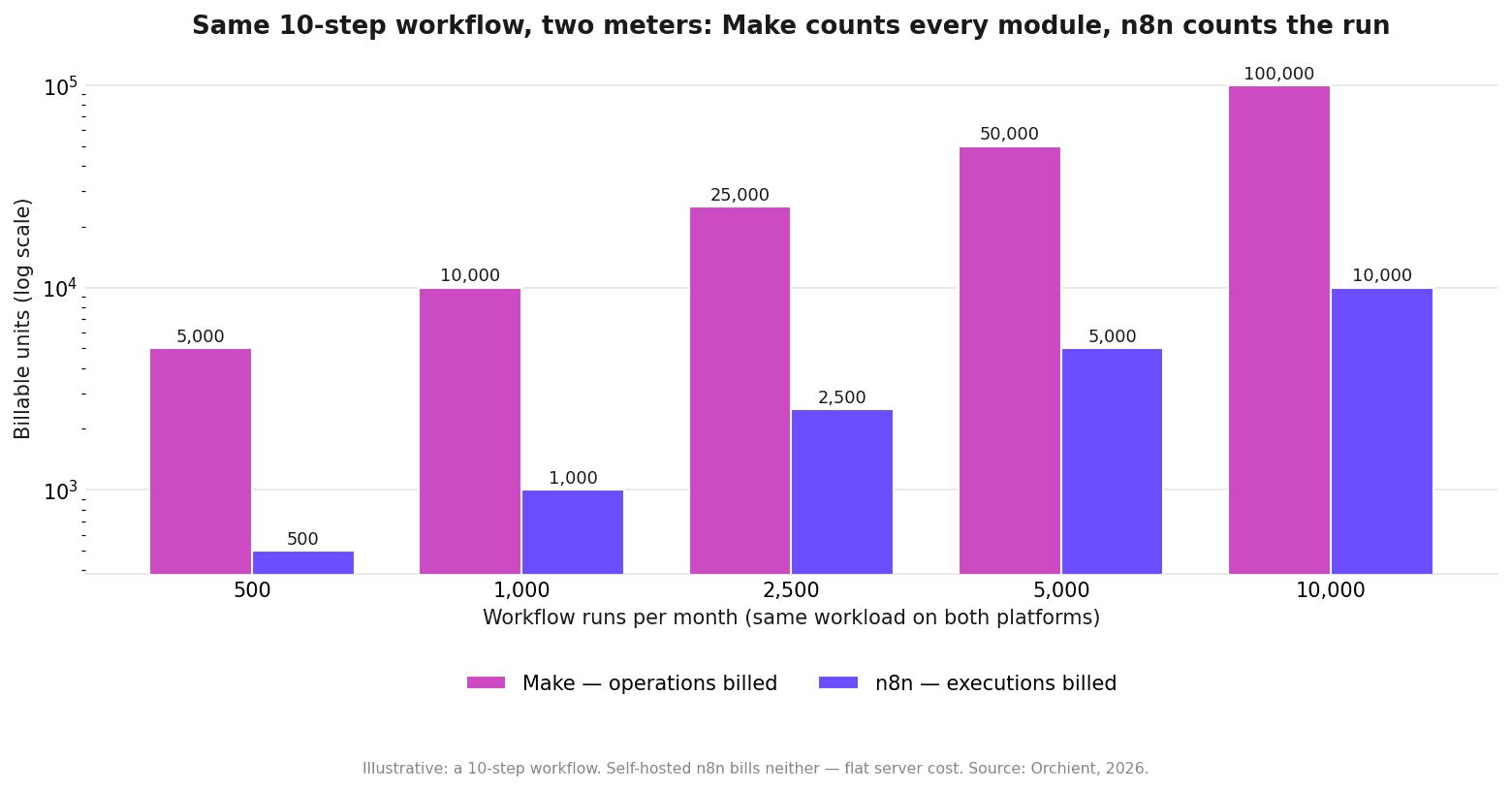
Figures are estimates as of 2026 — verify at make.com/pricing and n8n.io/pricing.
Make meters operations: every time any module in a scenario runs, that’s one op. Tiers run roughly: Free (~1,000 ops/mo), Core around $9–11/mo (~10,000 ops), Pro around $16–19/mo, Teams around $29–35/mo, with op packs above that. VERIFY current tiers and op allotments.
n8n meters executions on Cloud — one workflow run counts once regardless of steps — Starter around $24/mo (~2,500 executions), Pro around $60/mo (~10,000). Or run n8n Cloud (affiliate link) managed, or self-host the free Community edition on a ~$5–20/mo VPS — full math in n8n pricing explained. VERIFY Cloud tiers.
Here’s why the model matters more than the sticker. Take a 10-module scenario (trigger, router, three lookups, two transforms, three writes) running 1,000 times a month:
| Make | n8n | |
|---|---|---|
| What’s counted | 10 ops × 1,000 runs = 10,000 ops | 1,000 executions |
| At 5,000 runs/mo | 50,000 ops — multiple tier jumps | 5,000 executions — still low-tier |
| At complex + high volume | Op packs, rising bill | Self-hosted: flat server cost |
At a glance Make looks cheaper — its entry tiers cost less than n8n Cloud’s. And below a few thousand simple runs a month, it is cheaper, and you should weigh UX instead. The flip happens when scenarios get long or volume gets real: Make’s bill scales with steps × runs, n8n’s with runs alone (or with neither, self-hosted).
FLAG: insert a real billing comparison from a client account — a Make ops-usage screenshot next to the equivalent n8n execution count. The table above is illustrative until backed by our data.
Where Make is genuinely better
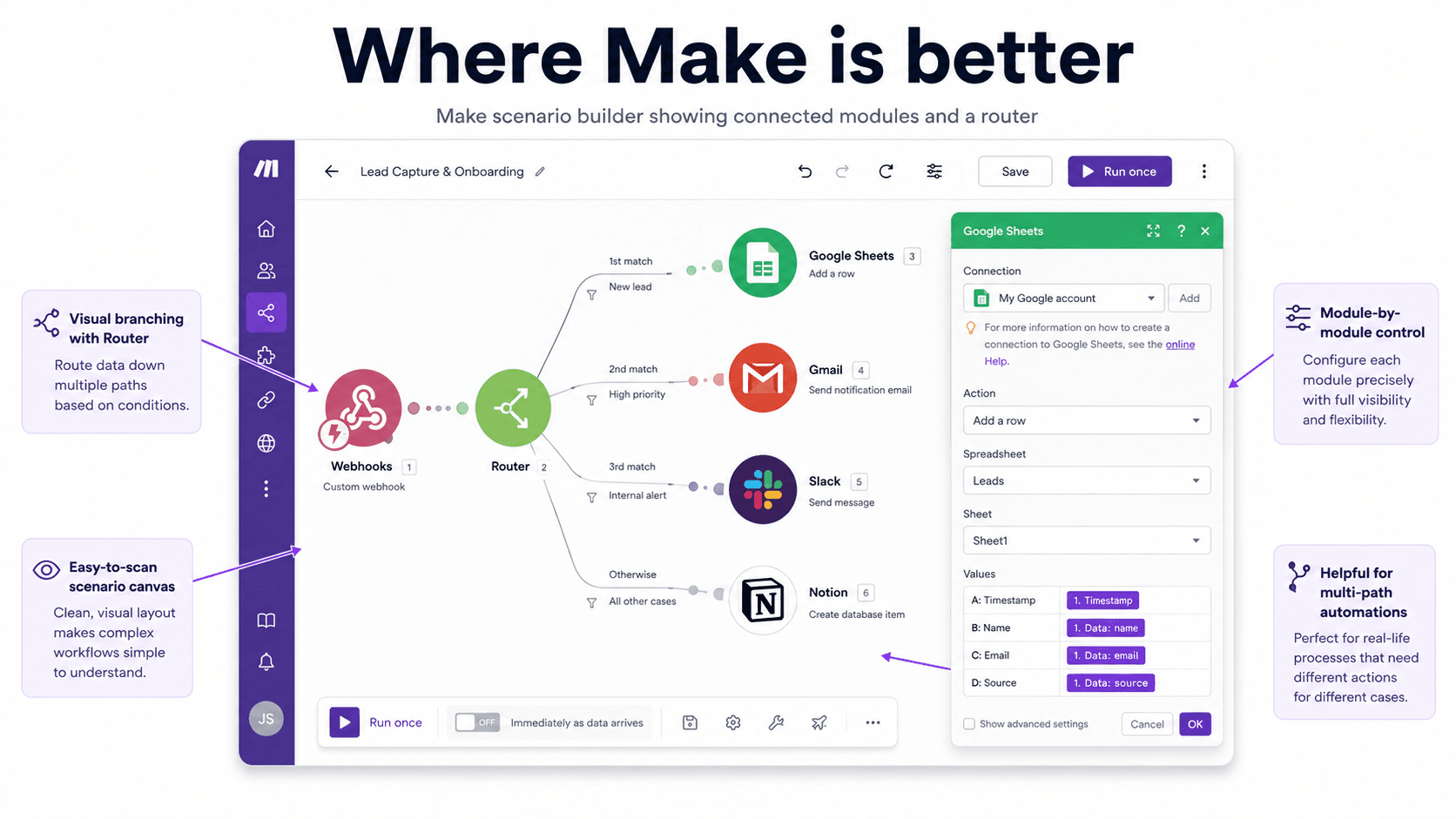
Honesty section. Make wins on real things:
- The canvas. Make’s visual builder is the best-looking and arguably the most intuitive in the category. Watching data flow bubble-by-bubble through modules makes debugging approachable for non-developers in a way n8n’s executions log isn’t.
- Gentler on-ramp. A motivated non-technical operator gets productive in Make faster than in n8n. Fewer concepts up front, more guided configuration.
- Solid mainstream app coverage. More prebuilt, polished integrations than n8n ships natively. (n8n’s answer — the generic HTTP node — works for anything but requires reading API docs.)
- Cheap entry tiers. For a small operator running modest scenarios, Make’s Core tier is one of the best automation deals going.
- Fully managed. No server, no upgrades, no 2am queue investigations. That has real value if you have no technical owner.
If you’re a solo operator or small team, under a few thousand runs a month, with mainstream apps and no AI-agent ambitions: pick Make and stop reading. It’s the right tool and the rest of this article is overthinking it.
Where n8n pulls away
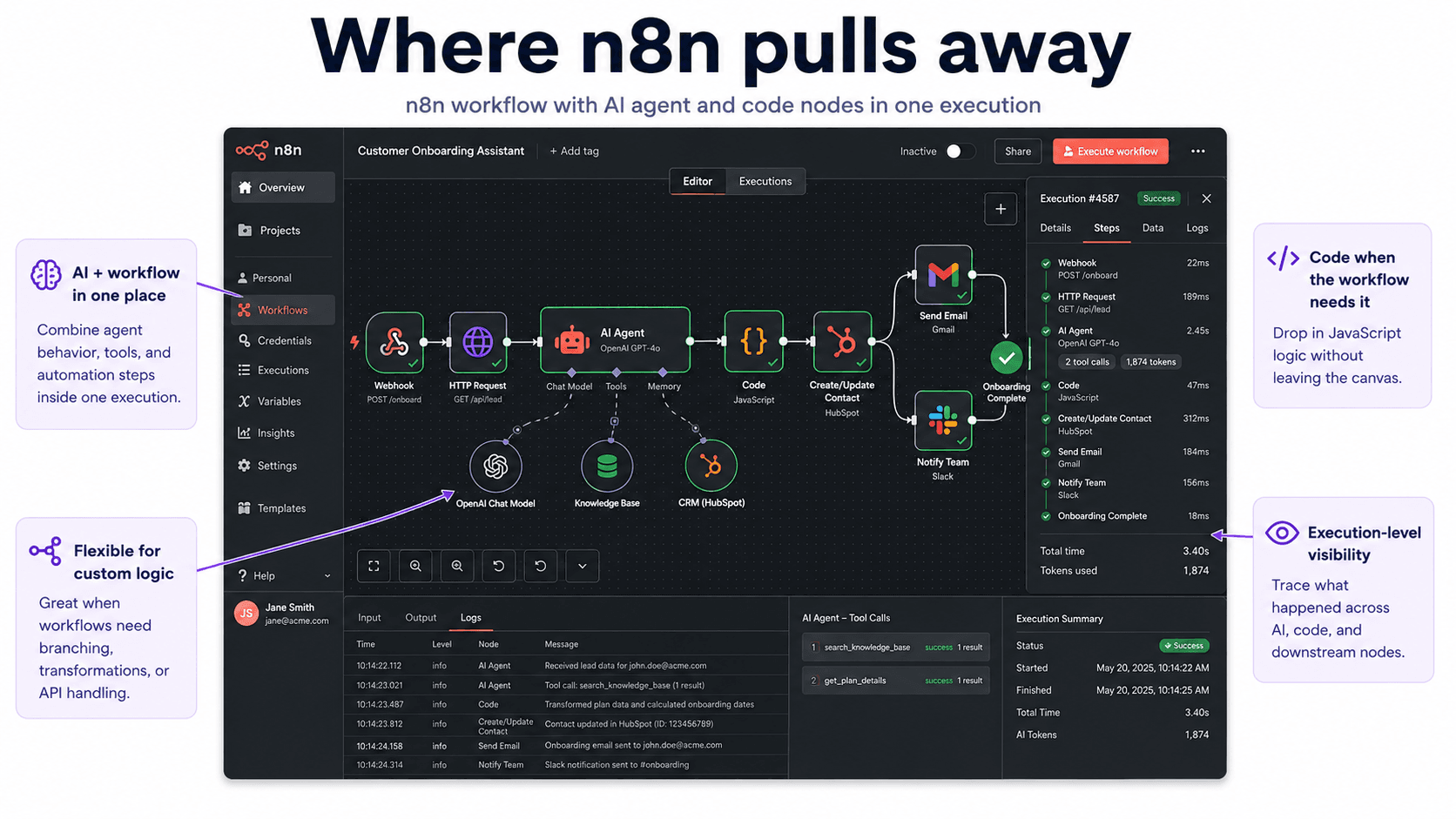
- Cost at scale. Covered above. The longer your workflows and the higher your volume, the wider the gap. Self-hosted, the marginal run is effectively free.
- Real code when you need it. n8n’s Code node is a genuine JavaScript/Python runtime. Make’s functions cover formulas and basic transforms; the moment you need to parse something gnarly or call a library, Make runs out of road.
- AI and agents. This one isn’t close. n8n has native OpenAI and Anthropic nodes plus a LangChain-based agent node — tool calling, memory, RAG — composable on the canvas. We build production AI agents in n8n; we wouldn’t attempt the same in Make. Make’s AI modules handle “send this to a model, get text back.”
- Error handling depth. Per-node error branches that can retry, alert, or route to a recovery sub-workflow. Make has error handlers, but production-grade failure design is easier to express in n8n.
- Data control. Self-hosted n8n keeps workflows, credentials, and data on your infrastructure. For compliance-bound operators (health, legal, finance, strict EU residency), that alone decides it. See self-hosting n8n on a VPS.
The tax for all this: a steeper learning curve, and if you self-host, you own the operations. n8n rewards technical capacity and punishes its absence. That’s the honest trade.
What breaks in production
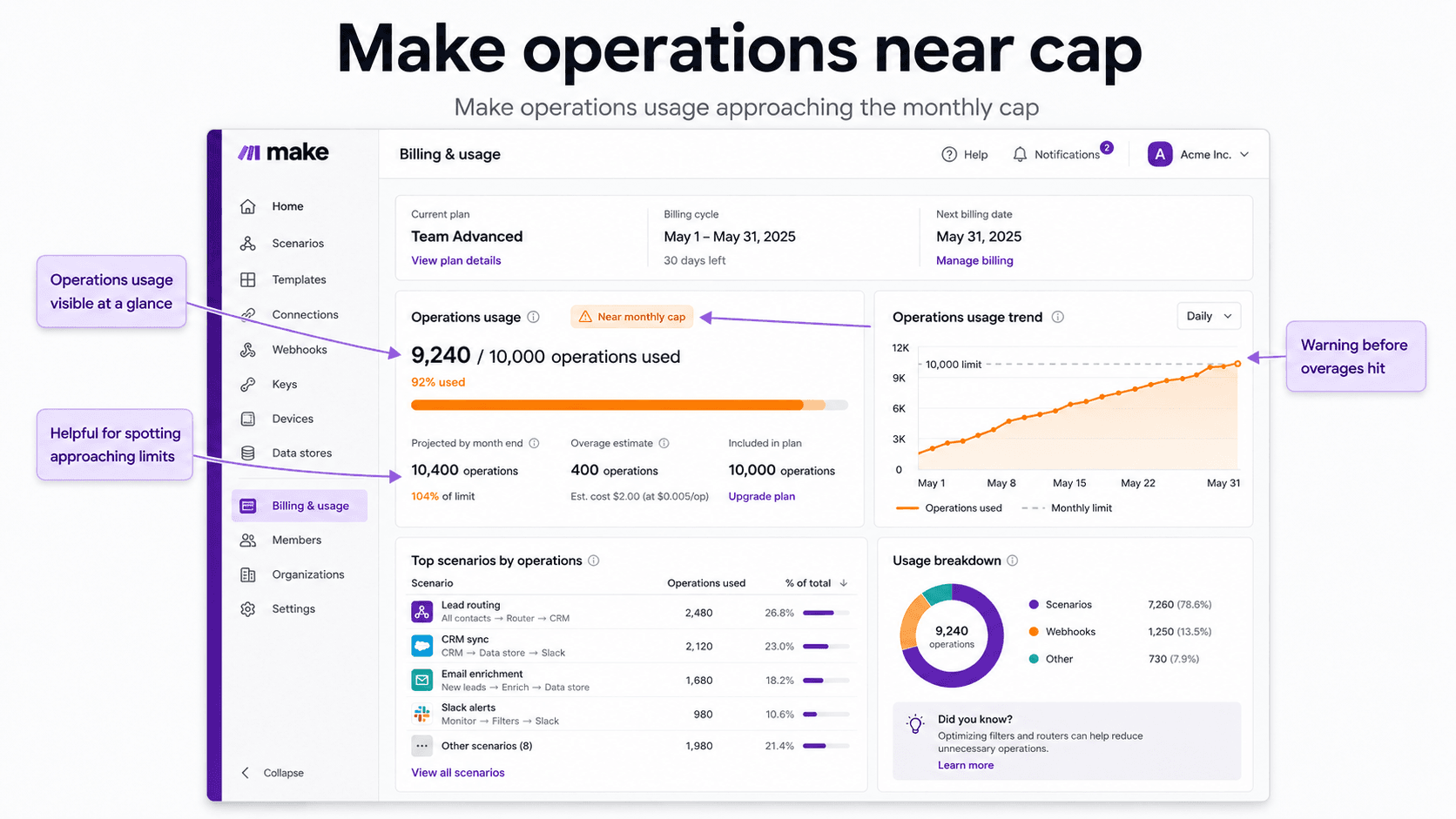
- Make: mid-month operation exhaustion. Hit your ops cap and scenarios pause. If nobody’s watching the usage meter, you find out via a data gap, not an alarm. Long scenarios burn ops faster than people budget for — the same surprise as Zapier’s task inflation, in different clothes.
FLAG: real example. - Make: complex scenario sprawl. Big logic in Make becomes routers-inside-routers. It still runs, but maintainability drops and every added module raises the per-run op count — you pay for your own complexity twice.
- n8n: queue saturation under webhook bursts. Self-hosted on a lean VPS, a spike of concurrent webhooks can back up the execution queue until you configure queue mode with workers. Solvable, documented — but it’s your problem now.
FLAG: our concurrency incident. - Both: silent credential expiry. OAuth tokens expire on both platforms; the workflow “runs” while the authenticated step fails. Wire failure alerting on day one, whichever you pick.
Migration reality (both directions)
- Make → n8n is a rebuild, not an import. Routers map to IF/Switch nodes, modules to nodes, and most scenarios come out cleaner — but budget real hours, and re-auth every credential.
- n8n → Make happens too (usually when a team loses its technical owner). Anything living in Code nodes has no Make equivalent and must be redesigned or dropped. That’s the lock-in to think about before choosing n8n: its power features don’t translate down.
- Webhook-triggered flows in either direction need a careful endpoint cutover or you drop events in the gap.
Who should pick which
| Operator profile | Pick | Why |
|---|---|---|
| Solo founder / small team, mainstream stack, modest volume | Make | Best UX-per-dollar at low volume |
| Non-technical team, no agency support | Make | Managed, gentle, good enough |
| Volume growing, scenarios getting long | n8n | Execution pricing stops the bleed |
| Building AI agents or RAG workflows | n8n | Agent nodes; Make can’t express this |
| Compliance / data-residency constraints | n8n self-hosted | Your servers, your data |
| Heavy custom logic or odd APIs | n8n | Real code nodes + HTTP node |
| Coming from Zapier for cost reasons | Either — do the math | See Zapier alternatives; Make if simple, n8n if complex |
Comparing all three? The full triangle: n8n vs Zapier, Make vs Zapier, and our ranked workflow automation tools shortlist.
Want the decision scorecard? The same template we use with clients — your volume, steps per workflow, and team skill in, a recommendation out. We run it inside the free automation audit, or grab it and run it yourself.
FAQ
Is n8n better than Make?
For scale, AI workflows, custom code, and data control, yes. For ease of learning, polish, and low-volume value, Make is better. The right answer is your volume and your team’s technical comfort, not a universal winner.
Is Make cheaper than n8n?
At low volume with short scenarios, usually yes — Make’s entry tiers undercut n8n Cloud. At higher volume or with long scenarios, n8n becomes cheaper because it counts runs, not steps; self-hosted n8n is cheapest of all at scale.
Can n8n do everything Make does?
Functionally almost everything, plus code and AI agents Make can’t match. What n8n lacks is Make’s larger prebuilt-app library and its gentler learning curve — the gaps are convenience, not capability.
Is Make the same as Integromat?
Yes — Integromat rebranded to Make in 2022. Same product lineage, same operation-based pricing concept.
Which is better for AI agents, n8n or Make?
n8n, clearly. Its LangChain-based agent node supports tool calling, memory, and retrieval natively. Make’s AI modules cover simple prompt-and-response steps, not agent architectures.
Can I self-host Make?
No. Make is cloud-only. If self-hosting or data residency matters, n8n (or another self-hostable tool) is the realistic option.
The bottom line
Make is the better product experience at small scale; n8n is the better system as you grow. If your automations are simple, mainstream, and modest in volume, Make’s polish and pricing are hard to argue with. The moment you see real volume, long workflows, AI ambitions, or compliance constraints, n8n’s model wins — and self-hosted, it’s not close.
The two numbers that decide it: average steps per workflow, and runs per month. Multiply them — that product is your Make bill’s trajectory and n8n’s indifference to it.
Past the evaluation stage? Send us your stack and volume in a free automation audit — 30 minutes, then a written recommendation: which platform, which plan, the cost math at your real numbers, and what a migration would honestly take. If Make is your right answer, that’s what the recommendation will say.
Pricing details are estimates as of 2026 and change often — verify at make.com/pricing and n8n.io/pricing. We build n8n workflows for clients commercially and use affiliate links to n8n Cloud, disclosed above.