

Heads up: this article contains an affiliate link to n8n. If you sign up through it we may earn a commission, at no extra cost to you. We only link tools we actually build with. We have no affiliate relationship with Make.
We’ve built client workflows in both n8n VS Make. Sometimes the same workflow in both, because the client wasn’t sure which to commit to. So what follows is the honest version, not the vendor version.
The short answer: Make is easier to start and more expensive to scale. n8n is cheaper at volume and harder to operate. Which one is “worth it” depends on a single question — how much does your team want to own?
n8n and Make are both visual workflow automation platforms, but they serve different operators. Make is a fully managed cloud tool with 3,000+ native integrations and a per-operation pricing model. n8n is open-source, self-hostable, and charges per workflow execution — making it significantly cheaper at scale but requiring more technical setup.
Not sure which platform fits your current stack? We map this for clients in a free 30-minute automation audit — you leave with a written recommendation, not a sales pitch. Book yours here.
Platform Overviews: What Each Tool Actually Is
Make (formerly Integromat)
Make launched as Integromat in 2012 out of Prague and rebranded in 2022. It’s a fully cloud-hosted automation platform built around the concept of scenarios — visual flowcharts of triggers, actions, and conditional logic. Make has always targeted the no-code and low-code market: the interface is polished, the integration library is deep (3,000+ native connectors), and you don’t need a server to run it.
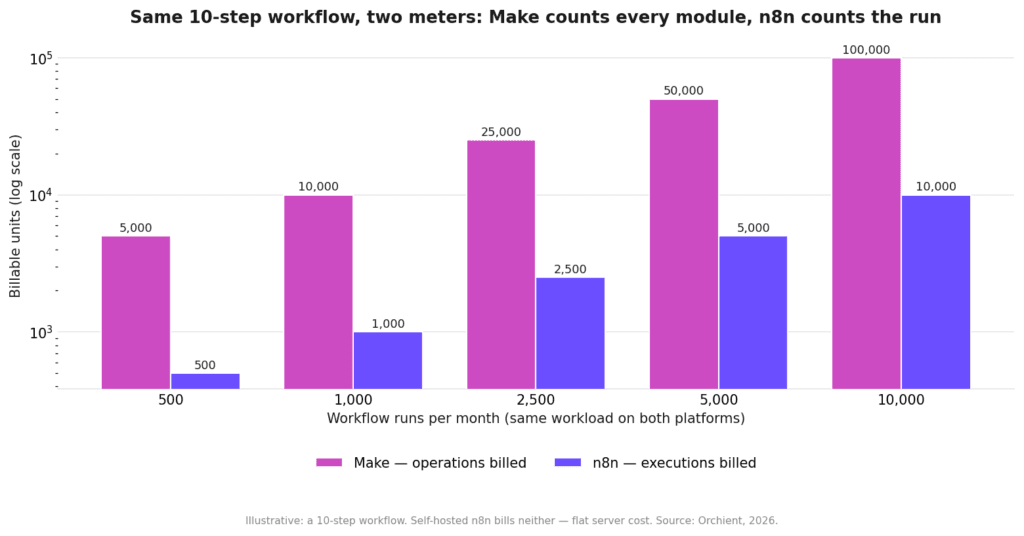
Every step a scenario takes consumes operations. That’s Make’s billing unit. A five-step workflow that runs 1,000 times costs 5,000 operations. It sounds simple until a loop multiplies that count.
Make competes directly with Zapier at the top of the no-code market and with n8n for teams who’ve started asking whether cloud-hosted automation is worth the price.
n8n
n8n launched in 2019 and is open-source at its core. The mental model is different: you build workflows made of nodes, and you’re billed per execution (one full run of the workflow), not per individual step. A five-node workflow that runs 1,000 times costs 1,000 executions — not 5,000 operations.
n8n offers a cloud-hosted version (n8n.io) and a self-hosted version you run on your own infrastructure via Docker, a VPS, or a managed cloud like AWS. The self-hosted path makes it essentially free at scale if you have someone who can manage it.
n8n’s integration library is smaller than Make’s — roughly 400+ native integrations — but it has a direct HTTP request node and a fully scriptable Code node that lets you call any API without a native connector. It’s also where most serious AI agent workflows are being built right now, given its native OpenAI, Anthropic/Claude, and LangChain integrations.
Pricing Comparison: Where Each Model Gets Expensive
This is where the decision usually gets made, so let’s be direct about the numbers.
n8n pricing explained covers the full breakdown, but the key difference is the billing unit: Make charges per operation (individual step), n8n charges per execution (full workflow run).
Pricing Table: Make vs n8n Cloud
| Plan / Platform | Monthly Price (Billed Annually) | Monthly Price (Billed Monthly) | Quota Included (Monthly) | Key Limits & Infrastructure | Notes |
|---|---|---|---|---|---|
| Make Free | $0 | $0 | 1,000 credits/mo | Max 2 active scenarios, 15-min minimum run interval | Good for learning & testing only; quota resets monthly. |
| Make Core | $9/mo | $12/mo | 10,000 credits/mo | Unlimited active scenarios, 1-min run interval | Best value for solo operators; basic data stores & API access. |
| Make Pro | $16/mo | $21/mo | 10,000 credits/mo | Adds custom variables & full-text log search | Same base credits as Core, but adds priority execution queueing. |
| Make Teams | $29/mo | $38/mo | 10,000 credits/mo | High-volume team roles, shared scenario templates | For small teams requiring multi-user access control. |
| Make Enterprise | Custom | Custom | Custom allocation | SSO, SCIM provisioning, 24/7 dedicated support, SLA | Contact sales; includes advanced overage protection. |
| n8n Cloud Trial | $0 | $0 | 14-day evaluation | Reduced executions for testing platform capabilities | No permanent cloud free tier exists; no credit card required to test. |
| n8n Cloud Starter | ~$20/mo (€20) | ~$24/mo (€24) | 2,500 executions/mo | 5 concurrent executions, 1 shared project workspace | Billed in EUR. Workflows automatically halt if quota is exceeded. |
| n8n Cloud Pro | ~$50/mo (€50) | ~$60/mo (€60) | 10,000 executions/mo | 20 concurrent executions, admin roles, 3 projects | Allows variable overage charges if limits are breached. |
| n8n Cloud Business | ~$800/mo (€800) | ~$960/mo (€960) | 40,000 executions/mo | SSO, Git version control, multi-environment setups | Limited to organizations under 100 employees (50% startup discount available). |
| n8n Self-Hosted | $0 (Software license) | $0 (Software license) | Unlimited | You manage uptime, updates, backups, and security | Community Edition. Requires VPS infrastructure (~$4–$15/mo on Hetzner or DigitalOcean). |
The Math That Surprises People
At 10,000 monthly executions with 6-step workflows, you’re consuming 60,000 Make operations per month. That puts you well past the Core and Pro tiers, into a plan that costs significantly more. On n8n cloud Pro at ~$50/mo, those same 10,000 runs cost you 10,000 executions — within the plan limit.
The more steps your workflows have, the worse Make’s economics get relative to n8n. Loops make it worse still — every iteration counts as separate operations.
Core Feature Breakdown
Visual Editor
Both platforms use drag-and-drop canvas editors. Make’s UI is more polished out of the box — the circular node connectors and color-coded modules feel approachable. n8n’s canvas is more functional than beautiful, but it’s improved significantly since 2022. Neither is a dealbreaker.
Where they diverge: n8n’s editor feels built for developers who want control. Make’s editor feels built for people who want to click through quickly. Both handle complex branching, but n8n’s Code node lets you drop into JavaScript or Python mid-workflow, which Make can’t do without a workaround.
Branching and Conditional Logic
Make uses a Router module to split paths. n8n uses an IF node or Switch node. Both work well. n8n’s Switch node handles multiple conditions cleanly in a single node; Make’s Router requires more visual real estate. For deeply nested logic, n8n is generally easier to audit.
Error Handling
Make has built-in error handlers you attach to modules — a visible, no-code approach. n8n has error workflows: you can route failed executions to a separate workflow that pings Slack, logs to a Google Sheets row, or retries with different parameters. n8n’s approach is more powerful but requires more intentional setup.
Both platforms support webhook triggers and both have retry logic. Make surfaces errors in the scenario history. n8n logs them in execution history with the full payload — which is extremely useful for debugging but generates storage overhead on self-hosted installs.
Webhooks and API Access
n8n handles webhooks cleanly with a dedicated Webhook node and a persistent URL per workflow. Make also supports webhooks but the free and lower tiers have polling delays (15-minute minimum on Free). On n8n, webhooks trigger instantly regardless of plan.
Both platforms support OAuth connections and both have an HTTP Request node for hitting any API without a native integration. n8n’s HTTP Request node is more configurable. Make’s API integrations tend to have better pre-built field mapping for mainstream apps.
Use Cases: When to Choose n8n vs Make
These are the actual scenarios where we make a recommendation to clients, not the generic “if you need advanced features…” cop-outs.
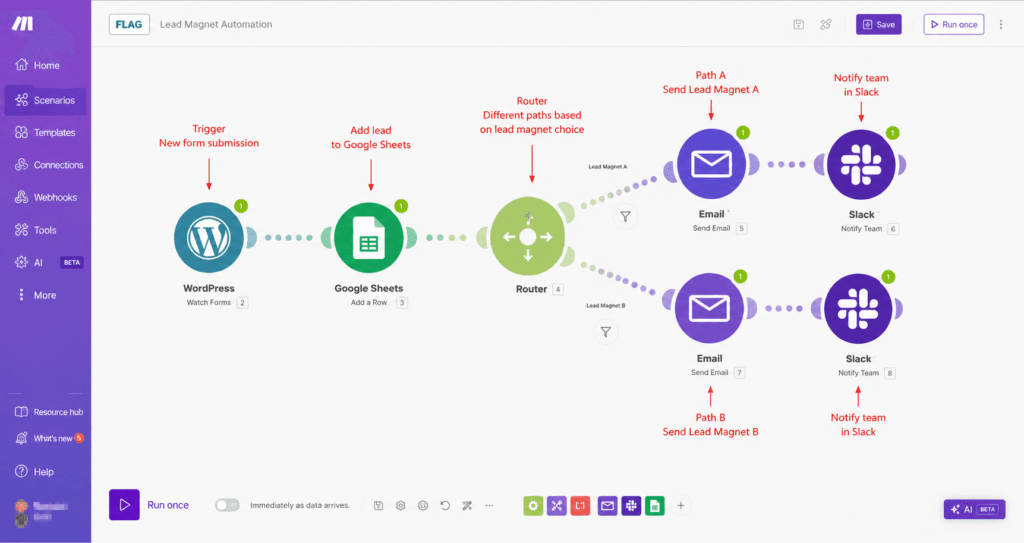
Choose Make when:
- Your team has no technical capacity and no appetite to acquire it. Make’s onboarding is genuinely faster, the error messages are more human-readable, and the integration library covers most SMB SaaS stacks.
- Your automation volume is low (under 20,000 operations/month total). The cost stays predictable and manageable.
- You’re automating straightforward linear workflows: form → CRM → Slack notification. Google Sheets, Airtable, HubSpot, Salesforce — all have strong native Make modules.
- You need 3,000+ integration options. Make’s native app library is wider than n8n’s, and for obscure SaaS tools, that matters.
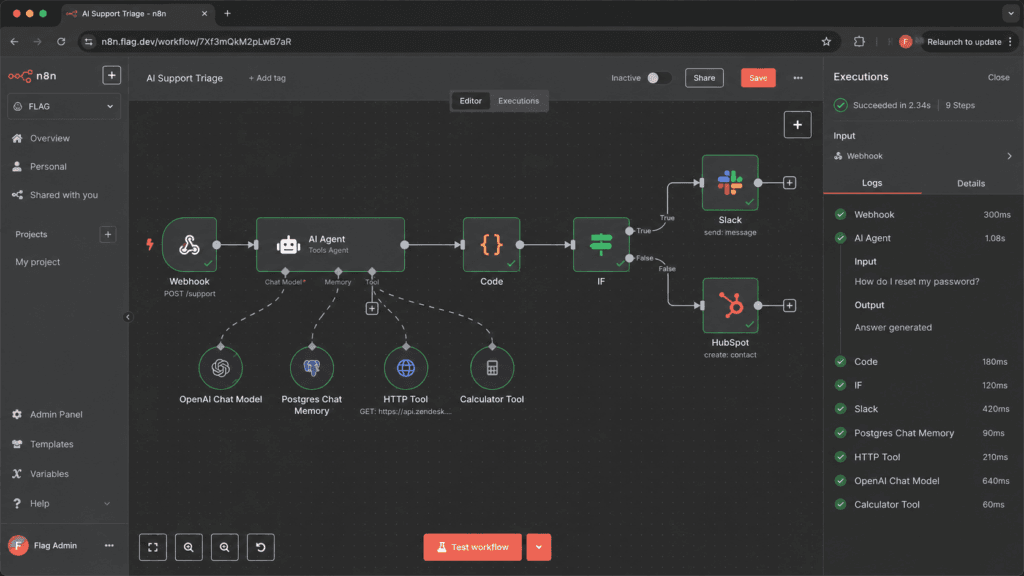
Choose n8n when:
- Volume is high or growing fast. If you’re running thousands of workflow executions a month, the cost gap becomes hard to ignore.
- You’re building AI agents or LLM-powered workflows. n8n’s native integrations with OpenAI (ChatGPT), Anthropic (Claude), and vector databases make it the better substrate for agent workflows right now.
- You have a developer on the team or budget to hire one. The self-hosted path on a Hetzner or DigitalOcean VPS via Docker is genuinely cheap to run once it’s set up — and the Code node makes n8n extensible in ways Make can’t match.
- You need to connect to a PostgreSQL database, a private API, or a GitHub repository directly. n8n handles these cases without ceremony.
- Data privacy or compliance matters. Self-hosting means your workflow data never leaves your infrastructure.
A middle case worth naming: if you’re running an ecommerce operation with high-volume order workflows, n8n’s execution pricing will save you real money month-to-month. But if your team will never maintain a Docker container and you don’t want to hire someone who will, Make’s operational simplicity might be worth the premium.
Working through this decision right now? We audit stacks like this every week. Tell us your current volume and tools — we’ll map the cheaper path. Free 30-minute audit →
Where Each Platform Actually Breaks in Production (And How We Found Out)
This is the section the vendor comparison pages don’t write.
Make’s Operation Multiplier Problem
The most common Make surprise we’ve seen: a client builds a workflow that fetches records from Airtable, iterates over them, and triggers an action per row. They test it on 10 records. It costs 40 operations and feels fine.
They run it on 800 records. The iterator multiplies every downstream operation by 800. What looked like a 4-step workflow becomes 3,200 operations per run. Run it daily for a month: 96,000 operations. On Make Core, their monthly limit was 10,000.
Make’s billing page does warn about this. The iterator behavior is documented. But operators building their first complex workflow almost always hit it by surprise.
n8n Self-Hosted: What Actually Breaks
Self-hosting n8n is not hard to start. It tends to break in predictable ways:
Version updates. n8n releases frequently. Occasionally a minor version update changes a node’s behavior or breaks an existing credential format. If you’re not pinning your Docker image version and running a staging environment, you’ll find out about breaking changes in production.
Memory ceiling. Complex workflows with large payloads — particularly AI agent workflows processing long documents — can exhaust the memory on an underpowered VPS. A Hetzner CX21 (2 vCPU, 4 GB RAM) handles most standard workflows comfortably. Heavy AI workloads may need more.
Webhook queue on restart. When the n8n process restarts (after an update, or after the VPS reboots), any webhooks that fired during the downtime are lost. There’s no automatic replay. For event-driven workflows, this can mean missed triggers unless you’ve built a catch-up mechanism.
SSL and nginx configuration. Getting HTTPS working for webhook URLs via Docker and nginx is a one-time setup, but it’s a genuine technical task. If your team hasn’t done it, plan for 2–4 hours the first time.
The True Cost of Running n8n Self-Hosted vs Make Cloud at Real Usage Volumes
Let’s put real-ish numbers next to the abstract “cheaper at scale” claim.
Scenario: 50,000 workflow executions per month, workflows averaging 5 steps each.
| Cost Component | Make | n8n Cloud | n8n Self-Hosted |
|---|---|---|---|
| Platform fee | ~$84–$159+/mo (est., depends on ops tier) | ~$50–custom/mo (est.) | $0 |
| Total ops / executions consumed | 250,000 ops | 50,000 executions | Unlimited |
| Plan required | Teams or higher (est.) | Pro + potential overage (est.) | N/A |
| Infrastructure | Included | Included | ~$6–15/mo (Hetzner/DO) |
| Maintenance time | ~0 hr/mo | ~0 hr/mo | ~1–2 hr/mo est. |
| Total est. monthly cost | ~$84–$159+/mo | ~$50–100+/mo | ~$6–15/mo |
At this volume, self-hosted n8n is the obvious cheapest path if you can staff the 1–2 hours of monthly maintenance. n8n cloud is significantly cheaper than Make once operation multiplication is factored in. Make’s advantage at this volume is zero operational overhead — you pay for that convenience.
At low volumes (under 5,000 executions/month, simple linear workflows), Make Core at ~$10/mo beats n8n Starter at ~$20/mo on pure cost. The break-even point shifts based on workflow complexity.
What a Platform Migration Actually Costs: Lessons From Moving Client Stacks Between n8n and Make
We’ve done migrations in both directions. Here’s what the comparison articles don’t tell you.
The Logic That Doesn’t Port Cleanly
Make scenarios and n8n workflows look similar in screenshots but they have different logical primitives. Make’s aggregator module (collects multiple items into a single bundle) doesn’t have a direct equivalent in n8n — you achieve the same result with a different pattern. Make’s native error handler attached to a module is a different mental model from n8n’s error workflow concept.
When you export a Make scenario and try to rebuild it in n8n, you’re not porting — you’re rearchitecting. Plan for it.
Credential and OAuth Re-Authentication
Every OAuth connection needs to be re-authenticated. For a stack with 20+ connected apps, that’s 20+ re-auth flows. Some apps (particularly those with strict OAuth redirect URI validation, like Salesforce or HubSpot) require admin-level reconfiguration. Budget time accordingly.
Actual Hours
Our rough rule: migrating a 15-workflow Make stack to n8n with no technical debt takes an experienced operator 8–16 hours. The further you are from linear, trigger-action-action workflows, the longer it takes. Migrations with complex iterator logic, custom Make functions, or deeply nested routers add hours. Plan for it, not against it.
This is also why we recommend not migrating unless there’s a clear operational or cost reason. If Make works and the cost is manageable, the migration cost won’t pay off for 12–18 months.
Decision Framework: Direct Recommendations by Team Type
Stop reading comparison charts and answer three questions:
1. Does anyone on your team know how to manage a Linux VPS and a Docker container?
- Yes → n8n self-hosted is worth serious consideration if volume is above ~5,000 executions/month.
- No → n8n cloud or Make. Now answer question 2.
2. What’s your expected monthly execution volume, and how many steps per workflow?
- Under 5,000 executions, simple (3–5 step) workflows → Make Core is fine and cheaper.
- Over 10,000 executions, or any workflows with loops/iterators → n8n cloud or self-hosted will likely be cheaper.
3. Are you building AI agent workflows, or do you need to connect to a database directly?
- Yes → n8n. The tooling for OpenAI, Claude, PostgreSQL, and GitHub is materially better.
- No → either platform works; fall back to volume and technical capacity.
The One-Line Summary by Team Type
| Team Type | Recommendation |
|---|---|
| Solo founder, no technical help, low volume | Make Core |
| Small ops team, moderate volume, no server admin | n8n Cloud Pro |
| Agency or internal dev team, high volume | n8n self-hosted |
| Enterprise, compliance requirements | n8n self-hosted or n8n Enterprise |
| Building AI agents or LLM workflows | n8n (cloud or self-hosted) |
Frequently Asked Questions
What is the difference between Make and n8n?
Make is a fully cloud-managed automation platform that bills per operation (individual workflow step). n8n is open-source, can be self-hosted, and bills per execution (full workflow run). Make is easier to start; n8n is cheaper at scale and more extensible for technical use cases.
What is the difference between Zapier, Make, and n8n?
All three are visual automation tools, but they sit at different points on the ease-vs-power spectrum. Zapier is the easiest and most expensive — it targets people who want automation without any learning curve. Make is in the middle: more powerful than Zapier, more approachable than n8n. n8n is the most powerful and cheapest at scale, but requires the most technical investment. See our n8n vs Zapier breakdown for the Zapier-specific comparison.
Is anything better than n8n?
Depends on what “better” means. For ease of use and time-to-first-workflow, Make and Zapier are faster. For AI agent workflows, n8n is currently the strongest platform in the no-code/low-code space. For raw power and flexibility, enterprise iPaaS tools like Workato or Tray.io go further — but they cost 10× more. n8n is not outdated.
Is n8n outdated now?
No. n8n releases updates frequently and has become one of the primary platforms for building production AI agents. Its active development on LLM integrations — native OpenAI, Anthropic/Claude, vector store, and agent loop nodes — puts it ahead of Make in this area. The UI is less polished than Make’s, but “outdated” is the wrong word.
Which is cheaper, Make or n8n?
At low volumes with simple workflows, Make Core (~$10/mo) is cheaper than n8n Starter (~$20/mo). At high volumes or with complex multi-step workflows, n8n is significantly cheaper — especially self-hosted. The crossover point depends on how many steps your workflows have: Make’s per-operation pricing multiplies with workflow complexity in a way n8n’s per-execution model doesn’t.
The Decision
Here’s how we’d frame it if a client walked in tomorrow:
Pick Make if your team won’t manage infrastructure, your workflows are straightforward, and your monthly volume stays under roughly 20,000 operations. The UX is genuinely better for non-technical operators and the integration breadth is real.
Pick n8n cloud if you’re scaling, building AI workflows, or need database and API access without custom workarounds. The ~$50/mo Pro plan is good value once you’re past 5,000 executions.
Pick n8n self-hosted if you have technical capacity, care about data residency, or are running enough volume that even $50/mo feels wasteful. A Hetzner or DigitalOcean VPS via Docker is a one-afternoon setup if you’ve done it before.
Don’t migrate your existing Make stack to n8n unless your monthly bill is genuinely hurting or you need capabilities Make can’t deliver. The migration cost is real and often underestimated.
If you’ve read this far, you’re past the evaluation stage. The next step is mapping your actual stack — current tools, current volumes, what you’re trying to automate — against these platforms. That’s exactly what we do in a free 30-minute audit. You’ll get a written recommendation for which platform fits your situation, and what a working pilot would look like.
Book the free automation audit →
Disclosure: Orchient builds production workflows for clients in both Make and n8n. We have an affiliate relationship with n8n (see the link above) and no affiliate relationship with Make. Pricing estimates are as of January 2025 — verify current pricing at make.com/en/pricing and n8n.io/pricing before committing to either platform.