

Zapier built the no-code automation category. It also built a pricing model that punishes you the moment it starts working. If you’re here, you already know the feeling — the task counter ticking up, the upgrade prompt appearing, the mental math of “what is this actually costing per month now?”
Heads up: some links below are affiliate links. If you sign up through them we may earn a commission, at no extra cost to you. We only link tools we actually build with.
We build workflows in several of these tools for real clients — this is a practitioner review, not a neutral one. We’ll tell you where we’ve run things at scale and where we’re working from research and vendor docs alone.
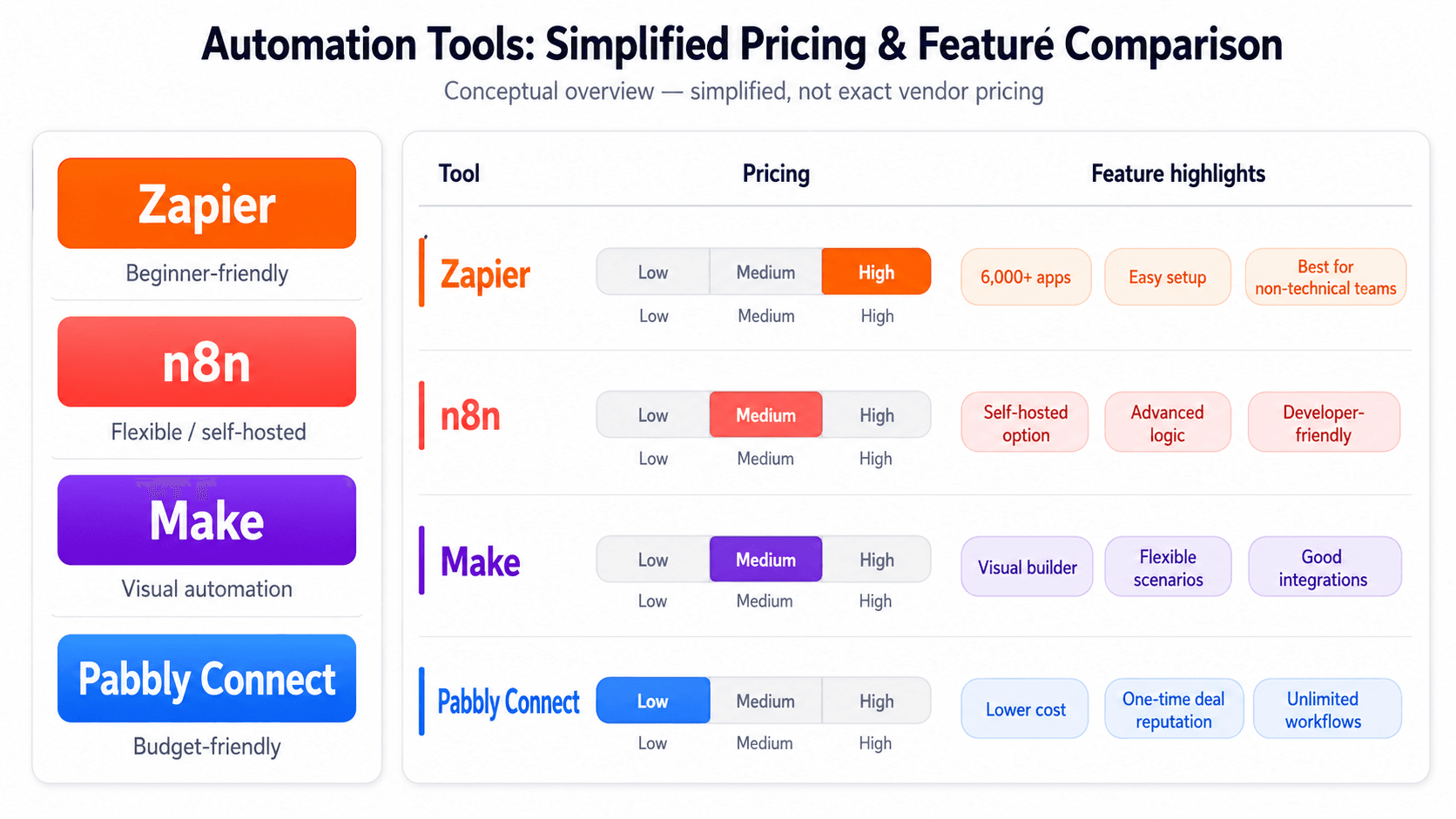
The best Zapier alternatives in 2026 are n8n, Make, and Pabbly Connect — each cheaper at volume and more flexible on logic. Which one fits depends on how many tasks you run monthly, whether you need self-hosting, and how much workflow complexity you’re actually building.
Not sure which platform fits your current stack? We map this for clients in a free 30-minute automation audit — you leave with a written recommendation, not a sales pitch. Book yours here.
What to Actually Look for in a Zapier Alternative
Ease of use is a marketing metric. Here’s what matters when you’re evaluating a platform you’ll be running in production six months from now.
Task or operation volume — and what overage costs you. Zapier bills by task. Make bills by operation (each action in a multi-step scenario counts). n8n Cloud bills by workflow execution. These are not equivalent. A 5-step Zap uses 1 Zapier task but 5 Make operations. Run that math before you compare plans.
Self-hosting availability. If you’re in a regulated industry, handling sensitive data, or running high volume where cloud costs would compound, self-hosting changes everything. n8n and Activepieces support self-hosted deployments. Zapier and Pabbly Connect do not.
AI node support. If you’re routing workflows through an LLM — summarizing content, classifying inputs, generating responses — you want native AI nodes, not a manual HTTP request to an API every time. n8n has this built in. Make added AI modules. Zapier’s AI features are improving but still feel bolted on.
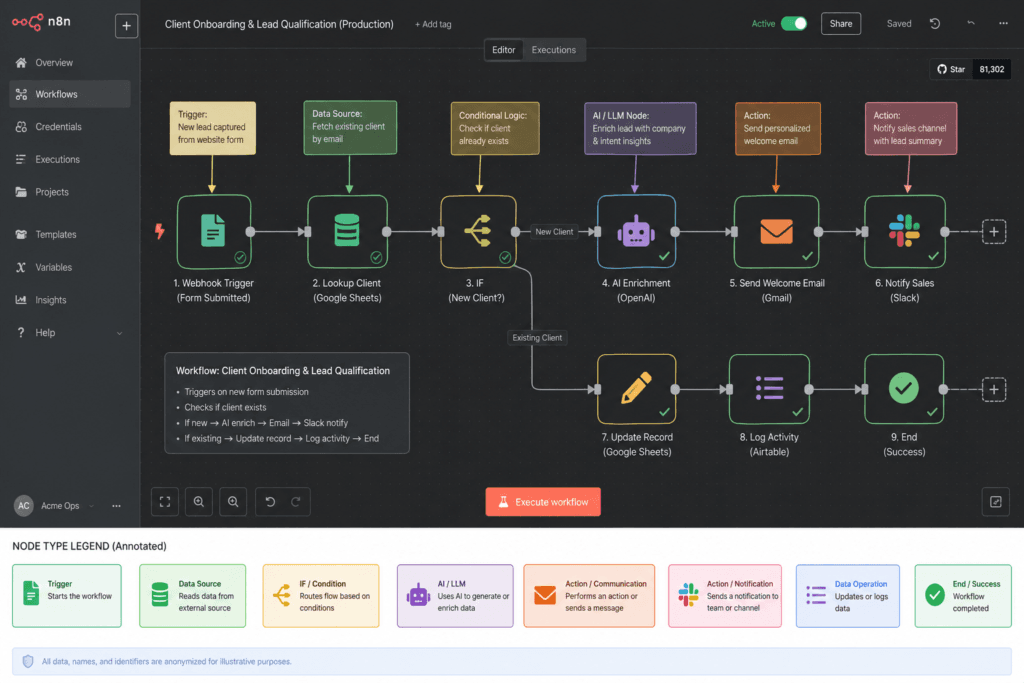
Error handling and branching. Zapier’s conditional logic (Paths) is functional but shallow. If you need multi-branch logic, looping, or retry-on-failure at the node level, you’ll feel the ceiling fast. Make’s error-handler routes and n8n’s IF/Switch nodes are meaningfully more powerful.
Integration depth, not just count. Zapier has 6,000+ app integrations. Most of your real work runs on 12 of them. Check whether the specific trigger and action you need exist — and whether the API coverage is actually complete, not just a generic webhook wrapper.
The 10 Best Zapier Alternatives Compared
We’re covering the tools operators actually consider: the serious alternatives, not the long tail of “IFTTT but with a better landing page.”
n8n — Best for Teams Ready to Own Their Stack
Who it’s for: Operators who want maximum control, are comfortable with a modest learning curve, and are running enough volume that Zapier pricing has become a real line item.
Real pricing (estimate): Cloud Starter around $20/mo for 2,500 workflow executions; Cloud Pro around $50/mo for 10,000 executions. Self-hosted is free to run, you pay for the server.
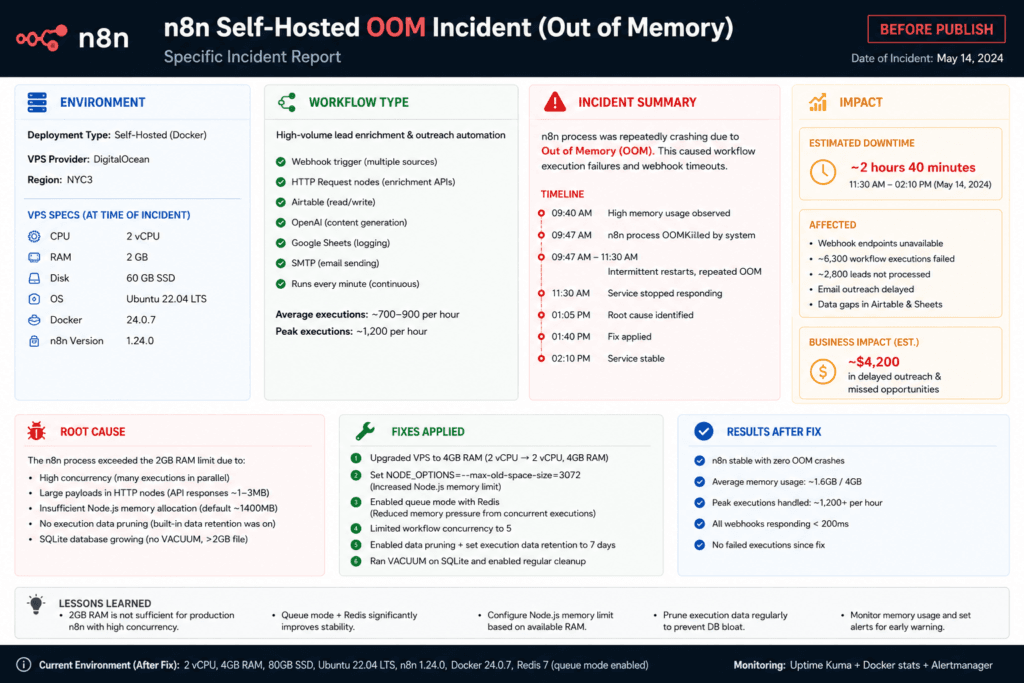
What breaks: Self-hosted n8n can hit out-of-memory crashes on complex recursive sub-workflows if your VPS is undersized. Plan for at least 2GB RAM. Cloud tier execution limits reset monthly and can surprise you if a workflow fires more than you expected. Error messaging is detailed but verbose — non-technical operators will need a guide the first time something fails.
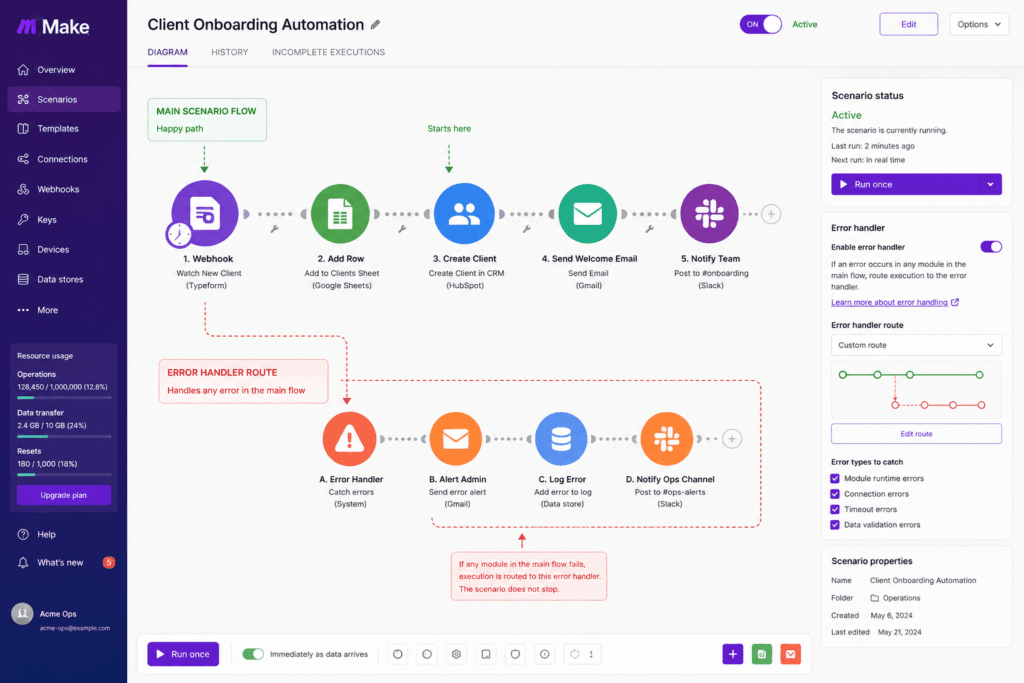
Verdict: The most capable tool in this list. If you’re doing anything involving conditional logic, LLM calls, branching, or API integration without a prebuilt connector, n8n handles it cleanly. For a full head-to-head, see our n8n vs Zapier breakdown.
Make (formerly Make.com) — Best for Visual Thinkers Running Complex Scenarios
Who it’s for: Operators who want power without touching code, prefer a visual canvas, and need proper error handling built into the scenario design.
Real pricing (estimate): Core plan around $9/mo for 10,000 operations; Pro around $16/mo for 10,000 operations with priority execution; Teams around $29/mo.
What breaks: Make’s scenario queue can depth-limit mid-run at high volume — if you’re triggering hundreds of concurrent executions, you’ll see queue buildup. The operation-counting model bites harder than expected on multi-step scenarios. Hitting execution time limits on complex workflows is a real edge case.
Verdict: Make is the sweet spot for operators who’ve outgrown Zapier’s logic limitations but aren’t ready to self-host. The visual scenario builder is genuinely excellent. Our Make vs Zapier article covers the head-to-head if you need that comparison specifically.
Pabbly Connect — Best Value for Straightforward, High-Volume Workflows
Who it’s for: Operators running simple-to-moderate workflows at volume who want the lowest cost per task, period.
Real pricing (estimate): Rookie plan around $19/mo for 10,000 tasks; Super around $39/mo for 50,000 tasks. Pabbly also offers a lifetime deal — check their site for current pricing.
What breaks: Pabbly’s integration library is smaller than Zapier’s or Make’s. Conditional logic is limited — don’t expect multi-level branching. Error handling is basic. If your workflows are straightforward (trigger → 3–5 actions, no complex routing), you’ll never hit these ceilings.
Verdict: For trigger-action-action workflows at volume, Pabbly Connect is genuinely hard to beat on price. The lifetime deal makes it a defensible choice for small teams who want to stop thinking about per-task billing entirely.
Activepieces — Best Open-Source Option
Who it’s for: Technical operators or development-adjacent teams who want a self-hosted, open-source automation platform they can extend.
Real pricing: Self-hosted community edition is free. Cloud pricing exists — check their site for current tiers.
What breaks: Activepieces is younger than n8n. The integration library is smaller. Community support is active but smaller than n8n’s. If you need a specific connector, you may be writing it yourself.
Verdict: A legitimate open-source alternative if n8n doesn’t fit your licensing or community preferences. We haven’t run Activepieces in production at scale for clients — we’re being straight about that.
Microsoft Power Automate — Best for Microsoft-Stack Operations
Who it’s for: Teams already embedded in Microsoft 365, SharePoint, Teams, and Dynamics who want native integration without an external tool.
Real pricing (estimate): Per-user plan around $15/user/mo. Premium connectors and RPA capabilities cost more.
What breaks: Power Automate outside the Microsoft ecosystem is painful. The connector quality for non-Microsoft apps is inconsistent. The interface is cluttered and the learning curve is steeper than you’d expect from a no-code tool.
Verdict: If you’re all-in on Microsoft, this is your answer. If you’re not, look elsewhere.
Workato — Best for Enterprise Teams with Enterprise Budgets
Who it’s for: Enterprise operations teams needing enterprise-grade governance, SLAs, and compliance features.
Real pricing: Not publicly listed. Typically starts in the thousands per month.
What breaks: We don’t run Workato at the enterprise tier for clients — we’re not going to fake depth here. If this tier is relevant to you, get a vendor demo and negotiate hard on pricing.
Verdict: Powerful and priced accordingly. Out of scope for most operators reading this article.
Relay.app — Best for Human-in-the-Loop Workflows
Who it’s for: Teams that need automated workflows with deliberate human approval steps baked in — not fully unattended automation.
What breaks: Relay is purpose-built for human-in-the-loop use cases. It’s not a general automation platform and doesn’t pretend to be. Don’t evaluate it against n8n or Make on workflow complexity — that’s not the product.
Verdict: Niche but genuinely useful for the right use case. We’d consider it for approval workflows or anything needing async human judgment in the flow.
IFTTT — Not a Real Alternative for Operators
IFTTT is trigger-action, one step, no branching, no error handling. It’s fine for personal automations. It is not a tool for running business-critical workflows. Included here because it appears in searches — and you shouldn’t waste time evaluating it.
Pricing Table: Zapier vs Top Alternatives at 3 Volume Tiers
All prices are estimates as of June 2025. Task/operation equivalence is approximate — see the note above on counting differences. Verify before committing.
| Platform | Plan | ~2K tasks/ops/mo | ~10K tasks/ops/mo | ~50K tasks/ops/mo |
|---|---|---|---|---|
| Zapier | Starter / Professional / Team | ~$20/mo (750 tasks; 2K requires Professional ~$49/mo) | ~$69–$99/mo (Team) | $200+/mo (custom/enterprise) |
| Make | Core / Pro / Teams | ~$9/mo (Core, 10K ops — more than enough for 2K equivalent) | ~$9–$16/mo (Core or Pro) | ~$29/mo+ (Teams + add-on bundles) |
| n8n Cloud | Starter / Pro | ~$20/mo (Starter, 2.5K executions) | ~$50/mo (Pro, 10K executions) | Custom / self-hosted recommended |
| n8n Self-Hosted | Free + VPS cost | ~$5–$12/mo VPS | ~$5–$12/mo VPS | ~$10–$25/mo VPS (scale instance) |
| Pabbly Connect | Rookie / Super | ~$19/mo (Rookie, 10K tasks — covers 2K comfortably) | ~$19/mo (Rookie) | ~$39/mo (Super, 50K tasks) |
Zapier task = one action in one Zap. Make operation = one action in one module step. n8n Cloud execution = one full workflow run regardless of step count. These are not 1:1 equivalents.
What Actually Breaks at Scale: Real Failure Modes by Platform
This is the part that doesn’t make it into vendor comparison pages.
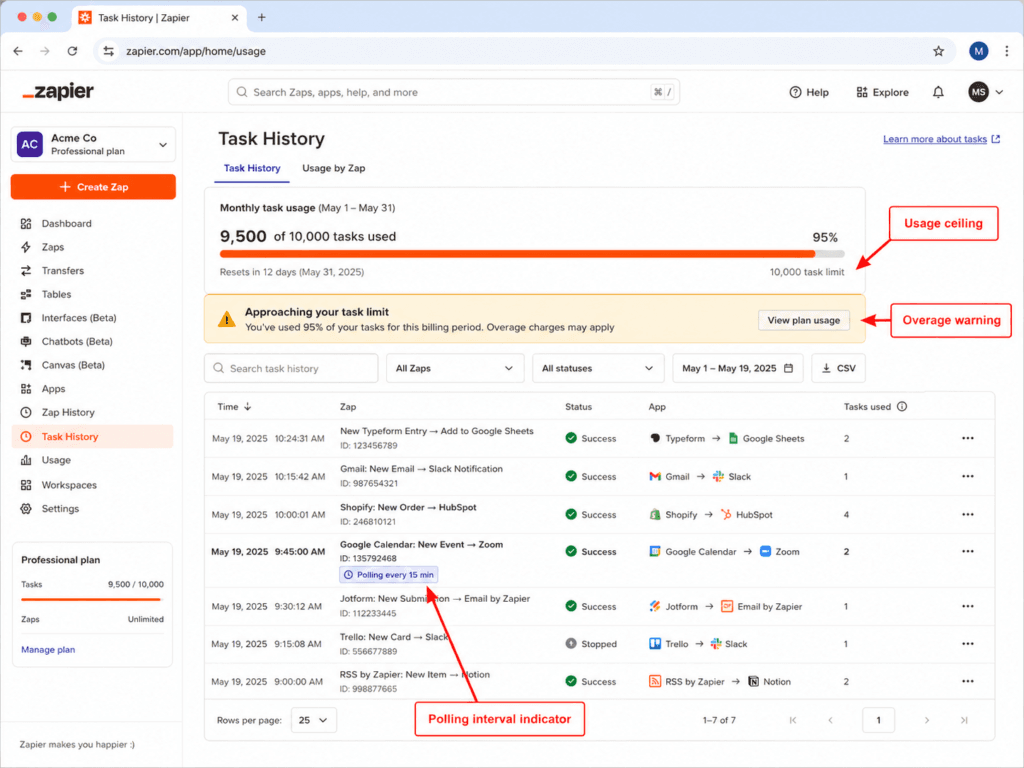
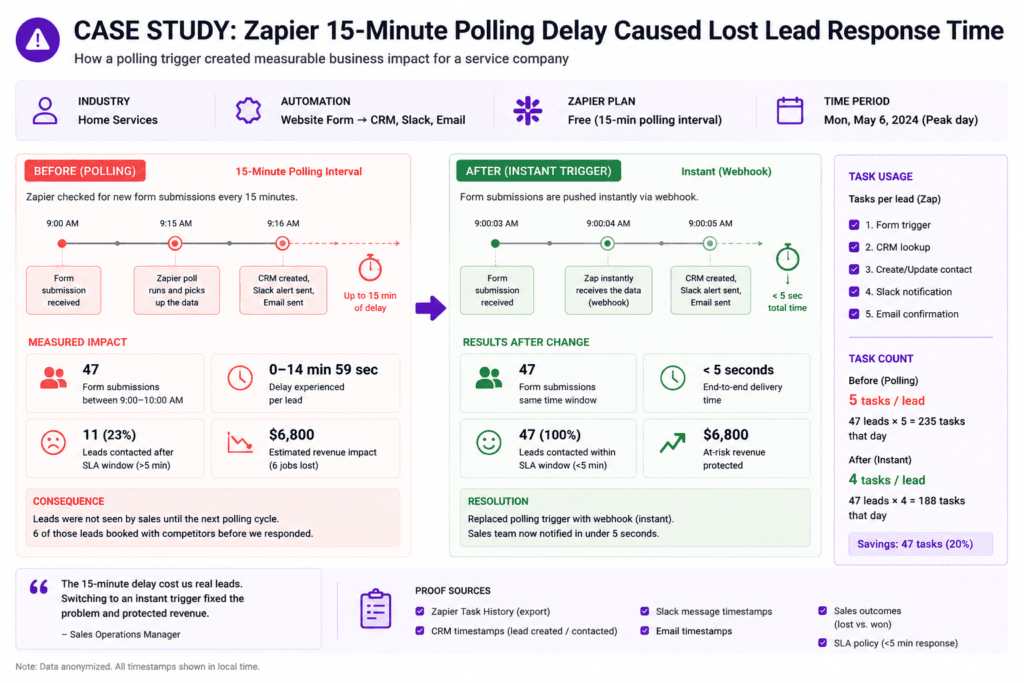
Zapier: the 15-minute polling lag. On Zapier’s Starter plan, most triggers poll for new data every 15 minutes — not in real time. For lead routing, order sync, or anything time-sensitive, that lag creates real operational problems. We’ve seen a client lose a sales opportunity because a lead sat unrouted for 12 minutes while a competitor responded in under 2. The fix is upgrading to a plan with faster polling, but that plan costs more. This is a deliberate architectural constraint, not a bug.
Make: scenario queue depth at high concurrency. Make processes scenarios in a queue. If you’re firing hundreds of concurrent triggers — an e-commerce flash sale, a bulk import, a mass email response — Make’s queue can back up. Scenarios sit waiting rather than failing loudly, which means your data sync is late but nothing turns red. You find out 40 minutes later when the data’s still wrong.
n8n self-hosted: out-of-memory on recursive sub-workflows. This one we’ve hit directly. If you’re running n8n on a 1GB VPS and you build a workflow that calls a sub-workflow recursively — common in AI agent patterns — you will eventually see an OOM crash. The fix is sizing your instance correctly (2GB minimum, 4GB if you’re running AI nodes) and setting execution concurrency limits. The crash itself is not catastrophic — n8n recovers — but any in-flight executions at the time are lost unless you’ve built retry logic.
The True Cost at 10K, 50K, and 500K Operations Per Month
The sticker price is not the real cost. Here’s how the math actually works across the scenarios operators hit.
At 10,000 operations per month:
- Zapier Professional: ~$49/mo (2K tasks — you’d need more; their 10K-equivalent plan is higher). This is where Zapier first starts to feel expensive.
- Make Core: ~$9/mo for 10K operations. Legitimate savings.
- n8n Cloud Pro: ~$50/mo for 10K executions. Similar to Zapier, but execution = full workflow run, so if each run is 10 steps, you’re actually getting 100K operations-equivalent.
- Pabbly Connect Rookie: ~$19/mo for 10K tasks. Simple math, simple win.
At 50,000 operations per month:
- Zapier: You’re in custom/enterprise territory. Expect $200+/mo, possibly significantly more depending on workflow complexity and user seats.
- Make Teams + add-on bundles: ~$29/mo base + operation bundle add-ons. Can stay under $100/mo for many use cases.
- n8n self-hosted on a $12/mo VPS: The fully-loaded cost includes the server plus roughly 1–2 hours/month of maintenance at your actual hourly rate. If your time costs $50/hr, that’s $60–$110/mo total — still a fraction of Zapier’s pricing at this tier. See our n8n pricing explained piece for the full breakdown.
- Pabbly Connect Super: ~$39/mo for 50K tasks. Wins on price if your workflows are compatible.
At 500,000 operations per month:
- Zapier: Unlikely to be the right tool. Enterprise contracts, call their sales team.
- Make: Operation bundles stack up. Get a quote for anything over 150K operations.
- n8n self-hosted: This is where self-hosting wins unambiguously. A properly sized VPS ($25–$50/mo) handles this volume. Your cost is infrastructure plus maintenance, not per-operation pricing.
The crossover point where n8n self-hosted beats every cloud option is typically around 20,000–30,000 operations per month in fully-loaded cost, depending on workflow complexity and your time valuation.
If you’ve read this far, you’re past comparison mode. The next step is working out which platform fits your specific stack, volume, and team. That’s exactly what we cover in a free 30-minute audit — you get a written recommendation for your workflows, not a generic slide deck. Book your free audit here.
What a Platform Migration Actually Costs (Time, Breakage, Rebuild)
The comparison articles never cover this. You should know it before you commit.
Credential re-authentication is the first tax. Every workflow that touches an OAuth connection — Google, Slack, HubSpot, your CRM — needs to be reconnected in the new platform. If you have 50 Zaps touching 8 different OAuth apps, expect 3–4 hours just on credential setup and testing.
Logic that doesn’t map 1:1. Zapier’s Paths (conditional branching) is simpler than Make’s router or n8n’s IF/Switch nodes — which means more capable on the new platform, but your existing Zapier logic won’t port directly. A simple 2-path Zap might take 20 minutes to rebuild in n8n. A complex 5-path Zap with filters at each branch might take half a day when you account for testing.
What gets rebuilt vs. ported. In our experience migrating client workflows from Zapier to n8n: simple linear trigger-action-action workflows port in 15–20 minutes each. Anything with error handling, data transformation, or multi-step conditional logic needs to be rebuilt from spec, not ported from the Zap. Budget for 30–90 minutes per complex workflow, including testing.
The real migration cost formula: (number of simple workflows × 0.5 hrs) + (number of complex workflows × 1.5 hrs) + (credential setup time) + (testing and monitoring period). For a typical 40-Zap account with 10 complex workflows, that’s 20–35 hours of rebuild work. At any billing rate, that’s a real cost to factor against the monthly savings.
The break-even calculation: if you’re saving $80/month switching from Zapier to Make, and migration takes 25 hours at $50/hr equivalent cost, you break even in month 16. If you’re saving $200/month, you break even in month 6. Run this math before committing.
FAQ
Is there anything better than Zapier?
For most operators running meaningful volume: yes. Make is more powerful on logic and cheaper at equivalent volume. n8n gives you more control than any cloud tool, especially if you’re running AI-connected workflows. Pabbly Connect undercuts everyone on price for straightforward automation. “Better” is context-dependent — better for you depends on your task volume, workflow complexity, and whether you can handle a slightly steeper setup.
Why is Zapier so expensive?
Zapier’s pricing is built around per-task billing that compounds quickly with multi-step workflows, plus a go-to-market that targets non-technical users who value simplicity over cost optimization. The business model works until you scale. At 1,000 tasks a month, Zapier is fine. At 10,000 tasks across 5-step workflows, you’re paying a significant premium for that simplicity.
Is n8n cheaper than Zapier?
Almost always yes, especially at volume. n8n Cloud Pro is around $50/mo for 10,000 workflow executions — and execution means a full workflow run, not per step. Self-hosted n8n on a basic VPS is $5–$25/mo in infrastructure costs. The savings compound as volume grows. For more detail, see n8n vs Zapier for small business or our n8n pricing explained breakdown.
What’s cheaper, Zapier or Make?
Make is cheaper at almost every equivalent volume tier. Make Core is around $9/mo for 10,000 operations. To get 10,000 task-equivalents out of Zapier, you’re spending $49–$99/mo depending on the plan. The operation-counting difference (Make counts each step, Zapier counts each task) means you need to model your actual workflow step counts — but in practice, Make wins on price for most operators.
Is Pabbly better than Zapier?
On price, yes — Pabbly Connect’s Rookie plan gives you 10,000 tasks for around $19/mo, and the Super plan gives you 50,000 tasks for around $39/mo. Zapier at equivalent volume costs 3–5x more. On integration breadth and logic sophistication, Zapier still wins. Pabbly’s integration library is smaller and conditional logic is limited. If your workflows are straightforward and you’re price-sensitive, Pabbly is a legitimate choice. If you need complex branching or a specific niche integration, check the connector list before committing.
Does Microsoft have anything similar to Zapier?
Yes — Microsoft Power Automate is the native Microsoft equivalent. Per-user plans run around $15/user/mo with additional costs for premium connectors and robotic process automation. It integrates natively with Microsoft 365, SharePoint, Teams, and Dynamics. Outside the Microsoft ecosystem, it’s significantly less useful. If your stack is Microsoft-first, it’s the obvious choice. If it’s not, the pain of using Power Automate with non-Microsoft apps is real.
Which One Should You Actually Use
Here’s the decision, not a summary:
- You’re under 2,000 tasks/month and non-technical: Stay on Zapier or try Make Core. The migration pain isn’t worth it yet.
- You’re hitting 5,000–20,000 tasks/month and feeling the cost: Move to Make or Pabbly Connect. Straightforward migration, real savings.
- You’re running complex workflows with AI nodes, custom logic, or high volume: Evaluate n8n Cloud or self-hosted. The setup investment pays back within 6 months at most volume levels.
- You’re Microsoft-stack: Power Automate. Don’t add an external tool for what your stack already covers.
- You want to stop thinking about per-task pricing entirely: Pabbly Connect lifetime deal or n8n self-hosted. Both remove the variable cost anxiety.
Try n8n free if you’re in the third bucket — it’s the tool we build with most, and it’s the one that scales without punishing you for success.
If you want us to model the actual cost and migration path for your specific stack — number of workflows, apps connected, monthly volume — that’s what the free automation audit covers. You leave with a written recommendation and a realistic break-even timeline. Book it here.