

Most “AI automation for small businesses” advice is written by people selling you the AI. We’re an automation agency — we ship these workflows to production for founders, ecommerce operators, and small teams, then get the 2am call when one breaks. We also run our own: our lead generation is automated, and we built an entire independent software-review business, AirSoftPilot, on the same plumbing.
So this is the honest version, from invoices and incident logs, not a demo reel. The headline truth: a small business doesn’t need “an AI.” It needs a handful of boring, reliable workflows that each kill one repetitive task — and exactly one of those steps gets to use AI.
What AI automation actually works for small businesses? The automations that pay off first are the ones that kill a daily task: a support bot that answers repetitive questions from your own docs, instant follow-up on new leads (speed-to-lead), lead enrichment and scoring, and back-office data entry. AI handles only the step that needs judgment; software does the rest. Anything that automates a once-a-quarter task rarely earns its keep.
Not sure which one would pay off fastest for your business? That’s exactly what we map in a free 30-minute automation audit — no pitch, a written recommendation.
Disclosure: Orchient builds client automations on n8n, and some links here are affiliate links (we may earn a commission at no cost to you). We name the tradeoffs honestly; that’s the point.
First, what “AI automation” actually means (cut the hype)
Forget the robot-running-your-company image. In practice, an automation is dead simple: a trigger fires, and software does the next five steps so a human doesn’t. A form gets submitted, and the lead lands in your CRM, gets a tagged welcome email, and pings the right person in Slack — nobody copy-pastes anything.
The “AI” part is one node in that chain: the single step that needs judgment. Read this incoming email and pull out the order number. Score this lead 0–100. Draft a reply in our voice. Everything factual still comes from your data; AI just reads, judges, or phrases.
That reframe matters because it kills the most expensive mistake in small-business automation: buying “an AI tool” for every task. You don’t need five AI subscriptions. You need one workflow with one AI step in it. The goal was never to add more software.
What actually works (in order of payback)
Across the small businesses we’ve built for, the ROI order is remarkably consistent. Start at the top.
1. Support deflection — answer repetitive questions automatically
If you answer the same 40 questions a week, a support bot that pulls answers from your own help docs is usually the fastest payback in the building. The key word is “your own” — more on why below.
2. Speed-to-lead — instant follow-up on new enquiries
The moment someone fills a form or misses a call, an automation fires a personalized reply and a booking link. For local and service businesses this is often the single highest-revenue automation you can run, because the lead who hears back in 60 seconds beats the competitor who calls back in two hours.
3. Lead generation, enrichment, and scoring
Find prospects, add their contact details, and have AI rank them so a human works a finished, sorted list instead of building a raw one.
4. Back-office data entry
Invoices and receipts out of your inbox into a spreadsheet; orders into your CRM; the soul-destroying copy-paste work that AI extraction handles in pennies.
5. Reporting digests
Yesterday’s numbers from five dashboards, summarized into two plain-English lines in Slack before your coffee.
Notice what’s not on this list: anything glamorous. The winners are repetitive, daily, and boring. That’s the tell.
What this looks like in real life (two builds)
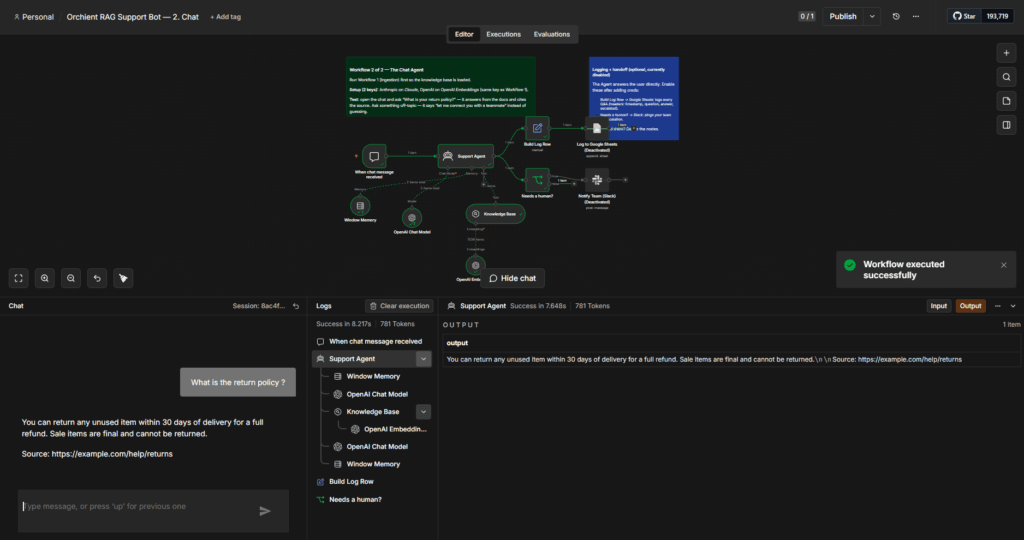
A support bot that won’t lie. We built a retrieval-augmented (RAG) chatbot on a client’s n8n. Ask it something covered in their docs and it answers with a “Source:” link. Ask it something it doesn’t know — “do you sell airline tickets?” — and instead of confidently inventing a policy, it replies: “I’m not certain about that, let me connect you with a teammate.” We tested it live: grounded answers when it knew, a clean human handoff when it didn’t. That single behavior — refusing to guess — is the whole difference between a helpful bot and a liability. (Full build: How to build an AI support chatbot in n8n.)
A prospecting machine. We needed our own first clients, so we built the system that builds the list: it scrapes local businesses from Google Maps, finds their email, scores each lead with AI, writes one personalized opening line, and drops a ranked list into a Google Sheet. An afternoon of manual prospecting became a coffee — and the output is scored, which manual work never is.
And the most honest example: AirSoftPilot is itself an automation case study. It’s an independent cold-email-software review site we run, and the content pipeline, email capture, and deliverability monitoring are automated. Running a real business on this stuff is how we know which parts hold up.
What doesn’t work (the part vendors skip)
A guide that only sells the wins is marketing. Here’s what actually breaks.
- Ungrounded AI hallucinates. An AI that answers from its general training instead of your documents will invent a refund window, a price, or a discount code — and now you owe the customer what the bot promised. The fix is grounding plus a “say you don’t know” rule, not a smarter model.
- Automating a broken process just makes the mess faster. If your intake is chaos, automating it gives you chaos at scale. Fix the process first, then automate it.
- Tool sprawl. Five AI subscriptions nobody owns is not an automation strategy; it’s a recurring bill. One workflow beats five tools.
- No human gate on irreversible actions. Let AI draft the refund and flag the escalation. Don’t let it issue the refund. The guardrails are the product.
Every failure we’ve cleaned up traces back to one of those four — never to “the AI wasn’t good enough.”
The real cost (and which tools to actually use)
The honest cost of a first automation is small: an afternoon to a few days of setup, and often under $20/month in tooling early on. Here’s the operator’s tool logic:
- Start on the easiest tool that connects your apps. For a non-technical owner that’s usually Zapier (or Make, or an AI-native builder like Gumloop). No code, fastest to a working result. (See the easiest AI automation tool for beginners.)
- Graduate to n8n when the bill stings. Zapier charges per task (per step); n8n charges per workflow run (regardless of steps). At volume, a multi-step automation is dramatically cheaper on n8n, and self-hosting is roughly $5/month.
- For outreach, deliverability beats volume. A small business chasing leads by email should fix SPF, DKIM, and DMARC before it pays for a bigger sending plan. Our hands-on testing at AirSoftPilot puts tools like Instantly from about $37/month (as of 2026), but the cheapest plan in the world won’t help if your domain lands in spam.
The cheap models are plenty for most SMB jobs — scoring a lead or writing one line costs a fraction of a cent. You do not need the most expensive AI.
How a small business should actually start
You don’t need a strategy deck. You need one win.
- Name where your hours actually went last week. Be specific: “two hours answering the same shipping questions,” “an afternoon chasing leads.”
- Pick the single most repetitive task. Not your whole business. One task.
- Find a template for it in your chosen tool and edit it — far faster than starting blank. (Steal one of our 7 real n8n templates.)
- Wire two or three apps and test once, on purpose, with a real example before you trust it.
Do that one time and the intimidation is gone. Then repeat down the list.
If you’d rather skip the learning curve, that’s the entire job of a free automation audit: in 30 minutes we find the one workflow with the fastest payback for your business, and send you a written plan to run it. No retainer, no pitch — these are the builds we ship clients on day one.
Frequently asked questions
Is AI automation worth it for a small business?
Yes, if you start with a daily repetitive task. The early automations often cost under $20/month and save real hours each week. Skip anything that automates a rare task — the payback isn’t there.
Do I need to be technical to automate my small business?
No to start — Zapier, Make, and Gumloop are no-code. Once an automation becomes business-critical or multi-step, it’s worth having someone who’s shipped them before, because the difference between a demo and a reliable system is error handling, escalation, and logging.
What’s the first thing I should automate?
Whatever repetitive task ate the most of your week. For most SMBs that’s repetitive customer questions (a docs-grounded support bot) or slow follow-up on new leads (speed-to-lead).
Will AI automation replace my staff?
No. The realistic win is removing the copy-paste busywork so your team does the work only a human can. The automations that try to remove the human from judgment or money decisions are the ones that fail.
The bottom line
AI automation for small businesses works — but not the way the hype sells it. It’s not one magic tool; it’s a few boring workflows that each kill a daily task, with AI doing only the step that needs judgment and a human guarding anything irreversible. Start with the most repetitive thing you do, ship one win, and repeat.
When you’re ready to stop reading and start building, the fastest path is a free automation audit: we map your highest-payback workflow and hand you the plan.
Related reading: The easiest AI automation tool for beginners · n8n workflow templates you can steal · How to build an AI support chatbot