
Half the “best AI agent” lists you’ll read were written by one of the tools on the list. We build agents into client workflows for a living, which means we also clean up after the ones that looked great in a demo and fell over in week two. So this ranking is organized around a single question: which agent earns its keep once it’s running unattended on Monday morning — not which one has the slickest launch video.
Which AI agent is best? It depends on what you’re automating. For no-code business workflows, n8n and Make lead on flexibility and cost at scale. For autonomous task agents (email, scheduling, CRM), Lindy and Relevance AI are strongest. For customer-facing reasoning, Claude (Anthropic) and ChatGPT (OpenAI) are the most reliable engines. Developer teams building multi-agent systems should look at CrewAI or LangGraph. There is no single “best” — there’s a best for your stack, volume, and budget.
Disclosure: Orchient builds client automations on n8n and Make, so we’re not neutral — and some n8n links below are affiliate links (we may earn a commission at no cost to you). Our ranking isn’t for sale: n8n earns the top spot because we ship on it daily and have the invoices and incident logs to back the claims. Where we haven’t personally run a tool in production, we say so.
We map the “which agent for which job” decision for clients every week. Want us to do it for your stack? That’s a free 30-minute automation audit — a written recommendation, no pitch.
TL;DR — the 12, at a glance
Prices are starting points as of June 2026, billed annually — verify on the vendor’s page before committing, because every one of these changes their tiers.
| # | Tool | Best for | Free tier | Paid from | Self-host |
|---|---|---|---|---|---|
| 1 | n8n | Flexible business workflow + AI agents at scale | Yes (self-host) | ~$24/mo Cloud | ✅ |
| 2 | Make | Visual no-code automation with AI modules | Yes | ~$9/mo | ❌ |
| 3 | Zapier | Fastest setup, widest app support | Yes (100 tasks) | ~$20/mo* | ❌ |
| 4 | Lindy | Autonomous “AI employee” task agents | Limited | ~$50/mo | ❌ |
| 5 | Relevance AI | No-code multi-agent “AI workforce” | Yes (200 actions) | ~$19/mo | ❌ |
| 6 | Copilot Studio | Agents inside the Microsoft 365 stack | Trial | ~$200/mo tenant | ❌ |
| 7 | Gumloop | Marketing/ops no-code AI workflows | Yes | ~$97/mo | ❌ |
| 8 | Voiceflow | Customer-facing chat + voice agents | Yes | ~$60/mo | ❌ |
| 9 | OpenAI (ChatGPT + AgentKit) | Reasoning + computer-use, customer-facing | ChatGPT free | $20/mo + API usage | ❌ |
| 10 | Anthropic Claude (+ Agent SDK) | Most reliable reasoning + coding agents | Claude free | $20/mo + API usage | ❌ |
| 11 | CrewAI | Open-source multi-agent framework (devs) | Yes (OSS) | usage-based cloud | ✅ |
| 12 | LangGraph / LangChain | Custom agents for engineering teams | Yes (OSS) | usage-based | ✅ |
*Zapier’s AI “Agents” are billed as a separate add-on, not included in the task plans — more on that below.
Skip to how to choose if you already know your category. The ranked list is for when you want the operator’s read on each one.
What an AI agent actually is (and isn’t)
Quick, because you’re here to choose, not to study. A chatbot answers. A standard automation (a Zap, a Make scenario) follows a fixed path you drew. An AI agent is the middle that’s new: it’s given a goal, some tools, and the latitude to decide which tools to use and in what order to reach that goal — then it loops until it’s done or gives up.
That autonomy is the whole value and the whole risk. A fixed automation fails predictably. An agent can take a creative wrong turn you never scripted — call the wrong API, loop forever, confidently invent a fact. Everything below is ranked with that tension in mind: how much useful autonomy you get versus how hard it is to keep on a leash. For the wider landscape beyond agents, see our hub on the best AI automation tools.
Types of AI agents by business need
Most readers fit one of four buckets. Find yours and weight the list accordingly:
- Workflow agents — run a multi-step business process (lead enrichment, ticket triage, reporting). You want n8n, Make, Zapier, Gumloop.
- Conversational agents — talk to your customers (support, booking, qualification). You want Voiceflow, or Claude/ChatGPT behind a chatbot for your business, often grounded with a RAG setup on your own docs.
- Autonomous task agents — act like a junior employee across your tools (inbox, calendar, CRM). You want Lindy, Relevance AI.
- Multi-agent / developer systems — teams of specialized agents you build in code. You want CrewAI, LangGraph.
The ranked list
1. n8n — best overall for business workflow automation
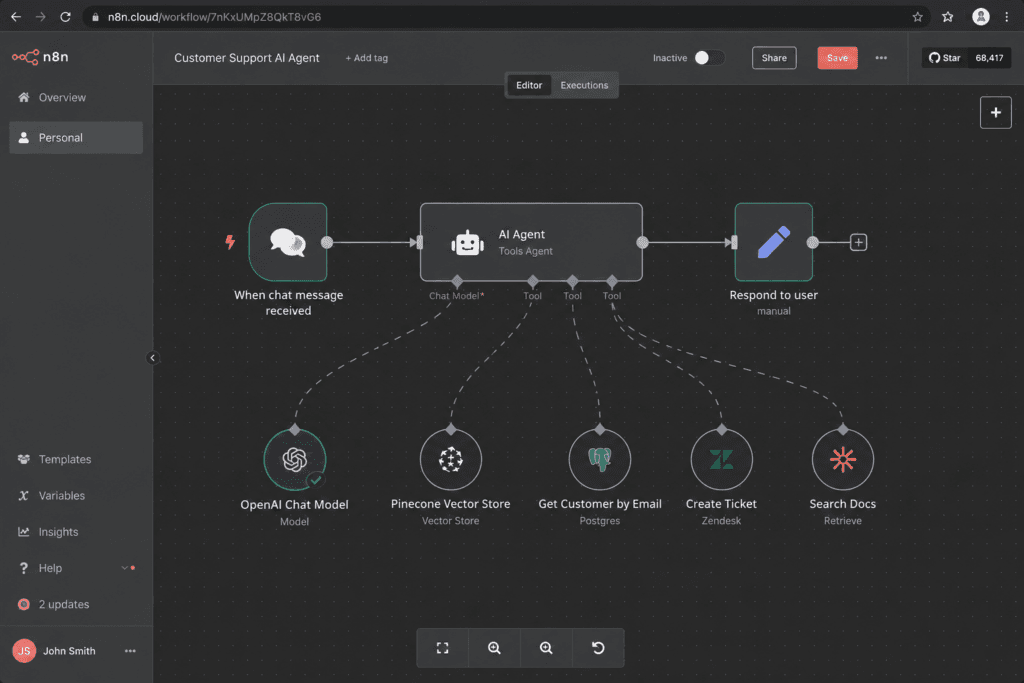
What it does in production: n8n is a source-available workflow automation platform with first-class AI agent nodes. You wire a trigger, give an agent a model and a set of tools (HTTP calls, your database, 500+ app integrations), and let it run — on n8n’s cloud or your own server. We run client agents on it weekly: lead pipelines, content ops, internal copilots. The reason it tops this list for business use is the combination almost nothing else has — genuine agent capability, ~500 integrations, and the option to self-host so your cost doesn’t scale linearly with usage. Try it on n8n Cloud or self-hosted.
Who it’s wrong for: non-technical solo operators who want zero setup and never to see a canvas. There’s a learning curve, and self-hosting has real ops cost (we break that down here).
Pricing: free to self-host (no execution limit); Cloud from ~$24/mo (Starter) and ~$60/mo (Pro), billed on executions, not workflow count. See n8n vs Zapier for the head-to-head, and our n8n automation guide and build an AI agent in n8n walkthrough.
2. Make — best visual no-code builder
What it does in production: Make is the most visually intuitive of the no-code platforms — a colorful node graph that ops people genuinely enjoy, now with AI modules and agent capability. We reach for it on client builds where a non-technical team will own the automation after handoff.
Who it’s wrong for: anyone who needs to self-host, and high-volume builds — the credit model gets expensive faster than self-hosted n8n.
Pricing: free tier (1,000 credits); Core ~$9/mo, Pro ~$16/mo, Teams ~$29/mo (annual). Since August 2025 it bills in credits (1 operation = 1 credit for standard modules; AI modules consume differently).
3. Zapier — best for the fastest possible setup
What it does in production: Zapier still has the widest app catalog and the lowest time-to-first-automation of anything here. If you need two SaaS tools talking by this afternoon, nothing beats it. Its newer Zapier Agents add genuine agentic behavior on top.
Who it’s wrong for: anything high-volume or budget-sensitive. The task meter is unforgiving at scale, and — the trap most lists skip — Zapier Agents and Chatbots are billed as separate add-ons, not included in your task plan. Easy to wake up paying three Zapier bills.
Pricing: free (100 tasks); Professional from ~$20/mo (750 tasks, annual); Team ~$104/mo (2,000 tasks). Agents add-on billed separately. See Zapier alternatives.
4. Lindy — best autonomous “AI employee”
What it does: Lindy is built around the “AI employee” framing — agents that live in your inbox, calendar, and CRM and take actions (draft replies, book meetings, update records) with minimal supervision. For owners who want delegation rather than a builder, it’s one of the most polished options.
Who it’s wrong for: complex branching workflows (a builder like n8n wins) and predictable budgets — credits vary by task complexity and voice features add real cost.
Pricing: limited free usage; paid roughly $50/mo (Plus) up to ~$200/mo (Max); Enterprise custom. Credit consumption (1–10+ per task) makes the real bill usage-dependent.
We’ve evaluated Lindy and Relevance but build most client agents in n8n/Make — so treat our take on the autonomous-agent tools as informed evaluation, not years of production scars. We’ll tell you when that distinction matters for your build.
5. Relevance AI — best no-code multi-agent “workforce”
What it does: Relevance lets you assemble teams of specialized agents (a “workforce”) without code — a researcher agent hands to a writer agent hands to a CRM agent. Strong middle ground between a workflow builder and a dev framework.
Who it’s wrong for: simple single-step needs (overkill) and anyone wanting to self-host (you can’t).
Pricing: free (200 actions/mo); Pro ~$19/mo (30,000 actions/yr); Team ~$234/mo; Enterprise custom. Usage meters on actions + vendor credits (the underlying LLM cost), with overages — read the meter before you commit.
6. Microsoft Copilot Studio — best for Microsoft-stack orgs
What it does: if your company lives in Microsoft 365, Copilot Studio builds agents that sit natively inside Teams, Outlook, and SharePoint with the admin and compliance controls IT already trusts. The integration story, not the raw capability, is why it wins inside those orgs.
Who it’s wrong for: non-Microsoft shops, and anyone outside IT governance — the message-based pricing and tenant setup are heavier than a no-code builder.
Pricing: roughly $200/mo per tenant for a message pack, or pay-as-you-go per message; pairs with Power Automate.
7. Gumloop — best for marketing & ops teams
What it does: Gumloop is a no-code AI workflow builder aimed squarely at marketing and operations — scraping, enrichment, content generation, repetitive research — with a friendlier on-ramp than n8n.
Who it’s wrong for: deep system integration and self-hosting; it’s a SaaS builder, not infrastructure.
Pricing: free tier; paid from roughly $97/mo.
8. Voiceflow — best for customer-facing chat & voice
What it does: Voiceflow is purpose-built for designing conversational agents — chat and voice — with proper conversation design tooling, testing, and handoff-to-human. If the agent’s job is talking to customers, a dedicated tool beats bolting chat onto a workflow builder.
Who it’s wrong for: back-office automation (wrong category entirely).
Pricing: free tier; Pro around $60/mo; Teams/Enterprise above. [VERIFY current Voiceflow pricing.]
9. OpenAI — ChatGPT + AgentKit
What it does: OpenAI is an engine, not a workflow tool. ChatGPT is the consumer/team product; AgentKit and the API are how you build agents — including computer-use (“Operator”-style) agents that click around a browser. Best-in-class for general reasoning and broad capability.
Who it’s wrong for: non-developers who want a finished agent — you (or a builder like n8n) still have to assemble the workflow around the model.
Pricing: ChatGPT free tier; Plus $20/mo; Team per-seat; API billed per token (usage-based).
10. Anthropic Claude — most reliable reasoning + coding agents
What it does: Claude is the other top-tier engine, and in our hands the more reliable one for agentic tool-use and code — it tends to follow instructions and stay on the rails better in long tool-calling loops. The Claude Agent SDK and Claude Code are strong foundations when correctness matters more than breadth. Like OpenAI, it’s an engine you build with, not a no-code product. (Full disclosure: this article was drafted with Claude — we use it internally.)
Who it’s wrong for: non-technical buyers wanting a packaged agent off the shelf.
Pricing: Claude free tier; Pro $20/mo; Max higher; API usage-based per token.
11. CrewAI — best open-source multi-agent framework
What it does: CrewAI is a Python framework for orchestrating teams of role-based agents (researcher, analyst, writer) that collaborate on a task. Free and open-source, with a paid cloud for deployment. The developer’s choice when you want multi-agent logic in code, not a canvas.
Who it’s wrong for: non-developers (it’s code) and simple single-agent jobs.
Pricing: open-source free to self-run; managed cloud is usage-based.
12. LangGraph / LangChain — most flexible for engineering teams
What it does: the framework that anchors a huge share of custom agent development. LangGraph adds stateful, graph-based control over agent steps — the right tool when an engineering team needs full control and is willing to own the complexity.
Who it’s wrong for: everyone who isn’t an engineering team. The power comes with real build-and-maintain cost; most businesses are better served one tier up the no-code stack.
Pricing: open-source libraries free; LangSmith/LangGraph Platform billed usage-based.
What AI agents actually cost when you run them at volume
The sticker price is the smallest number. Two meters run underneath every agent, and they’re what blow up bills:
- Platform fees — tasks (Zapier), credits (Make, Lindy), actions (Relevance), or executions (n8n). These scale with how often the agent runs.
- LLM token fees — every reasoning step and tool-call burns model tokens. An agent that loops 8 times to finish a job costs 8× the tokens of a one-shot prompt, and that’s the part nobody models.
Where the economics break, in practice:
- Zapier stings first because the per-task model wasn’t built for agents that fan out — and Agents are a separate bill on top.
- Make and Lindy credit models are gentler but still scale linearly; at steady high volume you feel them.
- n8n self-hosted is where the curve flattens: your platform cost is a flat server bill regardless of execution count, so only the LLM tokens scale. For any agent running thousands of times a month, that flat line is the difference between a hobby and a margin.
The rule of thumb we give clients: pick the platform on token economics, not the monthly fee. A $0 self-hosted platform with an agent that loops wastefully is more expensive than a $60 plan with a tight one. We model this in our automation ROI calculator.
A concrete shape of the math: an enrichment agent that runs 5,000 times a month and loops ~4 times per run is making ~20,000 model calls. On a per-task SaaS plan, those runs alone can push you into a higher tier before a single token is counted; on a flat self-hosted server, the platform cost doesn’t move and only the ~20k calls’ worth of tokens scale. At that volume the gap between the two is routinely the difference between a few dollars and a few hundred a month — which is exactly why the cheap-looking tool is often the expensive one.
Not sure which platform’s economics fit your run volume? We’ll build you the cost model — and a one-page scoring sheet for picking an agent — as part of a free automation audit.
The failure modes no vendor demo will show you
Every tool above demos flawlessly. Here’s what actually breaks once an agent runs unattended, and what to look for:
- Rate-limit failures mid-chain. An agent three tool-calls deep hits a 429 and — depending on the platform — either retries gracefully or dies and loses the whole run’s state. Platforms with real error branches (n8n, Make) let you catch and resume; lighter tools just fail.
- Silent schema drift. A webhook payload or API response quietly changes shape, the agent keeps “working,” and you get plausible garbage for days before anyone notices. The agents that surface a clear error here are worth more than the ones that paper over it.
- The loop with no kill switch. An autonomous agent decides the way to finish a task is to keep trying — and racks up tokens (and real actions, like sending emails) until you notice the bill. Always cap iterations and cost. The tools that make a hard limit easy to set are the ones we trust in production.
The meta-lesson, and the thing we say on every build: AI agents are plumbing, not magic. The guardrails are the product. A demo shows you the happy path; production is the other 20% of paths, and that’s where the tool actually gets chosen.
Before you migrate: the hidden cost of switching platforms
Most people find this article because they’re already on one tool and eyeing another. The savings can be real — but the move isn’t free:
- Logic doesn’t port 1:1. Iterators, error branches, and sub-workflows rarely translate cleanly between platforms (Zapier → n8n, Make → self-hosted). You’re rebuilding, not copy-pasting.
- Auth breaks on export. Every connected app gets re-authenticated by hand; credentials never come along.
- QA is the real bill. You have to re-test every path before trusting it with live data — and that’s where the hours actually go.
A blunt breakeven: if a switch saves $150/mo but costs 20 rebuild hours at $100/hr, you’re $2,000 down and don’t break even until month 14. If the saving is $30/mo, staying put is the correct financial answer. Run that math before you start migrating, not halfway through.
How to choose the right agent for your stack
Four questions, in order:
- What’s the job? Workflow, conversation, autonomous delegation, or a multi-agent dev system? That picks your category (see Types) and eliminates two-thirds of the list immediately.
- What’s your run volume? Under a few thousand runs/month, a managed SaaS is fine. Above that, self-hostable n8n’s flat cost curve starts winning hard.
- Who will own it? A non-technical team needs Make/Lindy/Gumloop polish. An engineering team can take n8n, CrewAI, or LangGraph and go further.
- What’s your integration anchor? All-Microsoft → Copilot Studio. Everything else → the open builders.
If you can answer those four, the right tool is usually obvious. If two of them pull in different directions — that’s exactly the call we make for clients.
FAQ
What is the best AI agent right now? For most businesses automating workflows, n8n — flexibility, ~500 integrations, and a self-host option that controls cost at scale. For autonomous “do my admin” agents, Lindy. For customer conversations, Voiceflow or a Claude/ChatGPT-powered chatbot. “Best” is genuinely use-case dependent.
Is there a better AI than ChatGPT for agents? For reliable agentic tool-use and coding, many builders (us included) prefer Claude for staying on-rails through long tool-calling loops. For raw breadth and ecosystem, ChatGPT/OpenAI is hard to beat. Both are engines — you still build the workflow around them.
Who leads in AI agents in 2026? Two layers. On engines, OpenAI and Anthropic lead. On business platforms that let non-developers actually deploy agents, n8n, Make, and Zapier lead, with Lindy and Relevance pushing the autonomous-agent frontier.
What are the top 5 AI agents for business? n8n, Make, Lindy, Relevance AI, and Voiceflow — covering workflow, visual no-code, autonomous task, multi-agent, and conversational needs respectively.
Do I need to code to use an AI agent? No. n8n, Make, Zapier, Lindy, Relevance, Gumloop, and Voiceflow are all no-/low-code. CrewAI and LangGraph require development. Engines like ChatGPT and Claude sit in between — usable in chat, but building a real agent around their API takes some technical work.
How much does an AI agent cost to run? Two meters: the platform fee (from $0 self-hosted to $200+/mo) and LLM token cost per run, which scales with how many steps the agent takes. For most SMB use cases, budget a modest platform fee plus tens of dollars a month in model tokens — but a poorly-bounded agent can multiply that fast, which is why iteration caps matter.
The bottom line
There’s no universal “best AI agent” — there’s the best one for your job, your volume, your team, and your stack. For the largest share of businesses we work with, that’s n8n for flexibility and cost control, with Make when a non-technical team owns it and a dedicated conversational tool when customers are on the other end. The engines (Claude, ChatGPT) power the smart parts; the platform decides whether it’s reliable and affordable in production. Whatever you pick, the order of operations is the same: choose the category first, bound the agent’s iterations and cost second, and only then argue about which logo goes on it.
You’re reading a ranking, which means you’re past “what is an AI agent” and into “which one do I build first.” That’s the 30 minutes we spend in a free automation audit: we look at your actual processes, tell you which agent fits which job, and send a written plan with the cost model behind it. No retainer, no pitch — just the spec you’d otherwise spend a weekend assembling.
Related reading: Best AI automation tools · AI chatbot for business · Build an AI agent in n