

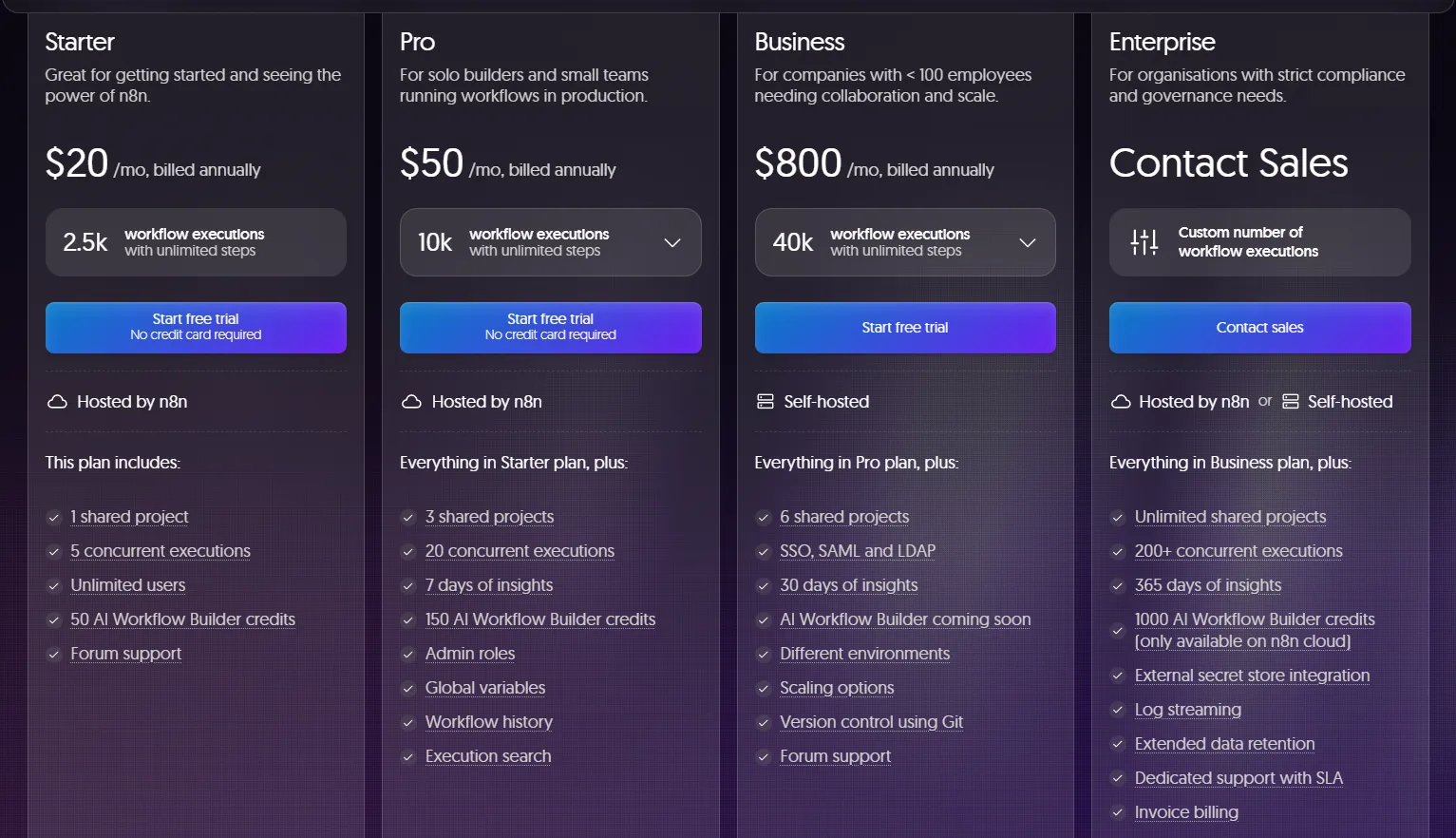
Most people searching for n8n pricing have already seen the official pricing page. They want to know what they’ll actually pay once the workflow is running at 2am and the retry loop is firing for the fourth time.
This is that article.
Heads up: some links below are affiliate links. If you sign up through them we may earn a commission, at no extra cost to you. We only link tools we actually build with.
The short answer: n8n is free to self-host with no execution limits. Its cloud plans start at $24/month (Starter) and rise to $60/month (Pro), billed annually. Enterprise pricing is custom. The real cost variable is infrastructure: self-hosting adds $20–$80/month in compute, plus ops overhead that most pricing pages ignore.
For teams that want this implemented rather than just priced, see our n8n workflow automation services
Not sure which n8n plan fits your stack? We map this for clients in a free 30-minute automation audit — and send you a written recommendation afterward. Book yours here.
What Is n8n
n8n is a workflow automation platform. You connect triggers (webhooks, schedules, API calls) to actions (update a database, ping Slack, write a row to Notion) in a visual canvas. The difference from Zapier or Make is the execution model: n8n runs code-level logic — conditionals, loops, sub-workflows — without requiring a developer. It is open-source (fair-code license, not purely MIT), which means you can self-host it on your own infrastructure and run unlimited workflows for the cost of a server. The cloud version trades infrastructure responsibility for a monthly fee and an execution cap. If you landed here from comparison research rather than the n8n docs, that’s the distinction that matters.
n8n Cloud Plans Breakdown
n8n’s cloud offering has three tiers. All prices below are estimates as of June 2025 — verify current figures at n8n.io/pricing before deciding.
| Plan | Price (est., billed annually) | Executions / month | Active workflows | Users | Key feature gates |
|---|---|---|---|---|---|
| Starter | ~$24/mo | 2,500 | 5 | 1 | Community support; no SSO; no version history |
| Pro | ~$60/mo | 10,000 | 15 | 3 | Email support; execution history (14 days); custom variables |
| Enterprise | Custom | Unlimited | Unlimited | Unlimited | SSO/SAML, audit logs, custom data retention, SLA |
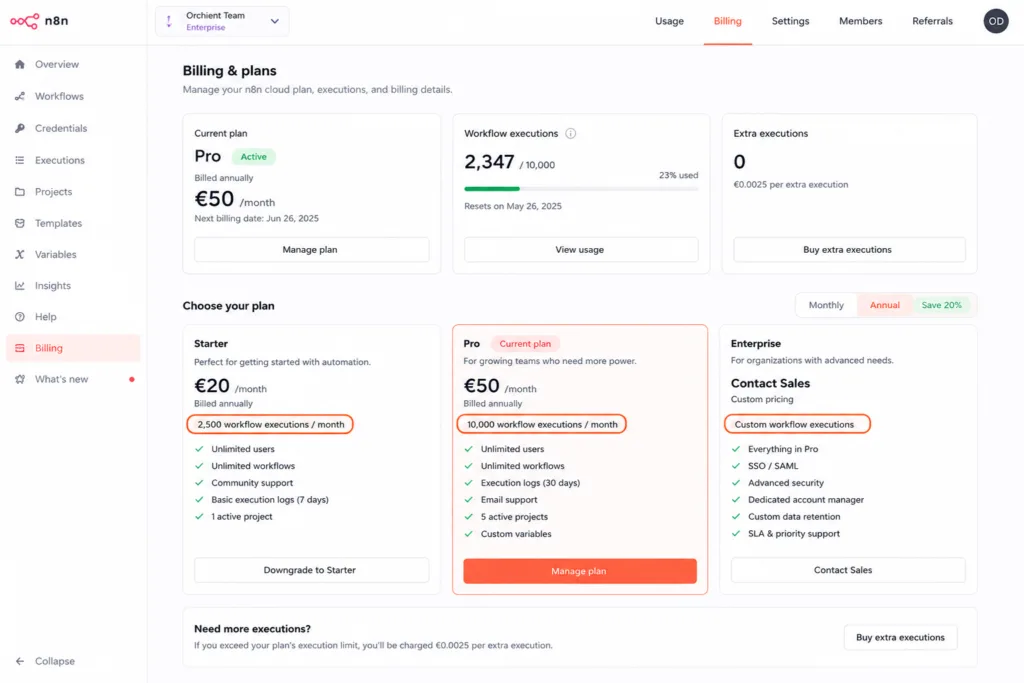
A few things the table doesn’t show:
Execution counting is granular. One workflow run = one execution, but sub-workflow calls and looped nodes each add to your count. More on this in a dedicated section below.
The workflow cap is tight on Starter. Five active workflows sounds like enough for a solo operator. It isn’t, once you factor in utility workflows (error handlers, data formatters, notification routers) that run alongside your core automations.
Pro’s 14-day execution history matters for debugging in production. Without it, a silent failure at 3am is nearly invisible. That alone pushes many SMBs off Starter within a month.
Cloud vs. Self-Hosted: Which Deployment Actually Costs Less
“Self-hosted is free” is technically true and practically incomplete.
The community edition has no execution cap, no workflow limit, and no seat fee. But running it in production requires a server, a database, and someone who doesn’t panic when it stops responding.
Here’s a realistic TCO comparison at three scale tiers:
If you’re comparing this against Zapier’s task-based pricing, read our n8n vs Zapier comparison first
| Deployment | 10k executions/mo | 100k executions/mo | 500k executions/mo |
|---|---|---|---|
| n8n Cloud Starter | ~$24/mo (within limit) | Not viable — over cap | Not viable — over cap |
| n8n Cloud Pro | ~$60/mo (within limit) | Not viable — over cap | Not viable — over cap |
| n8n Cloud Enterprise | Custom | Custom | Custom |
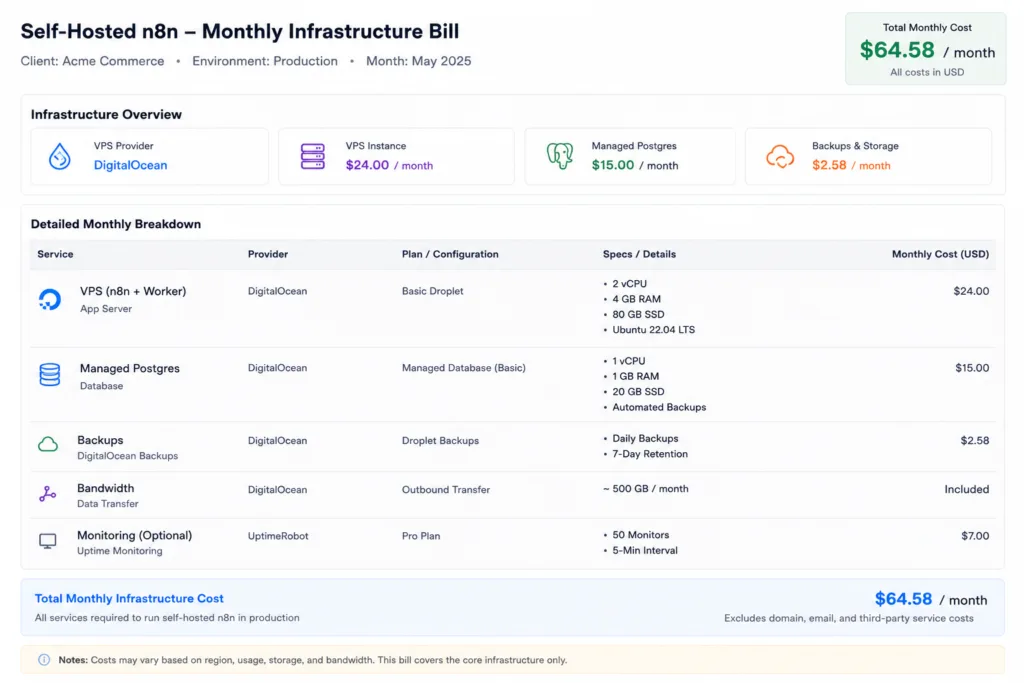
| Self-hosted: basic VPS (DigitalOcean $6–$12/mo Droplet, SQLite) | ~$10/mo infra | ~$20–30/mo (upgrade to 2–4 GB RAM) | ~$40–60/mo (4–8 GB, or multiple workers) |
| Self-hosted: managed infra (Droplet + Managed Postgres ~$15/mo) | ~$25–30/mo | ~$35–50/mo | ~$65–90/mo |
All figures are illustrative ranges based on typical deployments, not guarantees. Your actual bill depends on instance size, region, storage, and worker configuration.
The math on managed infra at 10k executions/month is genuinely close to Cloud Pro. What tips the decision isn’t always cost — it’s ownership. Self-hosting means you handle:
- Docker upgrades and n8n version pinning
- Postgres backup and point-in-time recovery
- Credential encryption key management
- Uptime monitoring (n8n doesn’t phone home when your instance dies)
For a solo operator with no ops background, that overhead easily runs 2–4 hours/month to maintain properly. Priced at $75/hr, that’s $150–300/month in real cost that never appears on an AWS or DigitalOcean bill.
Running the numbers on your own stack? We’ve done this cost analysis for dozens of clients. In a free audit, we’ll tell you which deployment model fits your volume and give you a written recommendation. Book a free audit.
The Real Cost of Self-Hosting n8n: Compute, Postgres, Workers, and the Ops Tax Nobody Prices In
Let’s get specific about the infrastructure stack.
A minimal production setup looks like this:
- 1 DigitalOcean Droplet (2 GB RAM, 1 vCPU) — roughly $12/mo
- SQLite on the same box — free, but no concurrent writes; fine for low volume
- Manual backups to an S3-compatible bucket — a few cents/mo in storage
This breaks under load. SQLite can’t handle parallel workflow executions without locking errors. Any workflow that runs more than a few times per minute needs PostgreSQL.
A production-grade setup:
- 1 Droplet (2–4 GB RAM) for the n8n process — $12–24/mo
- DigitalOcean Managed Postgres (basic tier) — ~$15/mo
- Optional: queue mode with a Redis worker for parallelism — adds ~$6–12/mo
- GitHub for workflow version control — free at small scale
Total: $33–51/month before your own time.
The ops tax is the line nobody puts in their pricing comparison. It includes:
- Upgrading n8n when a breaking change hits (happens a few times per year)
- Debugging when Docker Compose exits unexpectedly at midnight
- Rotating encryption keys when a team member leaves
- Testing that webhook endpoints are still live after a server migration
We’ve seen clients underestimate this badly. One ecommerce operator moved off Zapier to self-hosted n8n with genuine cost savings — then spent six hours troubleshooting a PostgreSQL connection pool exhaustion issue during Black Friday. The fix was a one-line config change. The six hours was not.
That’s not an argument against self-hosting. It’s an argument for pricing it honestly before you commit.
How n8n’s Execution Model Bites You in Production
Sub-workflows, retries, and polling triggers multiply your execution count in ways that aren’t obvious until your month-end bill.
Sub-workflows: n8n lets you build modular workflows that call each other. Clean architecture, but each sub-workflow call counts as an additional execution. A parent workflow that calls 3 sub-workflows = 4 executions per run, not 1.
Retry logic: If you add error handling with automatic retries (which you should), each retry attempt counts as a new execution. A flaky API that retries 3 times before succeeding costs 4 executions, not 1.
Polling triggers: Workflows triggered by schedule (checking a Slack channel, polling an API endpoint for new rows) fire on every interval whether there’s new data or not. A workflow that polls every 5 minutes = 8,640 executions/month before it does any real work.
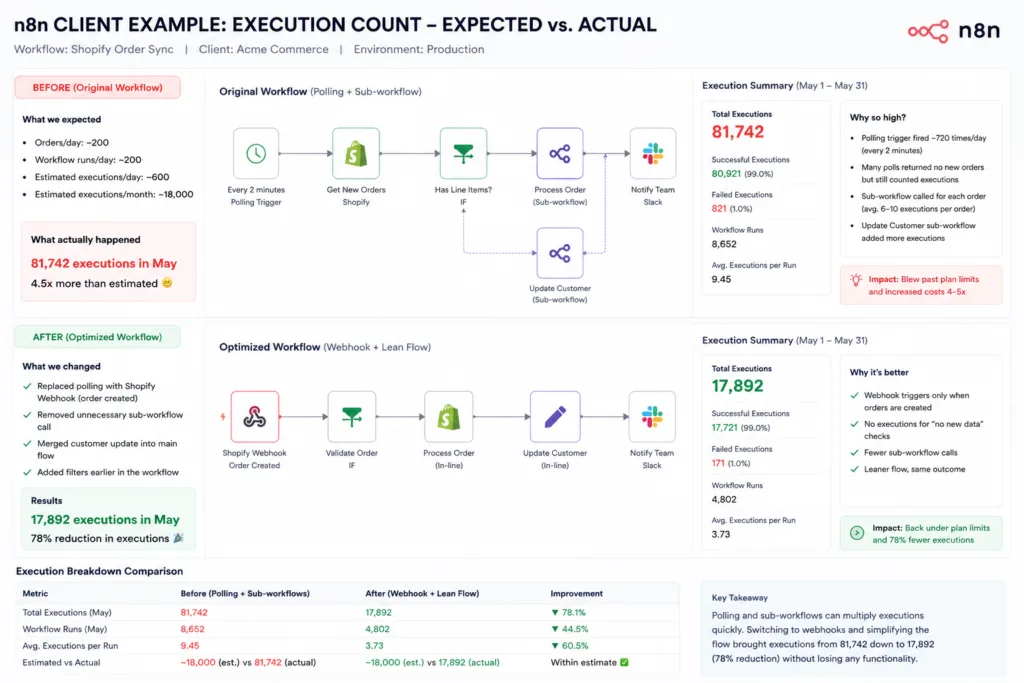
The practical fix: use webhook triggers instead of polling wherever the source system supports it. Notion webhooks, GitHub webhooks, and similar event-based triggers fire only when something actually happens. The execution count drops dramatically.
On Cloud Starter (2,500 executions/month), a naive polling workflow can eat your entire allowance in 12 days. Knowing this before you build saves you an unexpected upgrade.
Migration Reality Check: When Switching to n8n Costs More Than Staying on Zapier or Make
This is the section most n8n articles skip, because most n8n articles are written by people who want you to switch.
We build on n8n. We have a commercial interest in you using it. Here’s what actually makes migration expensive, so you can decide for yourself.
What translates cleanly from Zapier or Make:
- Simple linear workflows (trigger → 2–3 steps → done)
- Standard integrations (Gmail, Slack, Airtable, Notion, webhooks)
- Scheduled jobs with no branching logic
What requires redesign:
- Zapier Paths (conditional branching) maps to n8n’s Switch node, but the logic often needs rebuilding from scratch, not just re-clicking
- Multi-step Zaps with data transformations — n8n’s Code node is more powerful, but you need to know basic JavaScript to use it
- Credential handling — n8n stores credentials in its own vault; migrating 30 Zaps means re-authenticating every connected app
The honest hours estimate:
A Zapier stack with 15–20 Zaps takes 8–20 hours to fully migrate, depending on complexity. At $75–100/hr of internal labor, that’s $600–2,000 before you’ve saved a cent. The monthly savings need to justify that upfront cost.
The math works cleanly if you’re paying $200+/month on Zapier Professional ($49/mo for 2,000 tasks and running volume that hits the cap regularly. It doesn’t work if you have 5 simple Zaps that cost you $20/month on Zapier’s free or Starter tier.
For a deeper breakdown of where n8n beats Zapier on workflow complexity and cost, see our n8n vs Zapier comparison. If you’re a smaller operation deciding between them, n8n vs Zapier for small business covers the same question at lower volume.
Who n8n Pricing Makes Sense For
Low-volume solo operator (under 5,000 executions/month):
Cloud Starter at ~$24/mo is the right call. No infra, no ops, and 2,500 executions is enough if you’re not polling. Build webhook-triggered workflows and you’ll stay under the cap comfortably. Self-hosting isn’t worth the maintenance overhead at this scale unless you have a specific reason (data residency, a unique integration, or you’re already managing servers for something else).
Mid-scale SMB (5,000–50,000 executions/month):
This is where it gets interesting. Cloud Pro at ~$60/mo covers 10,000 executions. If you’re above that, the next step is Enterprise pricing (custom, typically $400+/mo based on what we see) or self-hosting with managed infra ($35–50/mo). The self-hosted option wins on pure cost, but only if you have someone who can own the maintenance. A two-person shop with no ops background will not enjoy debugging a Docker networking issue at volume.
High-volume production team (100,000+ executions/month):
Self-hosting is the only economically rational choice. Enterprise cloud pricing at this volume is custom and typically significant. A well-maintained self-hosted instance on a $24/mo Droplet with a $15/mo managed Postgres handles this load without stress. You need a dedicated person (or agency) managing it, but the infrastructure cost is a fraction of equivalent cloud tiers on any platform.
As a point of comparison: Zapier Professional runs about $49/mo for 2,000 tasks, and Make Core is around $9/mo for 10,000 operations. At low volume, Make is hard to beat on pure price. At high volume with complex logic, n8n self-hosted wins. The middle ground is where you actually need to run the numbers.
Frequently Asked Questions
How much does n8n cost to use?
n8n Cloud starts at approximately $24/month (Starter, billed annually) as of June 2025. Self-hosting the community edition is free, but infrastructure typically costs $20–80/month depending on scale and setup.
Is it free to use n8n?
Yes, the community edition is free to self-host with no execution or workflow limits. The free tier on n8n Cloud has limited functionality — most serious use cases require a paid plan.
How much does n8n automation cost?
Cloud plans run approximately $24–60/month for most teams. High-volume or enterprise deployments are either self-hosted (infra cost: $30–90/month) or negotiated as custom Enterprise contracts.
Is there a free alternative to n8n?
Make has a free tier (1,000 operations/month). Zapier has a free tier (100 tasks/month). n8n’s community edition is self-hosted and free with no limits. For most production use cases, all three require paid plans.
Why is n8n so expensive?
It isn’t, relative to Zapier at scale. Cloud Starter is competitive. The sticker shock usually comes from the execution model — polling triggers and sub-workflows can burn through a Starter allocation in under two weeks if you don’t account for how they’re counted.
Is n8n truly free?
The self-hosted community edition is genuinely free to run with no vendor-imposed limits. The cost is infrastructure and your time. “Free” on n8n Cloud is not a current offering for production use.
The Decision
Here’s the honest summary:
- Self-hosting is cheaper at scale but requires real ops commitment — budget at least $35–50/month for managed infra and 2+ hours/month for maintenance.
- Cloud Starter is the right starting point for most solo operators and small teams. It’s genuinely affordable, and the ops savings justify the monthly fee.
- Cloud Pro makes sense if you need 10,000 executions, 3 users, and execution history for debugging.
- The execution model is the hidden variable. Audit your trigger types and sub-workflow architecture before you commit to a plan.
- Migration isn’t free. Factor in rebuild hours if you’re moving from Zapier or Make.
If you’ve already read this far and you’re trying to decide between self-hosted and cloud for your specific stack, that’s exactly what a free automation audit is for. We look at your volume, your team’s ops capacity, and your current tool spend, then give you a written recommendation.
Book a free automation audit — we’ll spec the right deployment for your workflow in 30 minutes.
Want to go deeper on the platform comparison itself? Start with n8n vs Zapier for the full breakdown. Or try n8n and see the cloud dashboard for yourself — the free trial is functional enough to map your first workflow.
All prices in this article are estimates as of June 2025. n8n pricing has changed multiple times. Verify current figures at n8n.io/pricing before committing to a plan. Infrastructure cost estimates are illustrative ranges based on typical deployments — your actual bill will vary. Orchient builds client workflows on n8n and has a commercial interest in the platform; we’ve aimed to present tradeoffs honestly, including cases where n8n is the wrong call.